Command Prompt Output To File Append Hedge Berberis Thunbergii Set Of Hedges And Bushes Grass 13 Pieces Blender Market 8 Essential Beginner Tips For Learning Python Programming How To Use The Continuous Ping Command To Save Timestamped Results To A Text File What Is Mark Save The Output Of Command Prompt In A Text Or Csv File Using Vba Excel Otosection How To Redirect Windows Command Line Output To A Text File Windows Bulletin Tutorials 11 Answers Sorted by 1707 Yes it is possible just redirect the output AKA stdout to a file SomeCommand SomeFile txt Or if you want to append data SomeCommand SomeFile txt If you want stderr as well use this SomeCommand SomeFile txt or this to append SomeCommand SomeFile txt
ECHO Where some command is the command whose output should be redirected ECHO filename is the file the output should be redirected to ECHO a appends the output of the command to the file ECHO rather than overwriting the file ECHO ECHO Made by Wasif Hasan Nov 2019 Usage command tee Usage command tee a filename To redirect the output of a command to a file type the command then specify the or operator and finally provide the path to a file you want to redirect the output to For example here s how you can save the output from the ls command which lists the contents of a directory ls path to file Replace path to file with the full
How To Redirect Windows Command Line Output To A Text File Windows Bulletin Tutorials How To Use Cmd Command For Output Text File On Your Pc urdu All New Tips And Tricks And All Powershell Write To File Append The 9 New Answer Brandiscrafts How To Copy Command Prompt Output Text To Clipboard Or Save To File Winhelponline HOW TO SAVE THE OUTPUT FROM COMMAND PROMPT TO FILE Ask Caty How To Use Redirection To Copy Terminal Output To A File In Linux Systran Box How To Append Text To End Of File In Linux CS50 Intro To AI Python Project 2 Heredity YouTube More To Life ODI Series Extracting Data From HFM
Command Prompt Output To File Append
 Command Prompt Output To File Append
https://s3.amazonaws.com/markets-rails/uploads/1547024161581-untitled5.png
Before we see how to send command output to a text file in Command Prompt PowerShell or Terminal let us see how the command runs When you enter a command and hit enter its output will get
Templates are pre-designed documents or files that can be used for numerous purposes. They can conserve time and effort by offering a ready-made format and layout for creating different kinds of content. Templates can be utilized for individual or expert projects, such as resumes, invites, flyers, newsletters, reports, discussions, and more.
Command Prompt Output To File Append

This Simple Trick Saves Command Prompt Output To A Text File
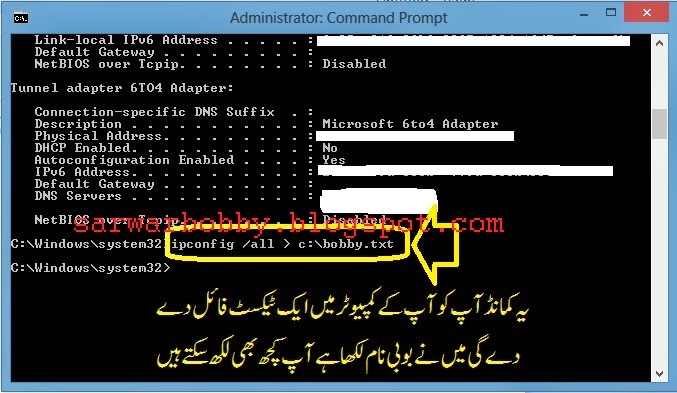
How To Use Cmd Command For Output Text File On Your Pc urdu All New Tips And Tricks And All
Powershell Write To File Append The 9 New Answer Brandiscrafts

How To Copy Command Prompt Output Text To Clipboard Or Save To File Winhelponline

How To Use Redirection To Copy Terminal Output To A File In Linux Systran Box
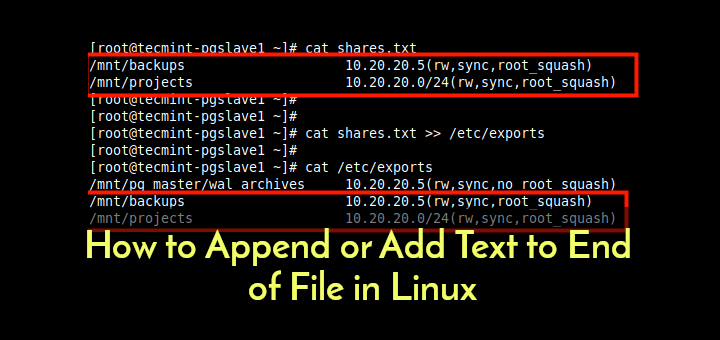
How To Append Text To End Of File In Linux
To save the command output to a file in a specific folder that doesn t yet exist first create the folder and then run the command Make folders without leaving Command Prompt with the mkdir command Export Ping Results to a File ping 192 168 86 1 C Users jonfi Desktop Ping Results txt

By Jason Fitzpatrick Published May 12 2017 Saving the output of a Windows Command Prompt command is a great way to get a nice neat copy to share with support staff analyze longer outputs using your favorite text editor or otherwise interact with the output with more flexibility than staying in the command window allows for

To do this open the command prompt and type dir test exe myoutput txt The character tells the console to output STDOUT to the file with the name you ve provided When you run this command you ll notice that there isn t any response in the command window except the error that the file doesn t exist

To save the command output to a text file with Command Prompt use these steps Open Start Search for Command Prompt Right click the top result and select the Run as administrator option Type

The Out File cmdlet sends output to a file It implicitly uses PowerShell s formatting system to write to the file The file receives the same display representation as the terminal This means that the output may not be ideal for programmatic processing unless all input objects are strings
1 There are lots and lots of perhaps far too many goodies in the bash reference manual including all sorts of redirections Adjust as needed for shell user166390 Mar 17 2011 at 17 31 4 You may also use tee if you want to redirect to both STDOUT and append results to a file To copy the command prompt output to the clipboard use one of the methods Using Keyboard Press Ctrl A to select all text and press ENTER to copy it to the clipboard Using the Edit menu Right click the Command Prompt title bar Edit Select All Repeat the same and this time select Copy from the Edit menu
Step 1 Press the Windows key on your keyboard type Command Prompt and click Run as administrator Step 2 Type the below command and hit Enter Note In the command change Your