Command Line Disable Sleep Windows 10 Windows 10 Keeps Going To Sleep Mode Every Few Minutes MobiPicker Disable Sleep From The Windows 7 Shutdown Button PeteNetLive How To Temporarily Disable Sleep Mode In Windows 10 11 Sound Breaking How To Disable Sleep Option From Windows 10 Start Menu StackHowTo Disable Login After Sleep In Windows 10 Downxup Web Dec 14 2011 nbsp 0183 32 therefore gt powercfg x standby timeout ac minutes disable 0 minutes NOTE ac connected to electric power dc works on battery so if you want to disable
Web Dec 15 2021 nbsp 0183 32 Power Requests prevent the computer from automatically powering off the display or entering a low power sleep mode Syntax powercfg requests Web May 30 2023 nbsp 0183 32 Go to System Navigate to Power amp battery Click on Screen and sleep Set sleep options to Never First press Windows I to launch the Settings app and then navigate to the System gt Power amp
Disable Login After Sleep In Windows 10 Downxup To Enable Or Disable Sleep Mode In Windows 10 Exporting Game Files TimberAPI Wondershare Video Converter Ultimate 8 4 Ionnimfa Windows Command Prompt 6 Sleep Shutdown Restart YouTube How To Sleep Windows 10 From The Command Line Disable Sleep From The Windows 7 Shutdown Button PeteNetLive How To Put Your Computer Into Sleep Mode With The Help Of Keyboard How To Disable Windows Defender Using PowerShell Command Line Tech
Command Line Disable Sleep Windows 10
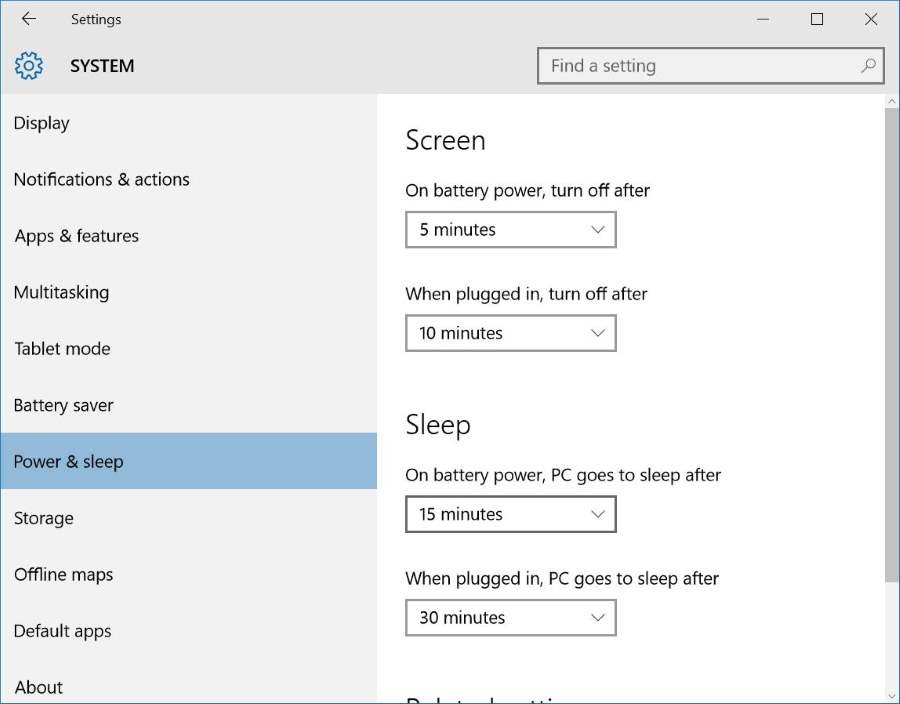 Command Line Disable Sleep Windows 10
https://www.mobipicker.com/wp-content/uploads/2017/01/enable-or-disable-sleep-mode-in-Windows-10-pic3.jpg
Web Apr 28 2023 nbsp 0183 32 Disable Sleep Mode from Command Line You can also disable the sleep mode directly from the Command Prompt as well as Windows PowerShell You will need to run 2 simple and almost identical
Templates are pre-designed files or files that can be used for different functions. They can save effort and time by offering a ready-made format and layout for producing various type of content. Templates can be utilized for personal or professional tasks, such as resumes, invitations, leaflets, newsletters, reports, discussions, and more.
Command Line Disable Sleep Windows 10
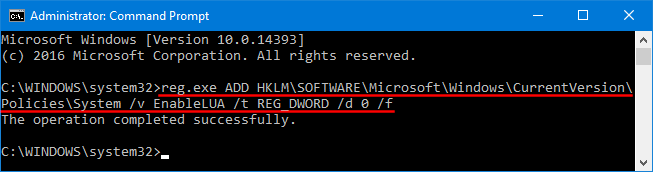
Disable UAC From Command Line Password Recovery

To Enable Or Disable Sleep Mode In Windows 10

Exporting Game Files TimberAPI

Wondershare Video Converter Ultimate 8 4 Ionnimfa
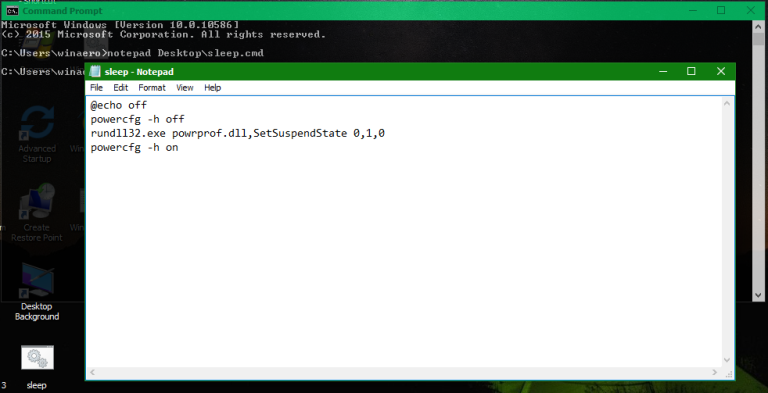
How To Sleep Windows 10 From The Command Line
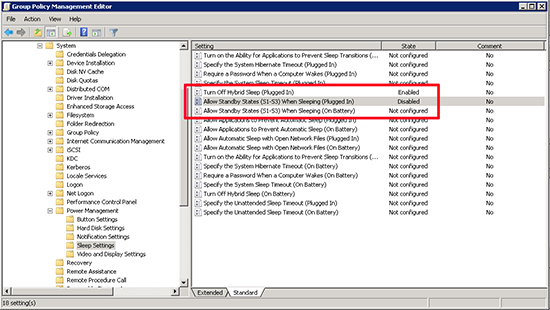
Disable Sleep From The Windows 7 Shutdown Button PeteNetLive

Web May 17 2022 nbsp 0183 32 Open Start Search for Command Prompt right click the top result and select the Run as administrator option Type the following command to generate a list of

Web Aug 16 2022 nbsp 0183 32 If you want to disable the computer s sleep timeout or standby quickly then execute the following command It will change the setting for the current power profile

Web Aug 30 2018 nbsp 0183 32 You can enter the below commands to do so the equivalent of setting them to never powercfg change standby timeout ac 0 powercfg change standby timeout dc
Web Jan 25 2023 nbsp 0183 32 This is next to the Windows 10 logo Then type Command Prompt into the search bar Next click Run as administrator Then type
Web Oct 4 2023 nbsp 0183 32 What are the different ways to turn off sleep on Windows 10 1 Use the Settings 2 Use the Control Panel 3 Use the Command Prompt 4 Use the Group Policy Editor 5 Use the Registry Editor
Web Oct 19 2015 nbsp 0183 32 The command rundll32 exe powrprof dll SetSuspendState 0 1 0 for sleep is correct however it will hibernate instead of sleep if you don t turn the hibernation off quot Web Aug 8 2023 nbsp 0183 32 In absence of command line arguments PowerToys Awake will keep the computer awake indefinitely When setting the value for the time limit parameter both of
Web Apr 26 2016 nbsp 0183 32 The first step is to run the command prompt as administrator In Windows 10 you can do this by right clicking on the start menu and clicking quot Command Prompt