Windows Disable Sleep Command Line How To Use The Linux Sleep Command To Pause A BASH Script How To Disable Windows Firewall With Command Line TechWiser How To Sleep For Five Seconds In CMD 14 March 2022 SWLG P C Immigration News Disable Sleep Mode Windows Xp Registry Stock Market Bubble Consequences Sleep To disable automatic Sleep Open up Power Options in the Control Panel In Windows 10 you can get there from right clicking on the start menu and going to Power Options Click change plan settings next to your current power plan Change Put the computer to sleep to never Click Save Changes
To turn off sleep mode on a Windows 10 PC go to Settings System Power sleep Then select the drop down menu under Sleep and choose Never If you re using a laptop do this for battery mode as well Click the magnifying glass icon in the bottom left corner of your screen This is next to the Windows 10 logo Open Start Search for Command Prompt right click the top result and select the Run as administrator option Type the following command to generate a list of available power plans and press
Disable Sleep Mode Windows Xp Registry Stock Market Bubble Consequences How To Disable Sleep Mode In Kali Linux Systran Box How To Disable Sleep Mode Lock Screen In Windows 10 YouTube Disable Sleep Mode Windows 11 Disable Sleep Mode Windows Xp Command Line And More Aftermarket Stock How To Sleep Windows 10 From The Command Line Linux Sleep Command Pause A Bash Script Disable Sleep Mode Windows 11 How To Sleep Windows 10 From The Command Line
Windows Disable Sleep Command Line
 Windows Disable Sleep Command Line
https://www.lifewire.com/thmb/OgcpZHQFIeGU4MElwVXTrfvhEUs=/6540x4705/filters:fill(auto,1)/Getty_sleeping_boy_floor_cute_dog_LARGE_Miguel-Sanz-577458773df78cb62c514570.jpg
6 Click on Allow hybrid sleep and select Off 7 Click on Hibernate after and select Never from the drop down menu 8 Click on Apply and OK to save changes Method 2 Using the Command Prompt 1 Press the Windows key X on your keyboard and select Command Prompt Admin 2
Templates are pre-designed documents or files that can be used for different functions. They can conserve effort and time by offering a ready-made format and design for producing different type of content. Templates can be used for personal or professional jobs, such as resumes, invites, flyers, newsletters, reports, presentations, and more.
Windows Disable Sleep Command Line

How To Disable The Command Prompt And Run Program In Windows

How To Disable Sleep Mode In Kali Linux Systran Box

How To Disable Sleep Mode Lock Screen In Windows 10 YouTube
Disable Sleep Mode Windows 11
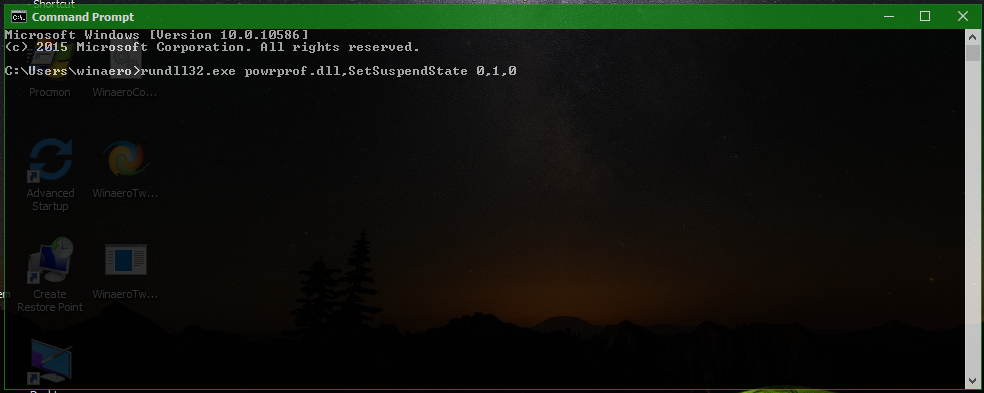
How To Sleep Windows 10 From The Command Line
Linux Sleep Command Pause A Bash Script

With only the command prompt is it possible to disable sleep mode when closing the lid of a laptop windows 7 windows command line 64 bit Share Improve this question asked Dec 14 2011 at 18 42 kb67 647 3 9 15 1 Out of curiosity is this just a purely theoretical question or is there some specific reason you need to do this

Jan 26 2022 1 Hello I need to know how to Disable Sleep Hibernation and anything related Permanently so that I can be absolutely certain that they are definitely off for good I just did a

Type the following command to disable hibernation turn off sleep mode and press Enter powercfg h off 4 Use the Group Policy Editor

Disable Sleep Mode from Command Line Disable Sleep Mode using Microsoft PowerToys Disable Sleep Mode using Third Party Tools Don t Sleep Insomnia Noise Closing Words Turn Off Sleep Mode on Windows Disable Sleep Mode from Settings App
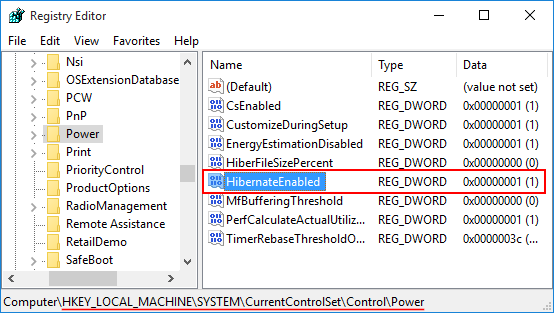
How to Turn Off Hibernation in Windows 10 There are two ways to disable hibernation in Windows 10 using the command line method that turns off the feature and deletes the hiberfil sys file and the graphical method that only turns off the feature Using Command Prompt Launch a Command Prompt window with admin rights on
If you want to disable the computer s sleep timeout or standby quickly then execute the following command It will change the setting for the current power profile Make sure to execute them Use the Start Menu Use a Dedicated Sleep Key or Button Use the Power User Menu Use the Command Prompt Use the Sign in or Ctrl Alt Delete Screen Use a Timer in Settings When you re not using your Windows 11 PC for a while it s good to put it to sleep to save power or battery life
If you want to disable sleep mode in Windows 11 10 you can use the following methods Disable sleep mode using Windows Settings Turn off sleep mode via Control Panel Use Microsoft