Cmd Command For Network Reset Ping Destination Host Unreachable Vs Request Timed Out OSHW Alchemist How To Reset Windows 7 Password Using Command Prompt Amazing Tech How To Scan Network For IP Addresses Using Cmd Tools Other Software Netsh Command For Network Management YouTube Ipconfig Network Encyclopedia Go to Settings Network or use a quick access command to open ms settings ms settings network Click Network reset Reset now Confirm the reset Windows will clear all network settings and remove network adapters your network adapters will not be shown in the Control Panel
In the search box on the taskbar click Start type command prompt right click the command prompt result and then select Run as administrator and confirm At the command prompt decline restarting your machine until you have entered the final command Type ipconfig release and press Enter Type ipconfig flushdns and press Enter 1 Open an elevated command prompt 2 Type the netcfg d command into the elevated command prompt and press Enter see screenshot below If you run the command and receive an error referring to NetSetupDeleteObject run the netcfg d command until it s successful 3 When finished restart the computer to apply
Ipconfig Network Encyclopedia How To Find Wifi Password On Windows 10 Using CMD Step By Step Cmd Reset Internet Reset Network Command Prompt G4G5 Cmd Copy Command Hot Sex Picture How To Cleanup And Reset Network Adapters Using Command Prompt Fix WiFi Not Working Issue On Windows 10 Easily Driver Easy How To Fix Unidentified Network Error On Windows 10 Pureinfotech 10 Best CMD Tricks Tips Hacks For Windows 2015 Facebook Auto Tricks Reset Network Settings On Windows 10 May 2020 Update
Cmd Command For Network Reset
 Cmd Command For Network Reset
https://img1.daumcdn.net/thumb/R800x0/?scode=mtistory2&fname=https:%2F%2Fblog.kakaocdn.net%2Fdn%2FcvSN9w%2FbtqudtU6JOs%2FuXqkph5K5xNXH1nPofKCxk%2Fimg.png
The following command worked for me on Server 2012 R2 Restart NetAdapter Name Ethernet 2 Replace Ethernet 2 with the name of your adapter Note To create a PS script create a new document in Notepad save is as script PS1 insert the line above and save Right click the file Run with PowerShell
Pre-crafted templates use a time-saving option for developing a diverse series of files and files. These pre-designed formats and designs can be utilized for numerous personal and professional projects, consisting of resumes, invites, leaflets, newsletters, reports, presentations, and more, enhancing the content creation procedure.
Cmd Command For Network Reset
How To Reset Your Windows Hostednetwork Settings With CMD

How To Find Wifi Password On Windows 10 Using CMD Step By Step
Cmd Reset Internet Reset Network Command Prompt G4G5

Cmd Copy Command Hot Sex Picture
Fix WiFi Not Working Issue On Windows 10 Easily Driver Easy

How To Fix Unidentified Network Error On Windows 10 Pureinfotech

How to Reset Network Settings in Windows 10 Step 1 There are two ways to open the command line Click on the Start menu type CMD in the search box then right click on it and select Run as administrator Or press WIN R type CMD and press Enter Step 2 Type the following command then validate with the Enter key on your keyboard

How to reset network adapters from CMD PowerShell or Terminal Did you reset your network adapters IMPORTANT All the procedures in this guide require you to log in to Windows 10 or Windows 11 using an administrator account How to reset network adapters in Windows 10 from Settings

Open a command prompt by using the keyboard combination Windows Key R and typing cmd into the textbox as shown in Figure A Figure A Type this command into the command prompt and press

With the text editor open type in these commands ipconfig release ipconfig renew arp d nbtstat R nbtstat RR ipconfig flushdns ipconfig registerdns You should see something that looks
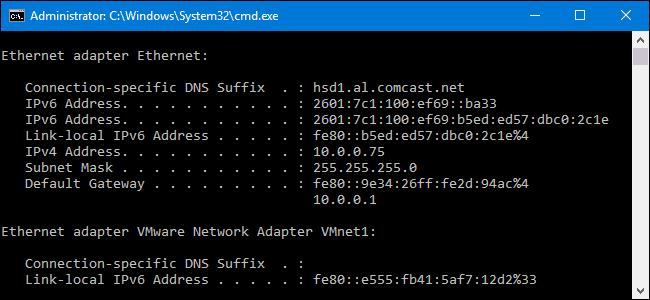
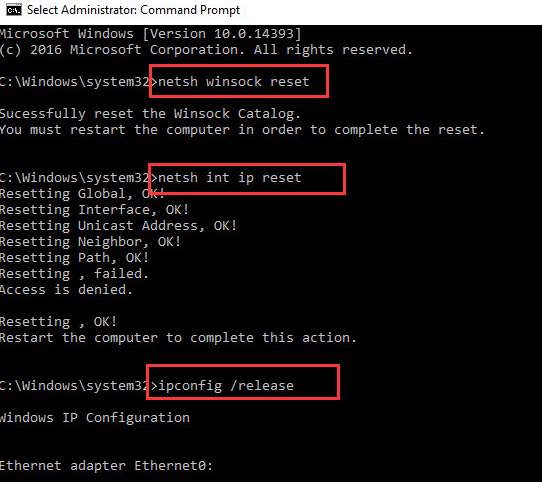
Type netsh int ip reset into the PowerShell window and then hit Enter If the task executes successfully you should see a whole bunch of Resetting OK in the window Restart your computer and then see if you re still experiencing problems If resetting the TCP IP stack didn t help you should try some other troubleshooting steps Reset
Resetting Network Settings For Windows devices the Winsock reset command restarts the communication required between your device and the network The int ip reset command rewrites the rules resetting it to factory default that are followed by devices to connect to the internet 1 How to check the internet connection in CMD 2 How to traceroute in CMD tracert command to troubleshoot network and internet problems 3 How can I see all the network adapters on my computer using CMD 4 How to check your network connection in CMD 5 How to renew the IP address of your network adapter 6
Reset Network Adapters in Settings 1 Open Settings Win I 2 Click tap on Network internet on the left side and click tap on Advanced network settings on the right side see screenshot below Open Advanced network settings 3 Click tap on Network reset see screenshot below 4 Click tap on Reset now see screenshot below