Clear Word Source Dashboard Teleias Search CLeaR Clear Risk Solutions Neurologist Fired After Tua Concussion What Is The Meaning Of The Word CLEAR YouTube All your meeting information effortlessly organized in a single source of truth Searchable Meeting Library Attend less meetings be better informed Powerful Search Enhance team communication alignment and collaboration through clear and concise information derived from meetings Organized Meeting Library The home for your meetings
All your meeting information effortlessly organized in a single source of truth Enhance team communication alignment and collaboration through clear and concise information captured from meetings Collaborate easily Create workspace channels and collaborate easily with clients customers or teammates By default Word preserves the original formatting when you paste content into a document using Ctrl V the Paste button or right click Paste To change the default follow these steps Go to File Options Advanced Under Cut copy and paste select the down arrow for the setting to change Pasting within the same document When you paste
What Is The Meaning Of The Word CLEAR YouTube Devotional Clear Word 365 Daily Readings LifeSource Christian Bookshop Clear Word On Green Button Isolated On White 7611283 Stock Photo At Unlocking The Power Of Microsoft Azure Appico Hand Writes Word Source With Red Marker On Transparent White Background SMART Notebook SMART Technologies Free Stock Photo Of Clear Crystal Graphic In Search Of Clear Skies At The First Clear Word
Clear Word Source
 Clear Word Source
http://teleias.com/wp-content/uploads/2018/03/logoOrange_transparent_main_whitetexthorizontal.png
If you are using Word 2010 open the document click on the Mailings tab click the down arrow under the Start Mail Merge button click on Normal Word Document This will disconnect the Word document from the source document I agree with a previous post here is a little adjustment
Pre-crafted templates use a time-saving option for creating a varied range of files and files. These pre-designed formats and designs can be used for different personal and professional projects, consisting of resumes, invites, flyers, newsletters, reports, discussions, and more, improving the material production process.
Clear Word Source
Engstill blogg se How To Clear Formatting In Word 2010 Document

Devotional Clear Word 365 Daily Readings LifeSource Christian Bookshop
Clear Word On Green Button Isolated On White 7611283 Stock Photo At

Unlocking The Power Of Microsoft Azure Appico

SMART Notebook SMART Technologies

Free Stock Photo Of Clear Crystal Graphic

Clearword is a real time AI meeting assistant that creates summary notes and completes actions live during your calls Works with Zoom Google Meet Microsoft Teams Real time meeting AI the new era of meetings Clearword is the world s first generative meeting partner to use artificial intelligence in real time making it possible to have

If you use the Show Hide text button to reveal Hidden text you may be able to see the reference Another way the reference might be hidden is if you are using Track Changes and you have a View Set in Review Tracking that is not showing deletions and so on In that case when you delete a Citation it will still be in your document and will

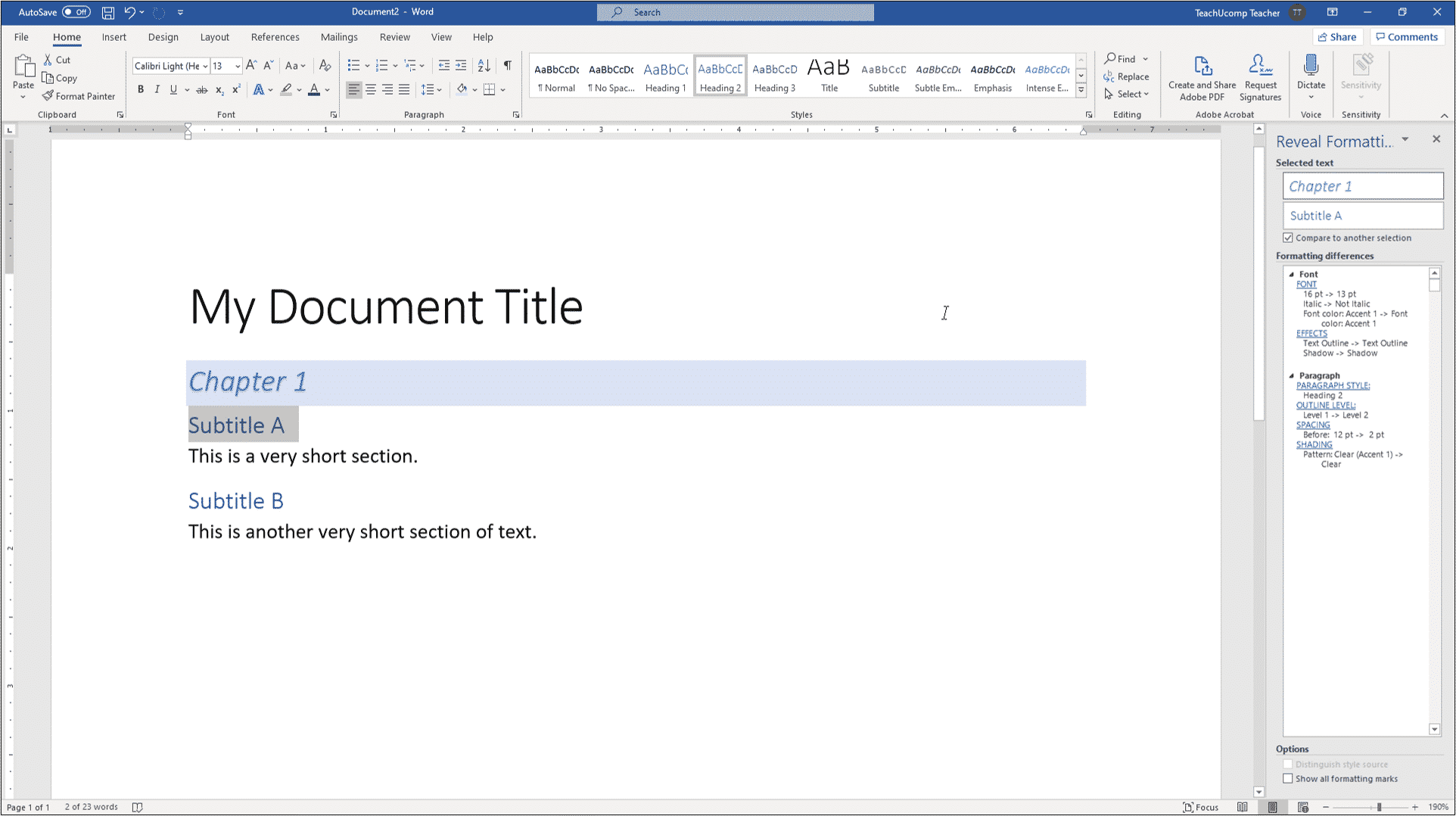
Select the the Clear Formatting option at the top of the list of styles The style for the selected content reverts to the Normal style You can also select the content for which you want to clear the formatting and click the Clear All Formatting button in the Font section of the Home tab Even if you press Ctrl A on Windows or Command A

In Word and Publisher On the Home tab in the Font group click Clear All Formatting In PowerPoint On the Home tab in the Font group click Clear All Formatting In Outlook On the Message tab in the Basic Text group click Clear All Formatting OneNote On the Home tab in the Basic Text group click Clear All Formatting

Clearword automatically creates summaries of your meetings and organizes them in a searchable video library 1 Connect Clearword with Google Calendar Clearword will create a page for each meeting like a mix between a calendar event and an editable doc except smarter Use this to prepare for your meeting with smart agendas discussion
If you ve applied various formatting changes to the content in your document and they either don t work or you want to start over you can easily clear form 2 Turn those descriptive topic sentences into topic sentences that make claims 3 Make sure people are doing things in your sentences unless you don t want them to be doing things
To add a citation to your document first add the source you used On the References tab click the arrow next to Bibliography Style and click the style that you want to use for the citation and source For example social sciences documents usually use the MLA or APA styles for citations and sources