Check Iis Service Status Command AWS How To Check IIS Version In Windows Server QA With Experts How To Check The IIS Version SQLDBPool OLTP OLAP Big Data And NOSQL How To Check IIS Version On Windows 10 8 7 Yourself How To Start Stop Restart Check Status IIS Service By Command Line How To Install IIS On Windows 10 Using Powershell H2S Media Using the Get Service cmdlet in PowerShell you can check the w3svc service status to verify the IIS status The W3SVC is a Windows service that is responsible for making IIS work Checking the IIS status is significant for service health ensuring the web server service is running and accessible
16 Answers Sorted by 97 sc query ServiceName find RUNNING To ensure that IIS is running correctly you can check its status by entering the following command in the Command Prompt iisreset status This command will display the current status of all IIS services
How To Install IIS On Windows 10 Using Powershell H2S Media 5 Ways To Check Installed Version Of IIS In Windows How To Check IIS Is Installed YouTube Mesos Services Learn Apache Mesos Command Line Why The service status all Grep Mysql Get Many GU A C mo Administrar Los Servicios De Windows Con Services msc 2022 How To Check Your Version Of IIS YouTube Using IIS Manager For Remote Administration TheITBros How To Check IIS Version On Windows 10 8 7 Yourself Digital Marketing
Check Iis Service Status Command
 Check Iis Service Status Command
https://res.cloudinary.com/dmsxwwfb5/image/upload/v1637166457/iis-version-check-windows-server-min.png
Check whether IIS is installed or not Stack Overflow I am trying to create a Local IIS Website using ASP NET When I click on New gt Website and select the type as HTTP and from the dialog box if I select the option as LOCAL IIS WEBSITE I am Stack Overflow About Products For Teams Stack OverflowPublic questions answers
Pre-crafted templates use a time-saving service for producing a varied series of files and files. These pre-designed formats and layouts can be made use of for various individual and expert projects, consisting of resumes, invites, leaflets, newsletters, reports, presentations, and more, enhancing the material development procedure.
Check Iis Service Status Command

How To Install IIS On Windows 10 Using Powershell H2S Media
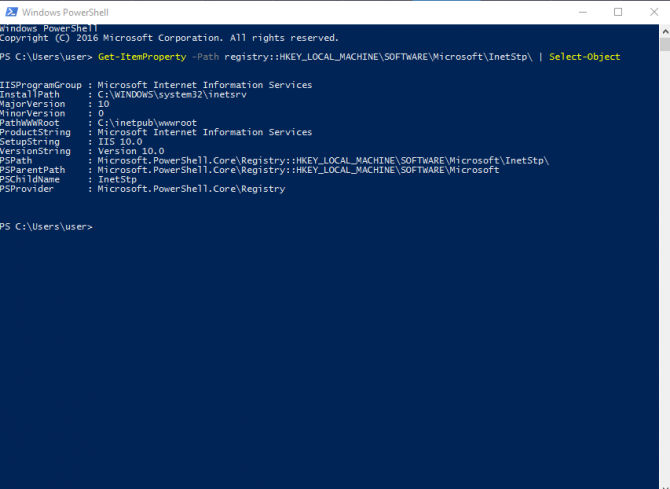
5 Ways To Check Installed Version Of IIS In Windows

How To Check IIS Is Installed YouTube

Mesos Services Learn Apache Mesos

GU A C mo Administrar Los Servicios De Windows Con Services msc 2022

How To Check Your Version Of IIS YouTube

Open the Command prompt press Windows key R and type cmd the C ommand Prompt window opens displaying and waiting type the following commands To Stop IIS iisreset stop To Start IIS iisreset start To Restart IIS iisreset restart Check Status iisreset status

For example I want to know whether IIS admin service is running or not If it is running the command ouput should be running I tried sc query type service state all find IIS Admin Service which displayed the output DISPLAY NAME IIS Admin Service I also tried net start IIS Admin Service find Running which displays
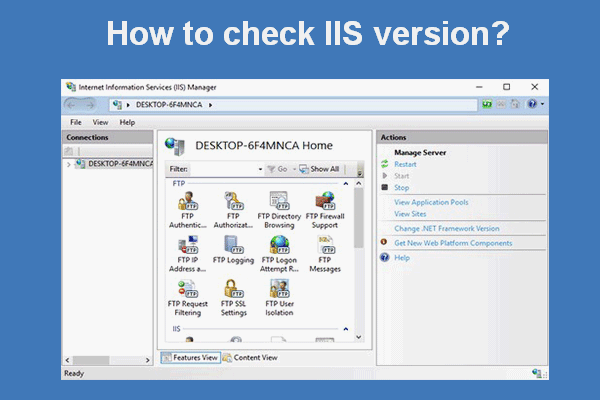
Modified 4 years 5 months ago Viewed 10k times 2 I m trying to use either a wmic or powershell command to check the state of IIS if it s running or not and uptime To check the state I ve used the wmic command wmic path Win32 Service where Name IISADMIN get State

4 Answers Sorted by 3 You can use the IIS Admin Scripts to query the server and then start it if you need The script is located in systemroot system32 To query you server just run IIsWeb vbs query w3svc 1 from a command line If it s not running then you can run IIsWeb vbs start w3svc 1 to start it

The Get IISSite cmdlet gets information about Internet Information Services IIS web sites and their current status and other key information If you a request a specific site or a comma delimited list of sites only those whose names
From the list of Worker Processes either double click on the process of interest to view currently executing requests or use the right click context menu The back forward arrows to the left of the address bar can be used to navigate back and forth between the list of requests and worker processes IISReset exe is used to safely start stop enable and disable the IIS services Always use the NOFORCE option when stopping or rebooting an IIS server IIS 5 1 IIS 6 0 SystemRoot System32 ConvLog exe ConvLog exe is used to convert log files to NCSA format
Need help on how to monitor IIS This guide covers the basics including HTTP ping checks IIS Application Pools and important Windows Performance Counters In addition we ll take a look at how to use an application performance management system to simplify monitoring IIS and get more advanced IIS performance monitoring for ASP NET