Affinity Designer 2 Remove Background How To Remove A Background In Affinity Designer YouTube Easy Way To Remove Background In Affinity Designer for Beginners Remove or Change Background In Affinity Designer YouTube Affinity Photo Remove Object Spaceshooli Affinity Photo Remove Background Tracksnipod In Apple s Preview app and in Keynote app you can remove background with a click or click and drag like instantly Recently a friend show me how he removes a background with Pixelmator Pro literally one click and everything around the object is gone
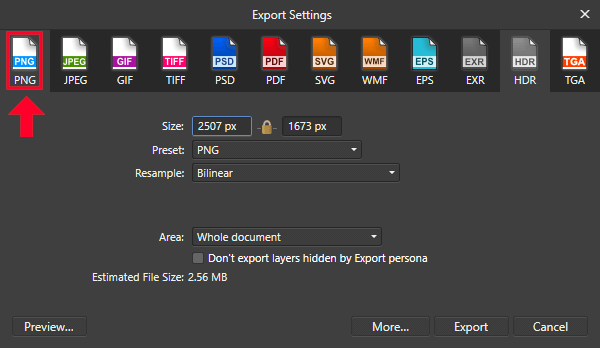
The Background Removal Tool is a feature in Affinity Designer that provides a quick and efficient way to remove backgrounds from images It uses advanced algorithms to analyze the image and separate the subject from the background based on color and texture Step 1 Open your image and unlock the layer Step 2 Set the layer to Rasterize Trim Step 3 Use the Selection Brush to create a rudimentary selection around your background Step 4 Refine the selection further using the menu options Step 5 Delete your background to transparent Step 6 Export your image as a PNG file
Affinity Photo Remove Background Tracksnipod How To Remove A Background In Affinity Photo 2021 Affinity Photo Remove Background Lassakorean Remove Background Affinity Photo Gasersafe How To Remove A Background In Affinity Designer Affinity Photo 2 Released Better Non destructive Editing New Masks How To Remove The Background In Affinity Photo Affinity Photo Remove Background Ladegwill Affinity Designer Pricing Reviews Features In 2022
Affinity Designer 2 Remove Background
 Affinity Designer 2 Remove Background
https://i.ytimg.com/vi/iieybI75sbM/maxresdefault.jpg
Welcome to the Serif Affinity Forums Techman2872 If you only want to make the white background effectively transparent so that whatever is behind it shows through you can simply select the layer in the Layers panel and set its blend mode to Multiply If you want to make the white background actually transparent so that you see a transparency chequerboard when there s nothing on a
Templates are pre-designed documents or files that can be used for numerous functions. They can conserve effort and time by supplying a ready-made format and layout for creating various kinds of material. Templates can be utilized for individual or expert projects, such as resumes, invitations, flyers, newsletters, reports, discussions, and more.
Affinity Designer 2 Remove Background

Easy Way To Remove Background In Affinity Designer

How To Remove A Background In Affinity Photo 2021
Affinity Photo Remove Background Lassakorean

Remove Background Affinity Photo Gasersafe

Affinity Photo 2 Released Better Non destructive Editing New Masks

How To Remove The Background In Affinity Photo

How to Remove White Backgrounds in Affinity Designer Quick Easy YouTube Get my beginner s guide for Affinity Designer http affinity sale Designer101 Download the example

Remove A White Background with Affinity Designer The following is an outline of the steps taken to remove a white background with Affinity Designer For a more thorough learning experience consider watching the video tutorial below Step 1 Open Your Photo The first step is to open the photo you d like to remove the background from

How to Remove a Background in Affinity Designer Sub That Sublimation Graphics Tutorials 20 9K subscribers Subscribe Subscribed Share 13K views 2 years ago Affinity Designer Tutorials for

Step 1 Unlock Your Background Layer First open the image you would like to change the background of Then unlock the background image layer by clicking on the small padlock icon in the Layers panel The padlock icon should disappear when the layer is unlocked Step 2 Enter Affinity Designer s Pixel Persona

How To Remove Background in Affinity Designer Affinity Designer Tutorial 3 159 views 121 Hey everyone I m Dav and In this video you re going to know exactly How To Remove
Remove or change background in Affinity Designer Xyz Tutorials 11K subscribers Subscribe Subscribed 60K views 7 years ago It is a step by step simple and straightforward tutorial we have Step 1 Navigate to the Document Setup Step 2 Select The Transparency Option In The Color Tab Step 3 Export Your Work For more details follow the full step by step tutorial below How To Make Transparent Background In Affinity Designer Exporting Current Image In Affinity Designer With Transparent Background Step 1 Navigate to the Document Setup
In order to export a PNG with a transparent background in Affinity Designer you first need to select the object you d like to export using the Move Tool You ll know you have it selected when you see the blue bounding box around it The blue bounding box around the object indicates that the object is selected