Windows Xp Remote Shutdown Command How To Do Remote Shutdown Windows 10 PC In Command Prompt YouTube About Remote Medium How To Shutdown Windows 10 With Command Prompt Timer YouTube How To Shutdown Remote Computer Using Cmd Shutdown Or Restart Windows How To Shutdown Power Off Windows 10 PC Using CMD Web If you want to allow only local users to run windir system32 shutdown exe s t 0 grant the SeRemoteShutdownPrivilege to the group INTERACTIVE Only local users are members of this group How to do it Run secpol msc Open Security Settings Local Policies User Rights Assignment Double click Force shutdown from a remote system in
Web Dec 23 2010 nbsp 0183 32 windows xp shutdown remote desktop remote shutdown Share Improve this question Follow asked Dec 23 2010 at 18 52 MBraedley 2 812 4 28 47 Add a comment 4 Answers Sorted by 10 I would start a command prompt and type the following command quot shutdown s quot to shutdown in less than a minute quot shutdown f quot to shutdown Web The following command will remotely shutdown a Windows XP computer under this scenario net rpc SHUTDOWN C quot enter a comment to display at shutdown quot f I x x x x U username password
How To Shutdown Power Off Windows 10 PC Using CMD Shutdown Or Reboot A Remote Computer Step by step Guide 2023 Windows Shutdown Timer Command Corehety Enabling Windows XP Remote Support How To Remote Shutdown Computer On Windows 10 Windows Central How To Remotely Shut Down Windows 10 With CMD Command Line Windows 3 Ways How To Remotely Shutdown A Computer With IP Address Restart Windows Using Cmd And PowerShell ShellGeek Learn How To Shutdown Someone Computer Using CMD Command Prompt Or
Windows Xp Remote Shutdown Command
 Windows Xp Remote Shutdown Command
https://i.ytimg.com/vi/6ZJi2WU0xXg/maxresdefault.jpg
Web Aug 28 2023 nbsp 0183 32 Is there a way to shutdown my headless Windows XP Pro machine remotely by Leo A Notenboom Question I have a couple of machines on my local network that I only access via Remote Desktop Connection They are headless meaning that they have no keyboard mouse or monitor attached
Pre-crafted templates use a time-saving option for developing a varied range of documents and files. These pre-designed formats and layouts can be utilized for different personal and professional tasks, including resumes, invitations, leaflets, newsletters, reports, discussions, and more, enhancing the content creation procedure.
Windows Xp Remote Shutdown Command

5 Ways To Remotely Shutdown A Computer WikiHow
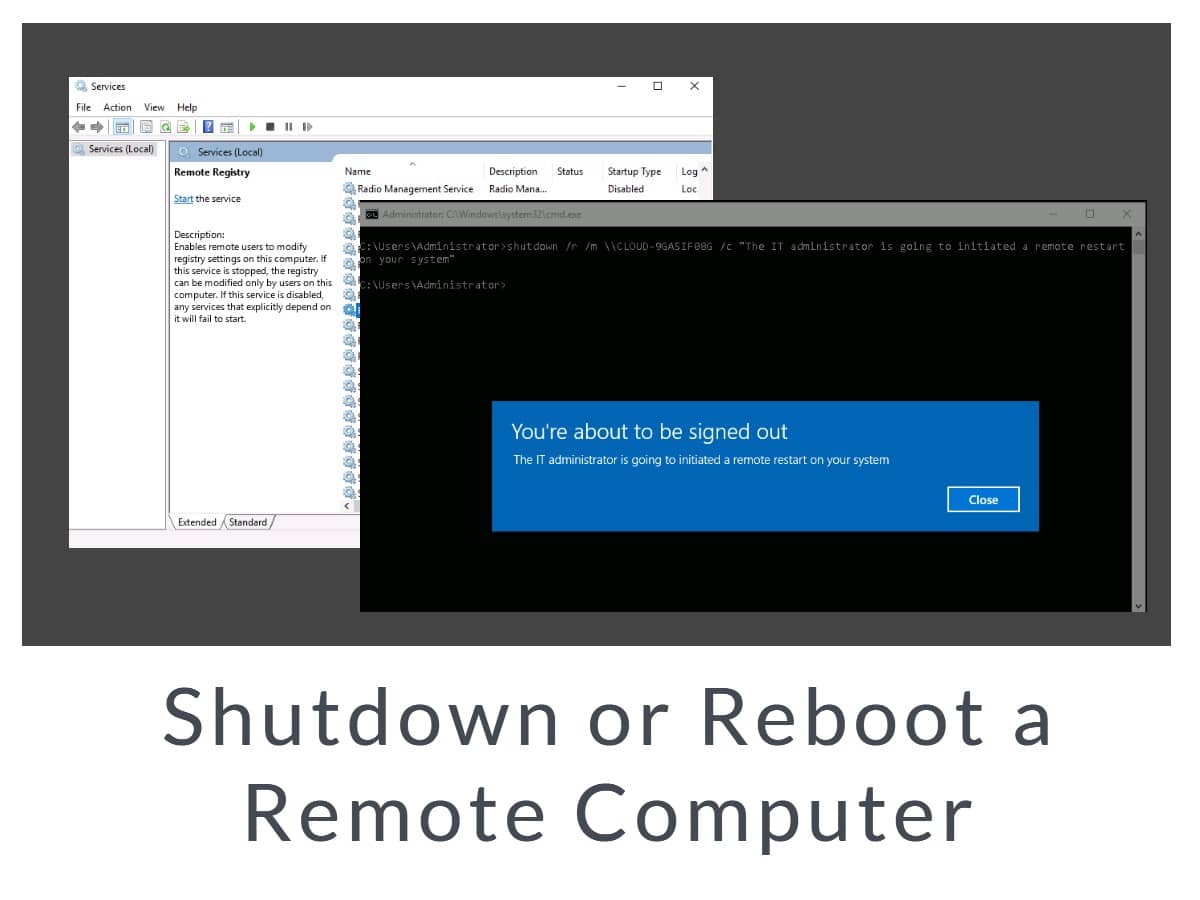
Shutdown Or Reboot A Remote Computer Step by step Guide 2023

Windows Shutdown Timer Command Corehety
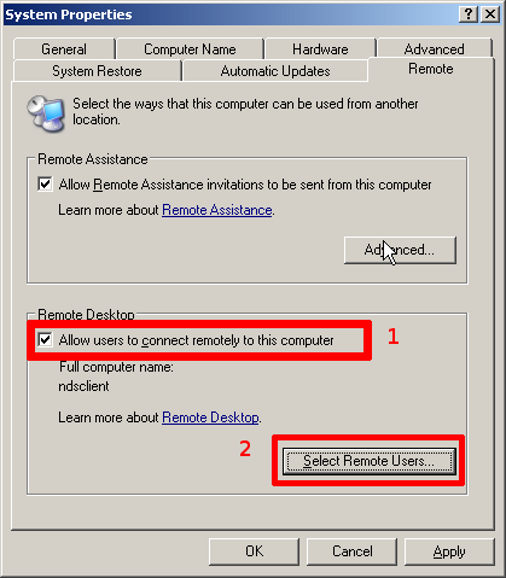
Enabling Windows XP Remote Support

How To Remotely Shut Down Windows 10 With CMD Command Line Windows
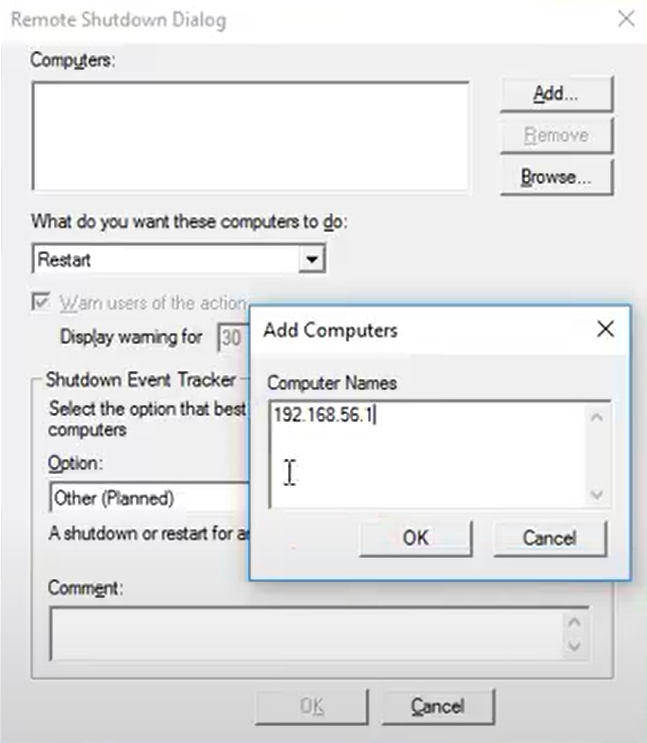
3 Ways How To Remotely Shutdown A Computer With IP Address

Web Mar 26 2012 nbsp 0183 32 Type the following command into the command prompt window for a graphical interface shutdown i From the remote shutdown dialog window you can add one or more computer names and specify whether you want to shut down or restart the system You can optionally warn users and log a message to the system s event log

Web Apr 1 2018 nbsp 0183 32 There are several command line switches below I list the most useful options s Shutdown the computer r restart computer m computer Specify the remote computer l Log off t xxx Set the time out period before shutdown to xxx seconds

Web Apr 20 2011 nbsp 0183 32 If you want to schedule the shutdown at a specific time you can use t switch to specify the time in 24 hours format For example to schedule remote computer shutdown at 3 30 pm today the command would be PsShutdown exe t 15 30 u username p password Remotecomputer

Web Jan 21 2015 nbsp 0183 32 You can perform a remote shutdown from the command prompt using the shutdown command and its associated switches from the remote shutdown dialog box or from a batch file I ll go through all three methods in
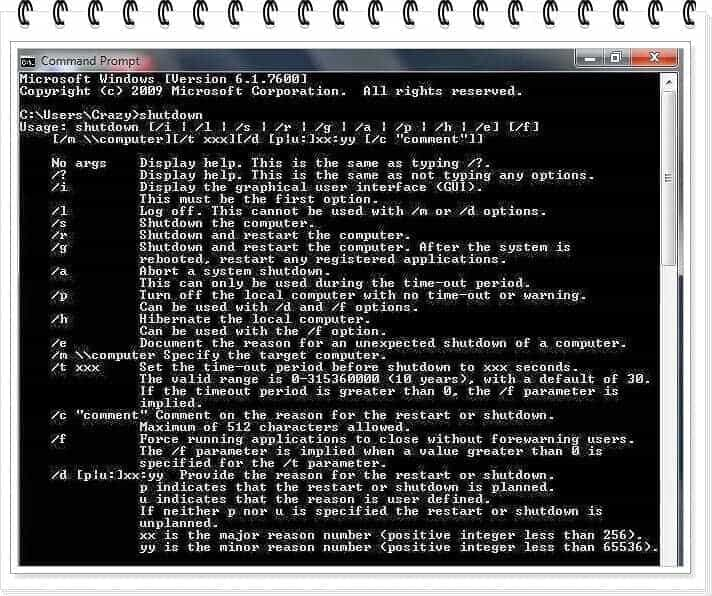
Web Sep 1 2011 nbsp 0183 32 If you are allowed to send remote commands to the computer instead of using remote desktop to manually access the machine you can type the following command in YOUR command line and not the remote computer shutdown s f m computername EDIT To create a DOS prompt for a shutdown via BATCH SCRIPT
Web Sep 8 2022 nbsp 0183 32 The cscript command is most popularly used to manage printers from the command line in Windows XP using scripts like prncnfg vbs prndrvr vbs prnmngr vbs and others Other popular scripts include eventquery vbs and pagefileconfig vbs Date The date command is used to show or change the current date Debug Web Jan 24 2016 nbsp 0183 32 There are no registry settings that you can tweak in order to enable remote shutdown You just need to provide the correct set of login credentials with the command But as there is no possibility to send a username and password with this command you have to do a little trick
Web Allow User to Shut Down XP from the Command Line Using Remote Desktop RDP Terminal Services I can t select Shutdown Reboot from the Windows XP start menu so I generally have to open a terminal and enter shutdown s t 0 to initiate an immediate shutdown