Windows Wsl Virtual Machine Could Not Be Started Hyper V How To Fix Virtual Machine Could Not Be Started Because The The Virtual Machine Could Not Be Started Because A Required Virtual Machine Could Not Be Started Because The Hypervisor Is Not Running Solved Error Could Not Create The Java Virtual Machine Exception Error Linux Windows FAQ Microsoft Learn A 9p protocol file server provides the service on the Linux side to allow Windows to access the Linux file system If you cannot access WSL using wsl on Windows it could be because 9P did not start correctly n To check this you can check the start up logs using dmesg grep 9p and this will show you any errors A successful output
Reboot Re enable the features that were disabled Hyper V Virtual Machine Platform Windows Hypervisor Platform and Windows Subsystem for Linux Reboot Open a Administrator Powershell and run wsl set default version 2 wsl install d Ubuntu And it finally worked GitHub is where people build software Wsl install The install command performs the following actions Enables the optional WSL and Virtual Machine Platform components Downloads and installs the latest Linux kernel Sets WSL 2 as the default Downloads and installs the Ubuntu Linux distribution reboot may be required
Linux Windows FAQ Microsoft Learn Ansible Troubleshooting Windows 11 Error 0x80370102 WSL Windows How To Copy Files From Windows To Linux Using The Windows Subsystem For Error 0x80370102 Virtual Machine Could Not Be Started Windows Server 2012 R2 Virtual Machine Could Not Be Started Because Store APP Check Install Virtual Machine Platform Microsoft WSL MiNET Activer WSL Sur Windows10 Hyper v Error Virtual Machine Could Not Be Started Because The Error 0x80370102 Virtual Machine Could Not Be Started
Windows Wsl Virtual Machine Could Not Be Started
 Windows Wsl Virtual Machine Could Not Be Started
https://synergy-usa-llc.com/wp-content/uploads/2022/11/Hyper-V-How-to-Fix-Virtual-machine-could-not-be-started-because-the-hypervisor-is-not-running-570x570.png
12 WSL2 isn t working for me Virtualization is enabled in Laptop BIOS AND within VirtualBox VM settings Here is my configuration Host Alienware17r3 Intel i7 32GB RAM BIOS Virtualization is enabled OS Ubuntu 18 04 5 LTS Hypervisor Oracle VirtualBox 6 12r139181 Qt5 9 5 VM Windows 10 Home 20H2 19042 450
Templates are pre-designed documents or files that can be utilized for various functions. They can save time and effort by providing a ready-made format and design for producing different sort of content. Templates can be utilized for individual or professional tasks, such as resumes, invites, leaflets, newsletters, reports, presentations, and more.
Windows Wsl Virtual Machine Could Not Be Started
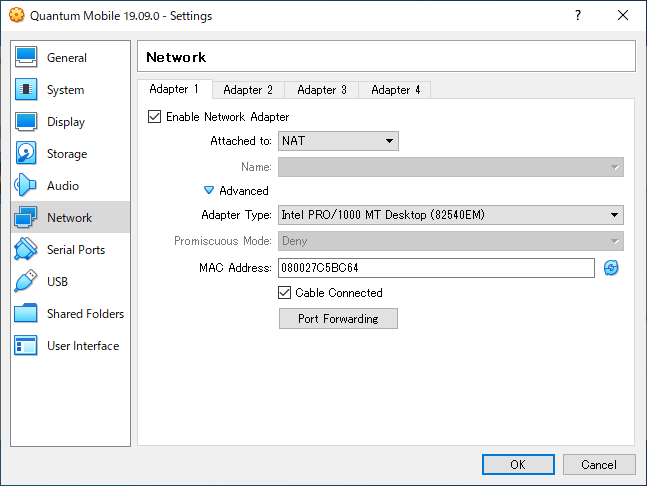
Windows WSL Setup AiiDA tutorial ISSP 2019 Documentation

Ansible Troubleshooting Windows 11 Error 0x80370102 WSL Windows

How To Copy Files From Windows To Linux Using The Windows Subsystem For
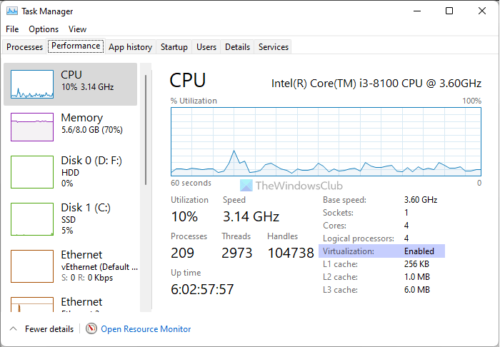
Error 0x80370102 Virtual Machine Could Not Be Started

Store APP Check Install Virtual Machine Platform Microsoft WSL

MiNET Activer WSL Sur Windows10
1 this didnt work for my Ubuntu 22 04 app but it did make my old ubuntu app 16 04 on windows 11 faster i still get error though on the 22 04 app WslRegisterDistribution failed with error 0x80370114 Error 0x80370114 The operation could not be started because a required feature is not installed Harry McKenzie Feb 8 2023 at 2 21 5

To enable WSL run this command in a PowerShell prompt with admin privileges Enable WindowsOptionalFeature Online FeatureName Microsoft Windows Subsystem Linux The requested operation could not be completed due to a virtual disk system limitation Virtual hard disk files must be uncompressed and unencrypted and must not be sparse
6 and reboot seems to have worked for me So maybe I did need Hyper V and or Hypervisor Platform enabled but it doesn t tell you anything useful Thanks a lot It s worked for me The Virtual machine could not be started because a required feature is not installed which feature is not installed

So to fix the issue we need to enable this option To do that follow the given steps Launch Control from the Start Menu Click Programs and Features Turn Windows features on or off Scroll

Solving the the WSL printing an empty line Open the C Windows System32 find and execute the file wslconfig exe as administrator reopen the terminal shell as administrator This should solve this problem Solving the virtual machine problem Verify if Hyper V is enable on Windows Features
Error 0x80370102 The virtual machine could not be started because a required feature is not installed Please enable the Virtual Machine Platform Windows feature and ensure virtualization is enabled in the BIOS Check the Hyper V system requirements https docs microsoft en us windows server 4 on Jun 18 2020 edited Agreed nested virtualization is essential VirtualBox has a setting for passing through VT x It has to initially be activated by a CLI command but it s there and it s turned on WSLUser on Jun 19 2020 edited
Error 0x80370102 The virtual machine could not be started because a required feature is not installed Then based on troubleshooting guide enabled virtualization Now both virtualization SLAT are enabled but still getting same above mentioned error Attached Snapshots Virtualisation SLAT PNG Please help Windows 10 0 comments Report a concern