Windows Powershell Command Line Editor Powershell The Comprehensive Beginners Guide To Taking Control Of The PowerShell Command Line To List All Available Azure Products In A How To Reuse A Windows PowerShell Command How PowerShell Differs From The Windows Command Prompt How To Get External IP Address From Command line PowerShell And CMD Mastering PowerShell s capabilities for processing text unlocks new possibilities for interfacing with Windows systems This comprehensive guide will take a deep dive into editing text files
Oct 27 2021 nbsp 0183 32 Keep reading and you will learn how to install and use three text editors Nano Vim and Emacs to edit your text files within PowerShell This tutorial will also cover the benefits of each to help you choose which one is Learn how to install the new Microsoft Edit a command line text editor for Windows and use it For a long time one of the features missing from Windows has been a good command line text
How To Get External IP Address From Command line PowerShell And CMD Powershell Tip 53 Run PowerShell As SYSTEM NT AUTHORITY SYSTEM Replace Command Prompt With PowerShell In The Windows 10 Power User Menu Powershell Text Editor Jordstarter How To Edit Files With A Real PowerShell Text Editor 2023 Command Prompt s Days May Be Numbered Thanks To PowerShell How PowerShell Differs From The Windows Command Prompt Mac Command Line Editor Liquidstashok Boost Your Productivity With Windows PowerShell Scripts
Windows Powershell Command Line Editor
 Windows Powershell Command Line Editor
https://images-na.ssl-images-amazon.com/images/I/51+AFcv90SL.jpg
Jun 10 2025 nbsp 0183 32 Microsoft Edit addresses a specific need for a default CLI editor in 64 bit Windows At just 250 KB it is exceptionally lightweight enabling text file edits within Command Prompt or PowerShell while providing modeless editing
Templates are pre-designed files or files that can be used for numerous purposes. They can save time and effort by supplying a ready-made format and layout for producing various kinds of material. Templates can be used for individual or expert projects, such as resumes, invitations, leaflets, newsletters, reports, discussions, and more.
Windows Powershell Command Line Editor

Powershell Execute Command Powershell Execute Cmd Command Singapp

Powershell Tip 53 Run PowerShell As SYSTEM NT AUTHORITY SYSTEM

Replace Command Prompt With PowerShell In The Windows 10 Power User Menu
Powershell Text Editor Jordstarter
Command Prompt s Days May Be Numbered Thanks To PowerShell

How PowerShell Differs From The Windows Command Prompt
Jun 15 2012 nbsp 0183 32 How do I edit text files in the Windows command prompt Why not use notepad The old edit works in PowerShell at least on my box Windows 7 Pro x86 but in x64 it

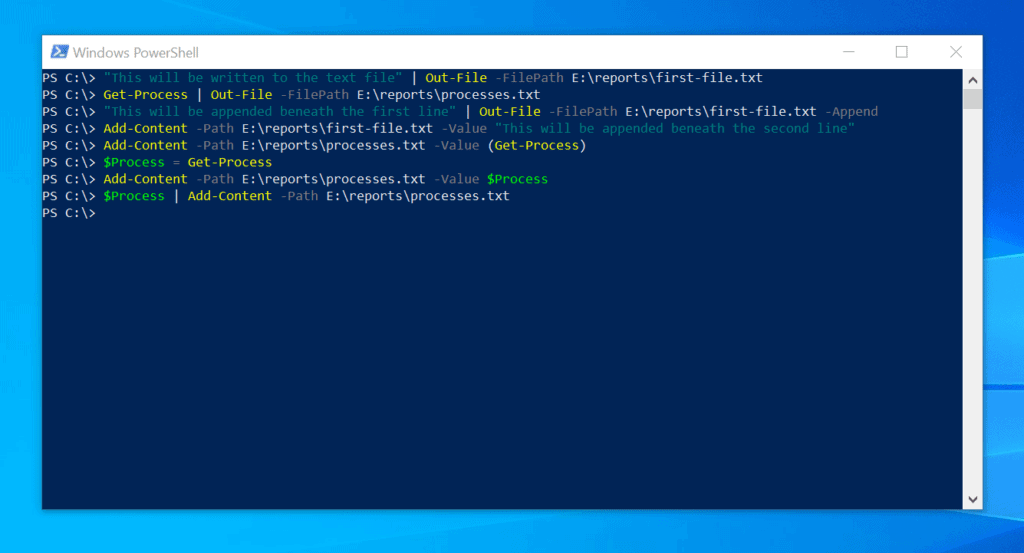
Mar 11 2025 nbsp 0183 32 This tutorial will teach you how to edit a text file on the PowerShell console using various methods Learn to use commands like Set Content Add Content and Out File to manipulate text files efficiently

Feb 24 2025 nbsp 0183 32 Describes how to edit commands at the PowerShell command prompt The PSReadLine module provides useful keyboard shortcuts to help you edit commands at the

Sep 25 2014 nbsp 0183 32 PsReadLine replaces the command line editing experience in PowerShell exe It provides But it doesn t replace it in a scary quot moved my cheese quot way but in a comfortable familiar way similar to how Bash works

Mar 2 2023 nbsp 0183 32 To edit a file txt in PowerShell use the command notepad file txt to open a graphical editor on Windows If you need a simple file edit in your terminal without a graphical editor and without installation you can use the command
May 21 2025 nbsp 0183 32 Microsoft Edit is a tiny CLI text editor that offers basic functionalities on Command Prompt and PowerShell It s open source so anyone can download from GitHub modify and Feb 13 2024 nbsp 0183 32 This article addresses PowerShell commands that let you manipulate text files efficiently We aim to cover these commands using practical examples providing both input
Jun 17 2014 nbsp 0183 32 One of the real strengths of PSReadLine is the enhanced command line editing experience Learning a few shortcuts will vastly improve the command line editing experience