Windows Explorer Pdf Preview Not Working Foxit Outlook PDF Preview Not Working When PDF Preview Is Enabled Githubmemory How To Disable The PDF Thumbnail Preview In Windows Explorer Help Fix Microsoft Outlook Cannot Preview PDF Attachments Winhelponline Fix Microsoft Outlook Cannot Preview PDF Attachments Winhelponline Top 8 Fixes For Preview Pane Not Working In Windows 10 This is caused by a bug in Microsoft Edge Preview Handler Workaround Remove from the folder name i e rename Folding Stools to Folding Stools and the preview will magically work regardless of what your default PDF viewer is Microsoft MVP 2003 to 2012 Windows Client
For some unknown reasons the preview of PDF files may stop working under the Network folders and display the text The problem especially persists with the PDF files only as Word and Foxit works with Windows Explorer Preview Please try to re associate the Preview PDF in Windows Explorer as following and see if it helps 1 Please open Foxit then go under File Preferences File Associations Advanced uncheck Include preview when setting default PDF viewer then click on OK
Top 8 Fixes For Preview Pane Not Working In Windows 10 Pdf Preview Not Working Windows 10 Depotbilla PDFs Do Not Preview Properly In Outlook Preview Or Windows Explorer PDFs Do Not Preview Properly In Outlook Preview Or Windows Explorer Pdf Preview Not Working Windows 10 Depotbilla Adobe Photodeluxe Free Cleaningmokasin Fix Microsoft Outlook Cannot Preview PDF Attachments Winhelponline How To Get Skyrim Creation Kit Without Skyrim Bigpor Windows 10 File Explorer Pdf Preview Not Working Cleaningmokasin
Windows Explorer Pdf Preview Not Working Foxit
 Windows Explorer Pdf Preview Not Working Foxit
https://user-images.githubusercontent.com/101287165/157511717-4fb235ce-5592-4d8e-bf9a-71ed6e8567f6.jpg
In the Preferences dialog box choose General in the Categories list and then select the Enable PDF thumbnail previews in Windows Explorer check box Note If you don t see the Enable PDF thumbnail previews in Windows Explorer checkbox update your Acrobat or Acrobat Reader to the latest version
Templates are pre-designed documents or files that can be used for numerous purposes. They can save time and effort by providing a ready-made format and design for producing different kinds of material. Templates can be utilized for personal or professional jobs, such as resumes, invites, flyers, newsletters, reports, discussions, and more.
Windows Explorer Pdf Preview Not Working Foxit

PDF Preview Not Working Correctly In Outlook Microsoft Community

Pdf Preview Not Working Windows 10 Depotbilla

PDFs Do Not Preview Properly In Outlook Preview Or Windows Explorer

PDFs Do Not Preview Properly In Outlook Preview Or Windows Explorer
Adobe Photodeluxe Free Cleaningmokasin
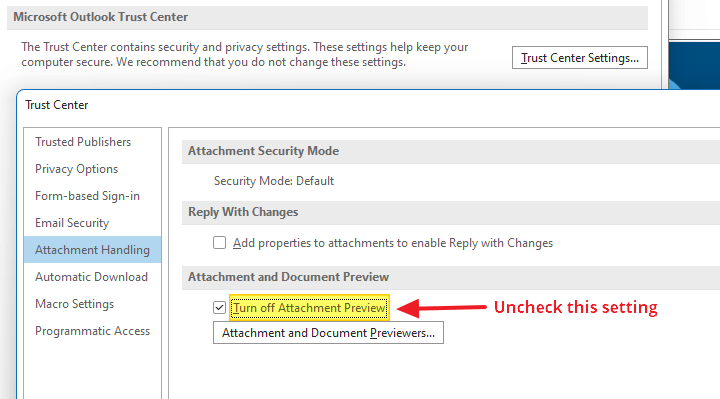
Fix Microsoft Outlook Cannot Preview PDF Attachments Winhelponline

If the File Explorer Preview Handler for PDFs is not showing the Foxit PDF Preview even though Foxit is set as the default PDF Previewer please follow steps below Open Registry Editor as Admin and navigate to HKEY CLASSES ROOT pdf shellex 8895b1c6 b41f 4c1c a562 0d564250836f

Yesterday the preview pane in my work pc running Windows 11 stopped loading pdf in the preview pane just a blank screen The apparent fix while searching the web was to update Acrobat but I don t have those installation files so I told the boss and that was that In the meantime I installed the powertoy for file explorer which works but the
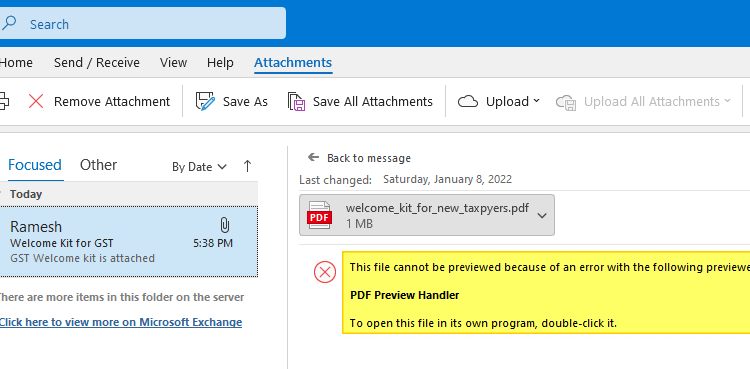
Launch Microsoft PowerToys as administrator Run as administrator In PowerToys Settings select File Explorer add ons in the left pane Turn on the Enable PDF pdf preview setting Turn on the Enable PDF pdf thumbnails setting
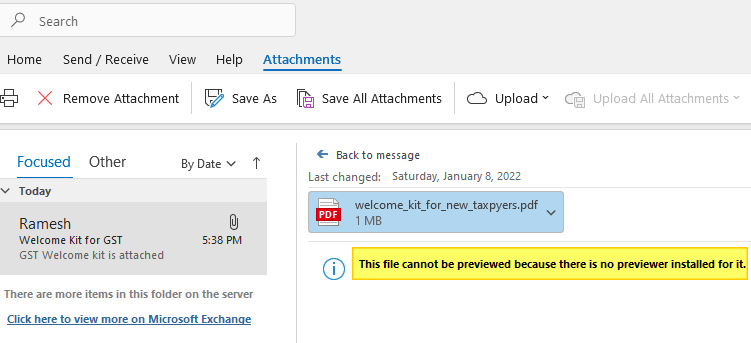
Install Uninstall Enterprise Deployment How to install MSI from command line with administrator Foxit PDF Editor Windows Edition Enterprise Deployment Quick Start Where to download Foxit Reader with Enterprise Packaging MSI

To enable the Preview Pane you can do these steps Open the Windows 11 File Explorer window Click the View tab and then select Show from the drop down menu Next click on the Preview pane option After that you can see the Preview pane appear on the right hand side of the File Explorer window Solution 2
Can PDF thumbnails in Windows Explorer 7 or 8 or 10 show the first page of the PDF file without having to install a custom PDF Preview Handler from Adobe or Foxit or from Tracker Software or from one of the other known preview providers Please note I do NOT mean the specific File Preview pane in Windows Explorer where one can scroll through all the pages of a PDF document which is Please try to turn off the protected mode for testing Windows Only Go to Edit Preferences Enhanced Security Uncheck Enable Protected mode at start up Turn off the protected mode and uncheck Enhanced Security click OK and reboot the application and see if that works
Kimberly Taylor of Foxit confirmed On Windows 8 1 64 bit our PDF Preview program does not work very well The preview window might fail to show Coupon Codes