Windows 7 Enable Hibernate Command Line How To Enable Hibernate Under Windows 7 YouTube Win10 How To Enable Hibernate Mode In Windows 10 Bangla Tech Solutions How To Enable Disable Hibernate In Windows 7 TechTin How To Enable Hibernate Option In Ubuntu 16 10 Tips On Ubuntu Web Mar 5 2009 nbsp 0183 32 1 Open an elevated command prompt 2 Do step 3 or step 4 below for what you would like to do 3 To Enable Hibernate NOTE This step will restore the hiberfil sys file and the Allow hybrid sleep and Hibernate after Power Options under Sleep
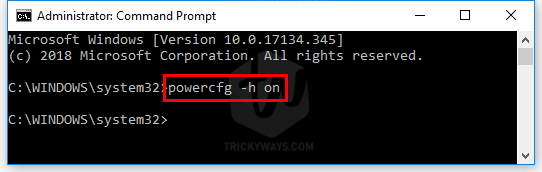
Web Sep 13 2019 nbsp 0183 32 Step 1 Open Command Prompt with Administrator rights To open Command Prompt type CMD in Start menu and then hit Ctrl Shift Enter to open the Command Prompt with Admin rights Step 2 Next type the below command and hit enter powercfg hibernate on Step 3 exit and hit Enter key to close the Command Prompt Web The Command Prompt is the quicker way to enable or disable Hibernate option on the computer Click on Start and type CMD into the search box and it will be listed under programs Right click on the icon and select Run as administrator In the Command Prompt type the commands shown below to enable or disable the Hibernate options
How To Enable Hibernate Option In Ubuntu 16 10 Tips On Ubuntu How To Enable Hibernate In Windows 10 No Command Line YouTube How To Enable Or Disable Hibernate In Windows Fixing Windows 7 Enable Hibernate Mode Enable Or Disable The Hibernate Option In Windows 10 Winaero How To Hibernate Windows 10 PC Using Command Prompt How To Manage Hibernate Mode In Windows 7 How To Enable Or Disable Hibernate In Windows 10 How To Enable Disable Hibernate In Windows 7 TechTin
Windows 7 Enable Hibernate Command Line
 Windows 7 Enable Hibernate Command Line
https://i.ytimg.com/vi/_vlzDbJkVnI/maxresdefault.jpg
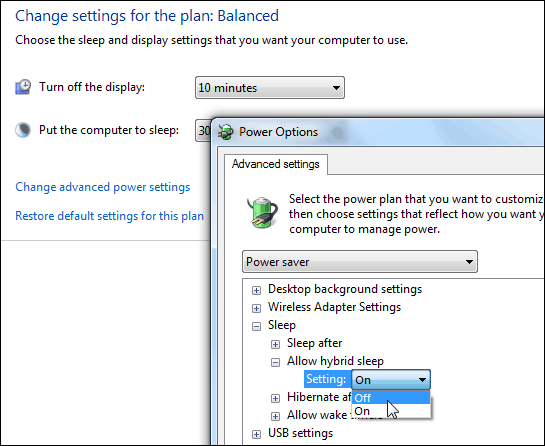
Web Aug 12 2009 nbsp 0183 32 Type the following command and hit Enter powercfg hibernate on Hibernate option should now be available for selection in Start menu power button If for some reason Hibernate is still not available try to disable Hybrid Sleep in Windows 7 with the following steps Go to Control Panel gt System and Security gt Power Options Click
Pre-crafted templates offer a time-saving option for developing a diverse series of documents and files. These pre-designed formats and designs can be used for various personal and expert projects, consisting of resumes, invites, leaflets, newsletters, reports, discussions, and more, simplifying the content production process.
Windows 7 Enable Hibernate Command Line

How To Enable Or Disable Hibernate Option In Windows 10 2 Different Ways

How To Enable Hibernate In Windows 10 No Command Line YouTube
How To Enable Or Disable Hibernate In Windows
Fixing Windows 7 Enable Hibernate Mode

How To Hibernate Windows 10 PC Using Command Prompt

How To Manage Hibernate Mode In Windows 7

Web Apr 28 2023 nbsp 0183 32 How to make hibernation unavailable Press the Windows button on the keyboard to open Start menu or Start screen Search for cmd In the search results list right click Command Prompt and then select Run as Administrator When you are prompted by User Account Control select Continue
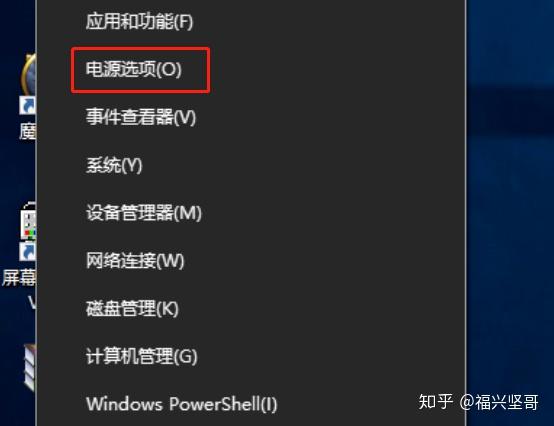
Web Instead of having to use Power Options in the Control Panel you can enable and disable Hibernate mode from the Command Line

Web Apr 29 2023 nbsp 0183 32 Method 1 Disable and enable hibernation using command prompt Using command prompt we can disable hibernation You will need an administrator account for this operation since you will have to run command prompt as an administrator
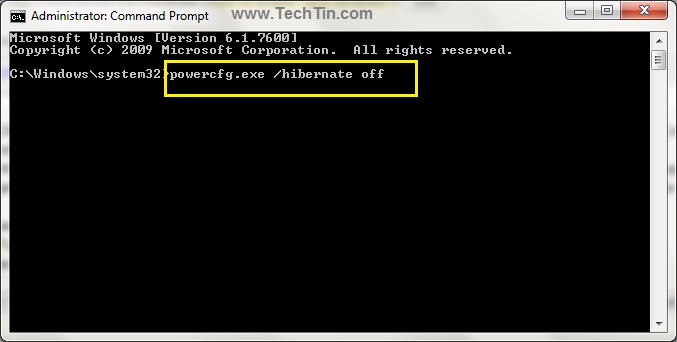
Web Feb 8 2012 nbsp 0183 32 In Windows we can turn on or turn off hibernation from command line using powercfg command This works on Windows 7 Vista XP Server 2008 and Server 2003 versions

Web Jan 4 2011 nbsp 0183 32 To enable Hibernate follow these steps 1 Go to Start and type cmd in the search box 2 From the result right click cmd and select Run as Administrator and at the prompt window click Yes 3 Now in the command prompt you need to type the command line powercfg exe hibernate on and press enter 4
Web May 12 2019 nbsp 0183 32 Put Windows to Hibernate Here are the options to put the system into hibernate mode First using the built in solution shutdown exe shutdown exe h nircmd hibernate wizmo hibernate psshutdown h Turn off the monitor To turn off the monitor without putting the system to sleep here are the options wizmo monoff nircmd monitor off Web Jul 27 2011 nbsp 0183 32 The following command lines can be used to hibernate a Windows 7 computer Hibernate Immediately Shutdown h t 1 c quot System is now hibernating quot Hibernate after 20 seconds You can change the number after ping n to have a different waiting time in seconds ping n 20 127 0 0 1 gt NUL 2 gt amp 1 amp shutdown h f
Web Jan 17 2019 nbsp 0183 32 First click Start and Type power options in the search box and hit Enter Next in the right hand pane select Change when the computer sleeps and then click Change advanced power settings In the