Windows 10 Product Key Command Windows 10 Product Key Finder Free Matictop How To Find Windows 10 Product Key Using Command Prompt How To I Get A Product Key Acer Community Find Windows 10 Key With 3 How To Find Your Windows 10 Product Key By Using The Command Prompt Find Product Key Win 10 Jeswatcher How to find your Windows 10 product key By Mark Tyson July 1 2022 2 10 pm BST Windows 10 Scroll to section If you have bought a new laptop or desktop PC in the last few years it
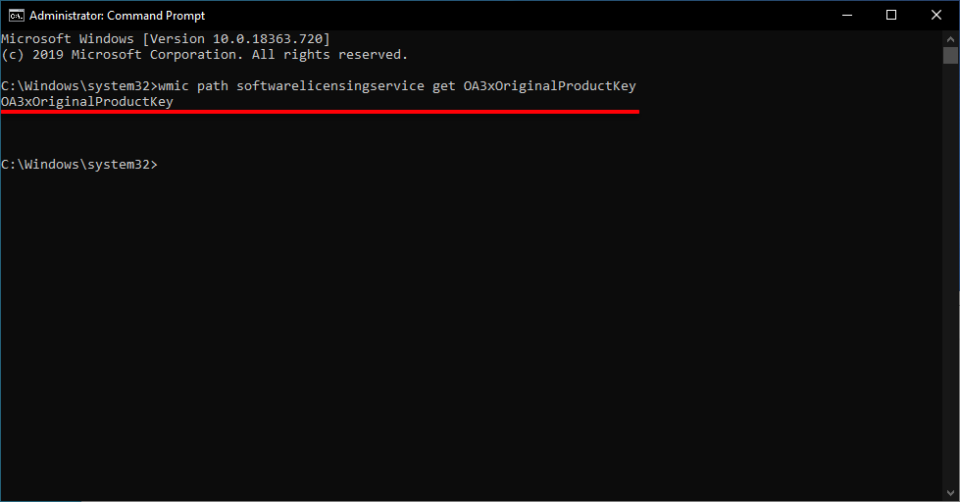
First press the Windows key search for cmd and click on Run as administrator Then run the following command wmic path softwarelicensingservice get OA3xOriginalProductKey After that you ll see your Windows 10 product key Alternatively you can run this command in the Command Prompt terminal Open this by right clicking on the Start Menu and choosing Windows Powershell Admin Now you ll have to enter the necessary command to see your Windows 10 product key Note that it is case
Find Product Key Win 10 Jeswatcher How To Find Your Windows 10 Product Key By Using The Command Prompt How To Find Your Windows 10 Product Key Using The Command Prompt YouTube How To Find Windows 10 Product Key Using Command Prompt YouTube How To Find Your Windows 10 Product Keys Using Command Prompt Study How To Find The Windows 10 Product Key Using Command Prompt YouTube Pre Installed Windows 10 Product Key UptimeTechsupport Original Windows 10 Pro License Retail Key 100 Online Activate Windows How To Change The Product Key On Windows 10 Windows Central
Windows 10 Product Key Command
 Windows 10 Product Key Command
https://wikikeep.com/wp-content/uploads/2020/03/2020-03-19_9-53-48-960x502.png
How to Find Your Product Key on Windows 10 and Earlier You ve lost your Windows 10 product key or don t even know what it was in the first place now you need it Don t worry here s how to look up your Windows 10 product key easily
Pre-crafted templates offer a time-saving service for producing a diverse range of documents and files. These pre-designed formats and layouts can be made use of for various individual and expert projects, consisting of resumes, invites, flyers, newsletters, reports, presentations, and more, simplifying the material production process.
Windows 10 Product Key Command

YouTube

How To Find Your Windows 10 Product Key By Using The Command Prompt
How To Find Your Windows 10 Product Key Using The Command Prompt YouTube

How To Find Windows 10 Product Key Using Command Prompt YouTube

How To Find The Windows 10 Product Key Using Command Prompt YouTube

Pre Installed Windows 10 Product Key UptimeTechsupport
To find your Windows 10 Product Key open a PowerShell window with administrative privileges type the following command and hit Enter Get WmiObject query select from

1 Download Magical JellyBean KeyFinder the free version 2 Extract keyfinder exe from the zip file to a folder on your PC You can skip the other files in the zip archive 3 Launch

Command prompt The most direct method for finding your Windows 10 product key is from the command line 1 Type cmd into the Windows 10 desktop search box 2 Then right click the

How to find your Windows 10 product key 1 Click the Windows search box and type in Command Prompt 2 Once the Command Prompt entry pops up right click that option and select Run as

A Windows product key is a 25 character code used to activate Windows It looks like this PRODUCT KEY XXXXX XXXXX XXXXX XXXXX XXXXX Locate your product key for Windows 10 or Windows 11 Depending on how you got your copy of Windows 10 or Windows 11 you ll need either a 25 character product key or a digital license to activate it
Users can find a Windows 10 product key by issuing a command from the command prompt Press Windows key X Click Command Prompt Admin At the command prompt type the following to reveal the Click the Change product key link Type the 25 digit product key for the version of Windows 10 you want Click Next to complete the process If the activation process completes
You can check the validity of the installed Windows product key by running this command from the command prompt or the Windows PowerShell C slmgr dli If the license status is Licensed then you are using the genuine Windows product key otherwise the key is not genuine Was it useful Share this post with the world No comments yet