Windows 10 Last Boot Time Use CMD Or Powershell To Find Last Boot Time Get Last Boot Time Of Computer Using PowerShell ShellGeek Get Last Boot Time Of Computer Using PowerShell ShellGeek Check Last Reboot Time In Windows 10 Password Recovery Get Last Boot Time Of Computer Using PowerShell ShellGeek This post will show you how to check if Windows 11 10 last boot was from Fast Startup Full Shutdown or Hibernate using the command line look for The boot type was under the shutdown time
How can I find the last boot time for my computer by using Windows PowerShell In Windows PowerShell 3 0 use the Get CimInstance cmdlet and select the LastBootUptime property from the Win32 Operatingsystem WMI class PS C Get CimInstance ClassName win32 operatingsystem select csname lastbootuptime csname lastbootuptime To see it first launch Task Manager from the Start menu or the Ctrl Shift Esc keyboard shortcut Next click the Startup tab You ll see your last BIOS time in the top right of the
Get Last Boot Time Of Computer Using PowerShell ShellGeek How To Check The Last Boot Time In Windows 10 Respiration 76 Never End USE CMD OR POWERSHELL TO FIND LAST BOOT TIME Determine Windows Server Last Boot Time ServerName active Multiple Reboot Scheduler 1 4 0 0 Information Technology Get CimInstance ClassName Win32 Microsoft Wants To Optimize Your Windows PC With A CCleaner Equivalent Interlude Geekality
Windows 10 Last Boot Time
 Windows 10 Last Boot Time
https://cannotdisplay.com/wp-content/uploads/2015/05/PowershellBoot.png
Windows Get last boot up time with PowerShell To get the last boot up time using PowerShell run the command Get CimInstance ClassName Win32 OperatingSystem Select Object LastBootUpTime To get the last boot up time of a remote computer run the command Invoke Command ComputerName HOSTNAME ScriptBlock Get CimInstance ClassName Win32
Pre-crafted templates offer a time-saving service for creating a varied range of documents and files. These pre-designed formats and designs can be utilized for numerous individual and expert tasks, including resumes, invitations, leaflets, newsletters, reports, presentations, and more, improving the material production process.
Windows 10 Last Boot Time

76 Never End USE CMD OR POWERSHELL TO FIND LAST BOOT TIME

How To Check The Last Boot Time In Windows 10 Respiration
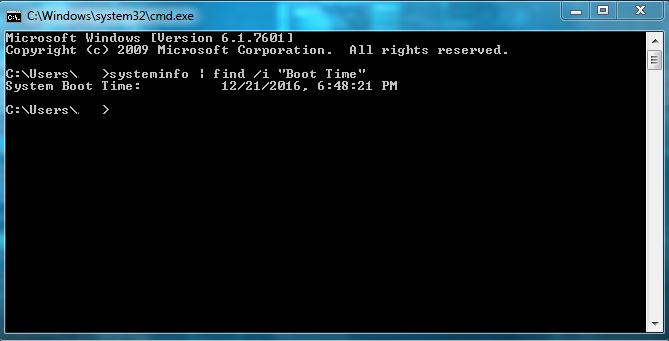
76 Never End USE CMD OR POWERSHELL TO FIND LAST BOOT TIME

Determine Windows Server Last Boot Time ServerName active

Information Technology Get CimInstance ClassName Win32


To check your last BIOS time in Windows 10 Launch Task Manager Ctrl Shift Esc and click the Startup tab Look for Last BIOS time in the top right of the window You ll see your last BIOS time in the top right of the interface

5 668 14 49 70 Add a comment 16 Answers Sorted by 211 systeminfo command is almost right what you need On English Windows 7 you can also do systeminfo find i Boot Time Or with the help of WMIC wmic os get lastbootuptime The main difference between Windows 7 and Windows XP that in Windows 7 Microsoft can show only last boot up time

1 Open Task Manager Ctrl Shift Esc in more details view 2 Click tap on the Startup tab in Task Manager see screenshot below 3 Look to see how many seconds it shows for the Last BIOS time towards the top right corner
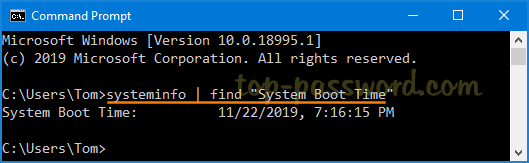
Windows 10 How to check your computer uptime on Windows 10 By Mauro Huculak published 27 September 2022 Do you need to know your PC s uptime In this guide we show you four ways to check on

Windows 10 s Task Manager displays your PC s Last BIOS time on its Startup tab Here s what that number means and how to decrease it so your PC boots faster What Is Last BIOS Time Related What Does a PC s BIOS Do and When Should I Use It
To Find Last BIOS Boot Time in Windows 10 Open Task Manager If it looks as follows switch it to the full view using the More details link in the bottom right corner Click on the Startup tab On the top right check out the Last BIOS time value The value is in seconds If Last BIOS time is blank this means that your motherboard UEFI Windows last boot time by Srini You can find the time windows was last rebooted on your computer using systeminfo or wmic commands Both the commands are explained below Using Systeminfo You can run the below command to find the Windows boot time systeminfo findstr C System Boot Time The above command works on Windows 7
If you have Windows 10 but want to be able to use the functionality of Last Known Good Configuration you can simply enter Safe Mode It s a similar boot option that allows you to run your device despite specific errors being present on the system While these instructions are written for Windows 10 Safe Mode also exists on all