Windows 10 Edge Proxy Settings Registry Windows Proxy Settings Ultimate Guide Part II Configuring Proxy Cervello Nascondiglio Grande Delusione How To Set Proxy In Microsoft How To Configure Microsoft Edge Proxy Settings Easy Guide Microsoft Mozilla FireFox 60 0 Proxy How To Disable Proxy Settings In The Registry Techwalla How to set up a proxy in Edge Launch Edge from your Start menu desktop or taskbar Click the More button in the top right corner of the window It looks like three dots Click Settings
The ProxyMode field lets you specify the proxy server used by Microsoft Edge Application Guard The ProxyPacUrl field is a URL to a proxy pac file Windows Registry Settings Path Mandatory SOFTWARE Policies Microsoft Edge Path Recommended N A Value Name SerialAllowUsbDevicesForUrls 1 Change Microsoft Edge proxy settings Open Microsoft Edge Click the Menu button in the top right corner and select Settings from the menu Scroll down to the Advanced settings section and click View advanced settings button Click the Open proxy settings button Go to the Manual proxy setup section and turn on Use a proxy server option
How To Disable Proxy Settings In The Registry Techwalla Ultimate Guide To Microsoft Edge Proxy Setup Geonode Nas l Yap l r Microsoft Edge Proxy Ayarlar n Yap land rma Microsoft Edge Windows 2022 Nas l Yap l r Microsoft Edge Proxy Ayarlar n Yap land rma Windows Edge Proxy Settings Microsoft Edge Proxy Ayarlar Nas l Yap land r l r Kolay K lavuz Nas l Windows 10 Machine Level Proxy Configuration
Windows 10 Edge Proxy Settings Registry
 Windows 10 Edge Proxy Settings Registry
https://igorpuhalo.files.wordpress.com/2022/07/image-8.png
Learn how to create a GPO to perform the Proxy configuration on the Microsoft Edge browser on the domain computers in 5 minutes or less
Templates are pre-designed documents or files that can be used for numerous functions. They can conserve time and effort by supplying a ready-made format and design for creating different type of material. Templates can be utilized for individual or professional jobs, such as resumes, invites, leaflets, newsletters, reports, presentations, and more.
Windows 10 Edge Proxy Settings Registry

Watch Series Co Proxy

Ultimate Guide To Microsoft Edge Proxy Setup Geonode

Nas l Yap l r Microsoft Edge Proxy Ayarlar n Yap land rma


Nas l Yap l r Microsoft Edge Proxy Ayarlar n Yap land rma

Windows Edge Proxy Settings

For Chrome on Windows enterprise policies can manually be set in this registry folder Computer HKEY LOCAL MACHINE SOFTWARE Google Chrome For the new Chromium based Edge where is the registry folder Computer HKEY LOCAL MACHINE SOFTWARE Microsoft Edge The current set of Microsoft Edge Policies are here
04 10 2022 4 contributors Feedback In this article System network settings Command line options for proxy settings Content license See also This article describes how you can use command line options to override the default system network settings Note This article applies to Microsoft Edge version 77 or later System network settings

To change and configure Microsoft Edge proxy settings use any of the following methods To turn off proxy settings in Microsoft Edge go to the menu three dots on the top right and

1 Download and install the Microsoft Edge administrative template 2 Set mandatory or recommended policies 3 Test your policies See also Use this article as guide to configure Microsoft Edge policy settings on Windows devices If you haven t set up Microsoft Edge see the Microsoft Edge setup guide Note

It s Powershell code and returns everything about Proxy Settings Plus If You Want any one property of numerous displayed in output just do this Get ItemProperty Path Registry HKCU Software Microsoft Windows CurrentVersion Internet Settings ProxyEnable as I wanted ProxyEnable Property Share Improve this answer Follow
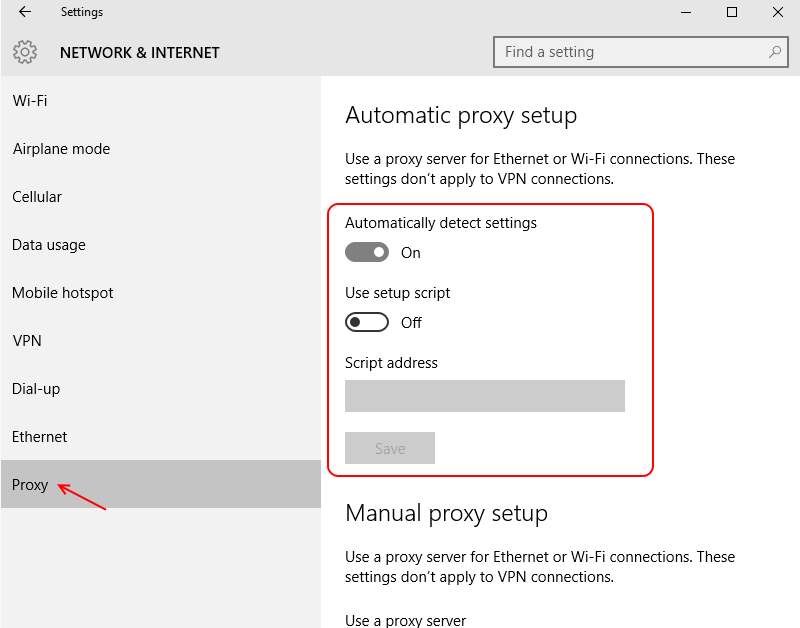
In the newly opened window click or tap the section labeled Network Internet Here you find several subsections with settings The last one should be named Proxy To change the proxy settings in Windows 10 click or tap on it Two separate sections can be configured on the right Automatic proxy setup and Manual proxy setup Check Best Answer OP myqldau jalapeno Jan 25th 2019 at 3 50 PM I just created registry entries via GPO and it worked Text Hive HKEY CURRENT USER Key path SOFTWARE Microsoft Windows CurrentVersion Internet Settings Value name ProxyServer Value type REG SZ Value data 10 30 50 8080 Text
Setting Up Microsoft Edge s Proxy Settings Step 1 Open the Microsoft Edge Browser and click on the horizontally aligned buttons at the top right corner Step 2 On the Edge menu select Settings Step 3 Click on System and Performance and then select Open your computer s proxy settings