Why Hyperlink Is Not Working In Pdf Why Is My Hyperlink Not Working On Canva 6 Simple Reasons Solved Why Hyperlink Is Not Working In Word Reasons And Solutions Webstings Why Hyperlink Is Not Working In Word Reasons And Solutions Webstings Why Hyperlink Is Not Working In Word Reasons And Solutions Webstings Quickly Solve Hyperlinks Not Working In PDF In 60 Seconds If links are not working in your PDF you should use the Export feature of MS Word 2013 or Save As feature of MS Word 2007 When I exported my ebook as a PDF I found that all the links in PDF were intact and clickable MS Word 2013 Open your document in MS Word 2013 Go to File menu and then select Export To option Then click PDF or XPS
Reason 1 Internet Connection If your system is not connected to the server your hyperlinks won t work It s because any link requires a connection to the server for work Reason 2 https or http The secure and insecure protocols are entirely different from each other HTTPS uses SSL encryption while the others don t Why Are Hyperlinks Not Working in PDF How to Fix it Still Not Working Add Hyperlink to PDF with a PDF Editor Cisdem PDFMaster An All in One Solution to Make Hyperlinks Work in PDF Link to a specific page or section in PDF Add hyperlinks to jump to external websites Remove and edit the hyperlinks in PDF easily
Quickly Solve Hyperlinks Not Working In PDF In 60 Seconds Why Is Hyperlink Not Working In Canva WebsiteBuilderInsider Hyperlink In Excel Not Working 3 Reasons Solutions ExcelDemy Why Hyperlink Is Not Working In Word Reasons And Solutions Webstings Hyperlink Meaning YouTube What Happens When You Click A Link Learn Steps Home Webstings Hyperlink In Word Not Working In Pdf Ghana Tips Not Specific Enough Synonyms 10 Words And Phrases For Not Specific Enough
Why Hyperlink Is Not Working In Pdf
 Why Hyperlink Is Not Working In Pdf
https://funnelgraphic.com/wp-content/uploads/2023/01/why-is-my-hyperlink-not-working-in-canva.png
1 Use another PDF viewer It is probably the first thing you can do to mitigate this issue on your computer If you have opened the PDF file in the Edge browser try opening it in Google Chrome or the Mozilla Firefox browser and vice versa 2 Copy the link manually
Pre-crafted templates provide a time-saving solution for creating a diverse series of files and files. These pre-designed formats and designs can be utilized for different personal and expert tasks, including resumes, invites, flyers, newsletters, reports, presentations, and more, simplifying the content creation procedure.
Why Hyperlink Is Not Working In Pdf
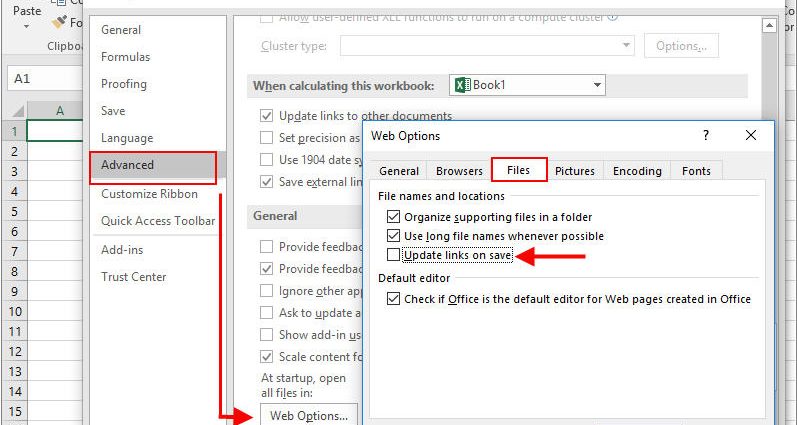
Why Is The Hyperlink Not Working In Excel Healthy Food Near Me
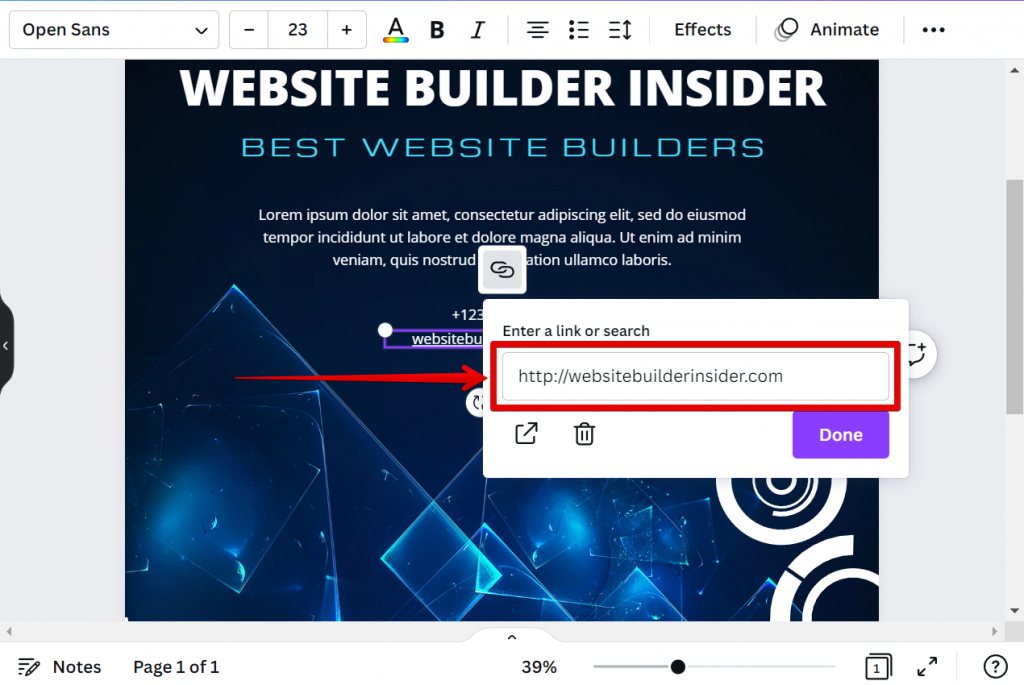
Why Is Hyperlink Not Working In Canva WebsiteBuilderInsider

Hyperlink In Excel Not Working 3 Reasons Solutions ExcelDemy

Why Hyperlink Is Not Working In Word Reasons And Solutions Webstings

What Happens When You Click A Link Learn Steps

Home Webstings

1 Correct answer MarkAH New Here Nov 20 2017 Hi all I was having the same issue and here is what I found Before attempting to convert the document from Word to PDF look to see if it says compatibility mode at the top of the Word window Mine did even though it was already a docx file

Solution 1 Convert files to PDF with a professional converter Instead of saving or printing a document to PDF you should use dedicated PDF software which can convert Word Excel and PPT to PDF while keeping the embedded hyperlinks active

Many factors can be the reason why hyperlinks not working in PDF Incorrect URL path An incorrect path will render the PDF hyperlink not working Missing http or https Missing http or https will make the hyperlink not work in PDF

Per the description shared we understand that the Hyperlinks in the Word document are acted as text when you save it as PDF Best for printing and Hyperlinks works when you save it as PDF Best for electronic distribution and accessibility
Why Is the Link in PDF not Working Hyperlinks are like pathways in a PDF connecting different documents together It can get super frustrating if these links stop working If you re dealing with this issue the first thing to do is to know the reason behind the problem
Hi benp76942208 We received your PDF document via email Thank you I investigated the link problem with your PDF document and concluded that your PDF document does not contain real hyperlinks I opened your PDF document in Acrobat Pro DC desktop app and used the Edit PDF feature to check if links are available in page 3 Acrobat Pro DC reported There are no links to the Web on this page Aug 23 2016 I m running Indesign CS6 I ve created hyperlinks in the Indesign documents and have selected to include hyperlinks in the print dialogue when exporting the PDF However in the PDF the hyperlink doesn t work
Here will be presented two solution for you if the hyperlinks are not working in PDF Let s dive in Solve 1 Check to URL Path For this use you have until copy the hyperlink and test thereto on the browser Siehe are the steps to complete the task Tread 1 Open the PDF file and mimic one hyperlink URL which is not working