Why Does My Pc Boot Loop Why Does My Pc Have Only 15 9GB RAM Usable Out Of 16GB Hindi YouTube How Does My PC Boot YouTube What Is This Load Screen And Why Won t My PC Boot Windows I Just Moved PC Boot Loops Even After New Power Supply PcBuildHelp Why Does My PC Turn ON And OFF After Installing RAM SOLVED Volt Fixer Workaround 1 Disable Automatic Restart Step 1 While restarting your computer continuously press F8 until you get Windows logo on screen Step 2 Once the boot menu appears on screen release F8 and select Safe Mode Step 3 When Windows boot into Safe Mode go to Search box and type sysdm cpl Open sysdm cpl from search results Step 4
A faulty operating system installation or driver updates are the most common cause but it can also stem from power outages storage issues malware or even faulty hardware Your computer is trying to enter Automatic Repair mode and as a result keeps restarting indefinitely 7 Disable Automatic Restart If automatic restart is enabled your computer will reboot every time it encounters a system failure To disable this feature press Win R type sysdm cpl in the text box and then click OK Select the Advanced tab and click Settings in the Startup and Recovery section
Why Does My PC Turn ON And OFF After Installing RAM SOLVED Volt Fixer Pc Boot Loop YouTube PC Boot Loop After New GPU I Just Recently Installed A New 6600xt And Why Does My Pc Fan Keep Running After I Turn It Off Fan Review Got A Nice 1650 Super Not 1 Month Ago And Then Prime Day Shows A 5500xt Boot Takes Too Long After Enabling Virtualization I Tryed To Find Out Why My Pc Wouldn t Boot And Found Out That It Can Pc Boots To Bios After Bios Update Archives Ngolongtech This Has Affected My Pc Boot Timing Any Suggestions Fedora
Why Does My Pc Boot Loop
 Why Does My Pc Boot Loop
https://i.ytimg.com/vi/ObkXpAUpNos/maxresdefault.jpg
What Causes a Windows 10 Boot Loop A Windows 10 reboot loop sometimes also called a bootloop interchangeably can be frustrating to deal with But what causes it Typically the fault can be traced back to one of these three things A Windows update An updated or new Windows driver The installation of new software an app or game
Pre-crafted templates provide a time-saving service for developing a varied series of documents and files. These pre-designed formats and designs can be made use of for various individual and expert projects, consisting of resumes, invitations, flyers, newsletters, reports, discussions, and more, streamlining the material creation process.
Why Does My Pc Boot Loop

Why Does My PC Keep Crashing When I Play Games ANSWERED TechReviewTeam

Pc Boot Loop YouTube

PC Boot Loop After New GPU I Just Recently Installed A New 6600xt And

Why Does My Pc Fan Keep Running After I Turn It Off Fan Review
Boot Takes Too Long After Enabling Virtualization

I Tryed To Find Out Why My Pc Wouldn t Boot And Found Out That It Can

The Windows boot loop problem is often the result of a device driver a bad system component or hardware such as the hard disk that causes a Windows system to spontaneously reboot in the middle of the boot process The result is a machine that can never boot completely and is stuck in a reboot loop

1 Go to start menu search msconfig 2 On the system configuration window go to the services tab 3 Tick on hide all microsoft service so that this won t be affected 4 Choose to disable all services
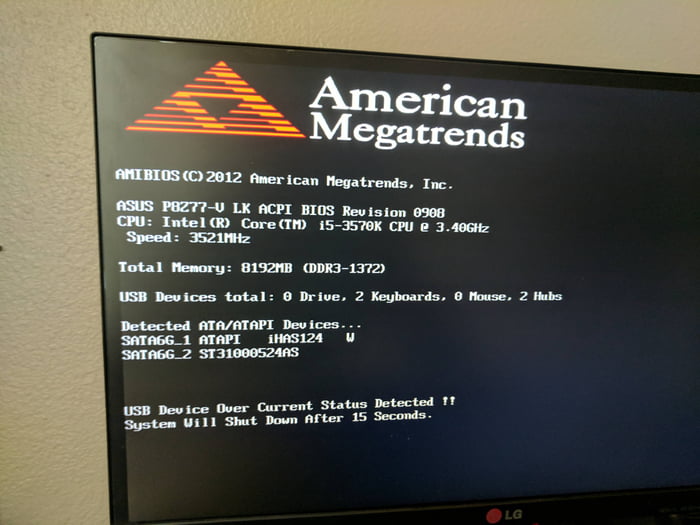
What you need to do first of all is boot up your computer with CPU installed NO sticks of memory RAM NO hard disks storage devices

One of the primary causes for the boot loop is a corrupted MBR or the EFI bootloader in GPT hard drives A quick workaround to this problem is to repair the boot sector using dedicated commands First get into the Advanced Startup Recovery Environment screen as discussed earlier Then go to Troubleshoot Next pick Advanced options

1 Unplug Peripherals and Hard Reset Your PC A piece of hardware that s connected to your computer such as your printer digital camera or video recorder USB storage device or media card reader may interfere with the normal Windows booting process
5 0 10 Jul 18 2021 1 I have a strange issue with my PC I turn my PC on and sometimes it boot loops it boot loops for about 5 minutes sometimes longer but eventually the PC The repair loop itself is caused by Startup Repair failing to fix the Windows startup problem A failed Windows update degraded hardware like memory or a hard drive or missing or damaged system files corrupted by malware You may also encounter this problem due to a driver issue for a specific piece of hardware or a registry error
Viewed 376 times 0 Recently I upgrade my case and began using a new SSD Whenever I restart the PC gets stuck in a boot loop and doesn t POST After about 5 attempted boots it shuts down After this happens if I turn the surge protector off and on then start the PC it works properly It also works properly if I shutdown instead of restart