What Is Protected Mode In Adobe Reader PDF Dark Mode How To Enable Dark Mode In Adobe Acrobat Reader How Protected View Feature For PDFs Windows Adobe Reader What Is Protected Mode Explained How To Disable Adobe Reader Protected Mode By Bas Wijdenes How To Enable Dark Mode In Adobe Reader PDF Dark Mode YouTube How to add passwords and permissions to PDF files Open a file in Acrobat and choose Tools Protect Select whether you want to restrict editing with a password or encrypt the file with a certificate or password Set password or security method as desired Click OK and then click Save
Protected View Protected View PV is a highly secure read only mode for Windows that blocks most actions until the user decides whether or not to trust the document Adobe strongly recommends that you use Acrobat in Protected View if you are concerned about security or frequently interact with PDFs on the Internet Disabling protected mode fixes this for the save button but not for exiting the application cant find a fix for that yet So using Adobe Acrobat Customization Wizard we customized the install package but have already deployed the latest version of Acrobat Reader DC 20 013 20064 and therefore deploying it again with updated transform file it
How To Enable Dark Mode In Adobe Reader PDF Dark Mode YouTube Comparison Of Real Mode And Protected Mode Of Microprocessor 80386 Difference Between Real Mode And Protected Mode Presentation Title Adobe Reader Vulnerability What You Need To Do To Stay Safe GHacks View Sd Card Protected Cannot Format US Leonie D Coleman Adobe Reader Protected Mode Disable How To Enable Protected Mode In Internet Explorer YouTube Creaci n Disfraces Mercenario Modo Oscuro Acrobat Reader Monta as
What Is Protected Mode In Adobe Reader
 What Is Protected Mode In Adobe Reader
https://i.ytimg.com/vi/rgKewXoVLtY/maxresdefault.jpg
If Acrobat is taking longer to open PDF documents I will suggest you to clear temp folder To get classic file open or save dialog try this Open Acrobat Go to Edit Preferences General Uncheck the option Show online storage when opening files Show online storage when saving files
Pre-crafted templates provide a time-saving option for producing a varied variety of documents and files. These pre-designed formats and designs can be made use of for numerous individual and expert projects, consisting of resumes, invites, leaflets, newsletters, reports, discussions, and more, simplifying the material development process.
What Is Protected Mode In Adobe Reader

How To Disable Protected Mode In Microsoft Edge KillBills Browser

Comparison Of Real Mode And Protected Mode Of Microprocessor 80386

Difference Between Real Mode And Protected Mode

Presentation Title

View Sd Card Protected Cannot Format US Leonie D Coleman

Adobe Reader Protected Mode Disable

Acrobat Reader runs in Protected Mode by default Adobe Acrobat or Acrobat Reader can have compatibility issues with anti virus software when it intercepts system calls for the Adobe Acrobat or Acrobat Reader sandbox In such cases Adobe Acrobat or Acrobat Reader can fail to open crash or displays an incompatible configuration dialog For
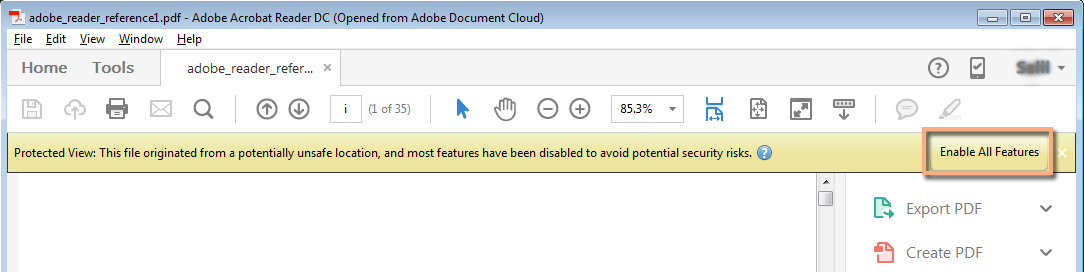
Right click the document in the browser and choose Document Properties Click the Advanced tab When Protected View is enabled the status says Protected Mode On If you trust the PDF and where it came from click Enable All Features The PDF is added to your list of privileged locations and is trusted from then on

Adobe reader cannot open in protected mode due to an incompatability with your system configuration

Enable enhanced security Acrobat and Acrobat Reader enable enhanced security by default Adobe recommends that you enable enhanced security if it isn t already enabled and that you bypass restrictions only for trusted content Choose Preferences From the Categories on the left select Security Enhanced

Protected Mode is a key Reader and Acrobat security feature and should be enabled to protect user systems and data Note While Reader has supported Protected Mode since 10 x Protected Mode is gradually being extended via a phased rollout to Acrobat s DC Continuous track beginning June 2020 Classic track versions will likely see similar support later this year
Adobe Acrobat DC on Windows now has a Protected Mode here s how to enable it and how it helps protect our users from digital threats 1 Open Adobe Reader or Acrobat 2 Click on Edit in the top menu bar and select Preferences 3 In the left sidebar click on Security Enhanced 4 Under Privileged Locations click on Add Folder to add a folder that you trust and want to exclude from Protected Mode 5
Protected Mode be enabled the default in Acrobat Reader additionally is done to run transparently in the background whereas protecting your apparatus and product Adobe reader cannot open in protected mode due to an incompatability with your verfahren configuration