What Is Mid Function In Excel Mid Formula In Excel Example How To Use MID Function ExcelNotes How To Use MID Function In Excel YouTube MID Function Microsoft Excel YouTube MID Function In Excel Extract Text From Middle Excel Unlocked The function will return a specified number of characters from the middle of a given text string While doing financial analysis the MID function can be useful if we wish to extract characters from the middle of a specific text Generally it is used by combining it with other functions such as VALUE SUM COUNT DATE DAY etc
The MID function allows you to extract text from the middle of a string Like other functions you use it by entering a formula in a cell that contains the function and it s parameters The following represents what a typical MID formula looks like MID A1 17 4 The formula s parameters break down as follows The first parameter The MID function in Excel is a formula that yields a certain number of characters from a long string of text This function consists of three inputs that you provide The first component is the cell that contains the initial text string The second and third components are the starting character and the number of characters you want to extract
MID Function In Excel Extract Text From Middle Excel Unlocked How To Use MID Function Microsoft Excel Excel Trivia Everything The Fabulous Find Mid Century Modern Furniture Showroom In Victoria How To Use Excel MID Function Formula Details And Video Examples AMORLINC Function Of Excel Depreciation Of As Asset Excel Unlocked Excel Right Left And Mid Functions How To Use IF Function In Excel Mahipal Dodia Shortcuts For The Undo Function In Excel Pixelated Works Rounding By Powers Of 10 In Excel Pixelated Works
What Is Mid Function In Excel
 What Is Mid Function In Excel
https://cdn.ablebits.com/_img-blog/excel-mid/mid-formula-between-chars.png
LastWord Mid MyString 14 4 Returns Demo MidWords Mid MyString 5 Returns Function Demo The second example use MidB and a user defined function MidMbcs to also return characters from string The difference here is that the input string is ANSI and the length is in bytes Function MidMbcs ByVal str as String start length
Pre-crafted templates provide a time-saving option for developing a diverse range of documents and files. These pre-designed formats and layouts can be used for various individual and expert tasks, consisting of resumes, invitations, flyers, newsletters, reports, discussions, and more, simplifying the material creation process.
What Is Mid Function In Excel

Using Excel s MID Function Deskbright
How To Use MID Function Microsoft Excel Excel Trivia Everything

The Fabulous Find Mid Century Modern Furniture Showroom In Victoria

How To Use Excel MID Function Formula Details And Video Examples

Excel Right Left And Mid Functions
How To Use IF Function In Excel Mahipal Dodia
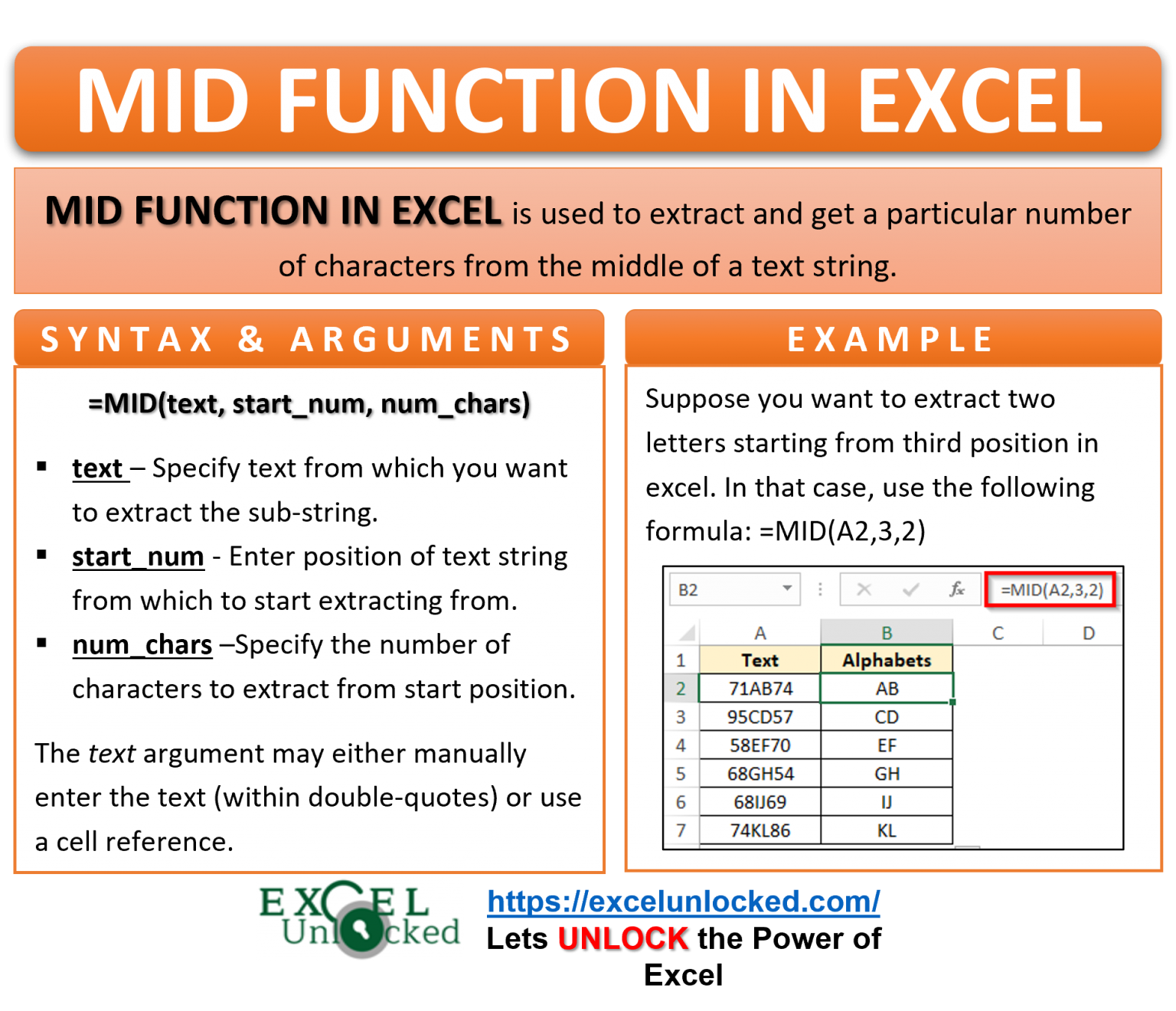
MID text start num num chars MIDB text start num num bytes The MID and MIDB function syntax has the following arguments Text Required The text string containing the characters you want to extract Start num Required The position of the first character you want to extract in text The first character in text has start num 1 and so on

For Example MID Bangalore is the Capital of Karnataka 18 7 In this formula the MID function will return from the 18 th character it will return 7 characters i e Capital The MID function is also available in VBA too We will discuss that at the end of this article
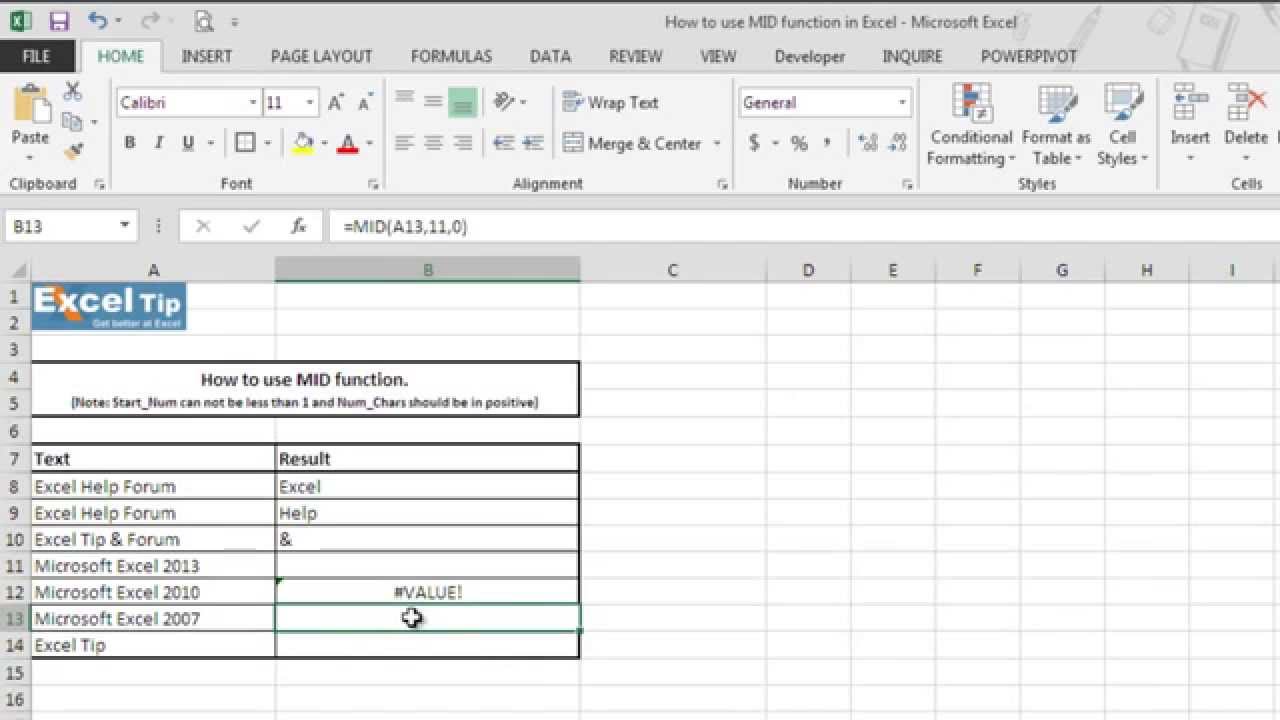
MID text start num num chars Text is the text string containing the characters you want to extract Start num is the position of the first character you want to extract in text The first character in text has start num 1 and so on Num chars specifies the number of characters you want MID to return from text

Excel MID function syntax and basic uses Generally speaking the MID function in Excel is designed to pull a substring from the middle of the original text string Technically speaking the MID function returns the specified number of characters starting at the position you specify The Excel MID function has the following arguments
Steps Firstly use the following formula in cell C5 MID B5 1 FIND B5 Here cell B5 represents the first cell of the Name column After that press ENTER As a result the MID function will return the First Name as shown in the following image Finally drag the Fill Handle to get the remaining outputs 2
The MID function in Excel accepts three arguments and all three arguments are mandatory Arguments text This holds the value of the input text string A cell reference containing the input string or text enclosed in double quotes are both acceptable input values start num The position of the first character we want to extract It must be an integer formula which indicates the Learn how to use the MID function in Microsoft Excel This tutorial demonstrates how to use Excel MID with our easy to follow examples and takes you step by
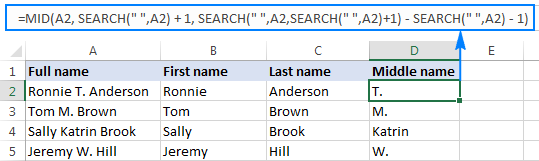
For First Name here we have used the MID formula in Excel MID B17 1 SEARCH B17 1 in this MID Formula example the MID function searches the string at B17 and starts the substring from the first character here search function fetches the location of space and return the integer value In the end both functions filter out the