What Is 2 Gmt Time Longines Spirit Zulu Time GMT Hands On Review Video Price Horology 101 How To Use A GMT Watch GearMoose Time Zones How To Use A Rolex Gmt Master Ii Packmechgroup How To Use The GMT Master II Reading Multiple Time Zones YouTube May 18 2022 nbsp 0183 32 Urgent Issue Storage Sense Dehydration Settings not working We have set the dehydration settings for any OneDrive sync d folders via Local Group Policy to 14 days so if they sync a library in the future it s set to 14 days This is supposed to be an automated service that moves content to online only if not quot opened for more than quot 14 days
Jun 22 2025 nbsp 0183 32 5 Use Storage Sense Go to Settings gt System gt Storage Turn on Storage Sense to automatically free up space by deleting temporary files 6 Disable or Reduce System Restore Points if needed Be cautious this will limit your ability to revert system changes 7 Resize Partitions Advanced Mar 14 2024 nbsp 0183 32 This tutorial will show you how to manually run Storage Sense on demand in Windows 11 Storage Sense can automatically free up drive space for you by getting rid of items that you don t need like temporary files and items in your Recycle Bin If Storage Sense is turned on you can select to
How To Use The GMT Master II Reading Multiple Time Zones YouTube Omega Seamaster Aqua Terra GMT Worldtimer 220 12 43 22 03 001 Topper Idea For Today I Wonder 5 How Does Time Differ Around The World Charise In India Half Hour Time Zone Difference GMT Zulu UTC Local Time Converter How To Use Your GMT Watch Set For Three Time Zones YouTube How To Read GMT Master II 24 Hour Hand Watch Chest Blog What Is GMT In Geography Quora The Course Of The GMT Delma Explains The GMT Watch
What Is 2 Gmt Time
 What Is 2 Gmt Time
https://monochrome-watches.com/wp-content/uploads/2022/03/Longines-Spirit-Zulu-Time-GMT-Watch-Pilot-Review-Video-8.jpg
Dec 5 2022 nbsp 0183 32 To do this you can use Group Policy to configure the quot Configure Storage Sense schedule quot setting under quot Computer Configuration Administrative Templates System Storage Sense quot As for your second question about OneDrive with FSLogix profiles using Storage Sense there is not currently a Microsoft supported solution for this specific scenario
Templates are pre-designed documents or files that can be utilized for numerous functions. They can conserve effort and time by providing a ready-made format and layout for producing different sort of material. Templates can be utilized for individual or expert jobs, such as resumes, invites, flyers, newsletters, reports, presentations, and more.
What Is 2 Gmt Time
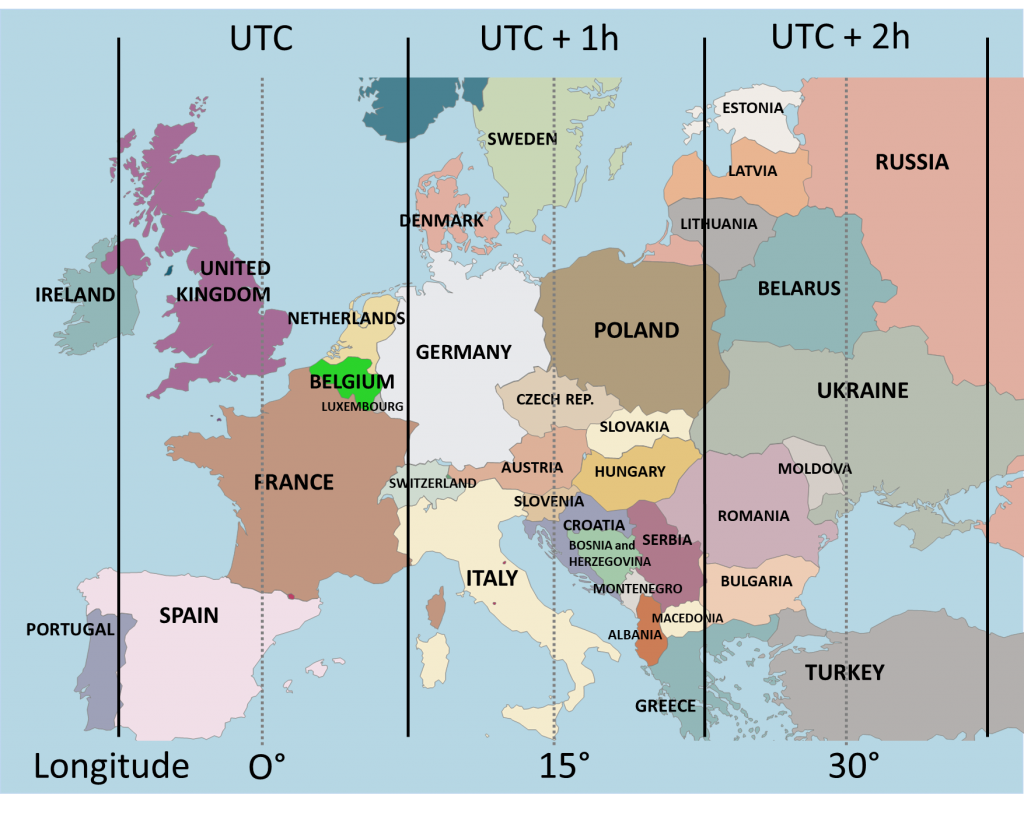
The Belgian Timezone And The Daylight Time Saving System Royal

Omega Seamaster Aqua Terra GMT Worldtimer 220 12 43 22 03 001 Topper

Idea For Today I Wonder 5 How Does Time Differ Around The World

Charise In India Half Hour Time Zone Difference

How To Use Your GMT Watch Set For Three Time Zones YouTube

How To Read GMT Master II 24 Hour Hand Watch Chest Blog

Sep 7 2021 nbsp 0183 32 This tutorial will show you how to enable or disable Storage Sense to automatically free up system drive space for all users in Windows 10 and Windows11 Storage Sense can automatically free up drive space for you by getting rid of items that you don t need like temporary files and items in

Apr 10 2019 nbsp 0183 32 What s new in Storage Sense Starting with Windows 10 Storage Sense has embarked on a path to keep your storage optimized We re making continuous improvements in every update In the next Windows 10 feature update build 17720 and later we re adding a new capability and making a few changes to Storage Sense s behavior

Jul 21 2025 nbsp 0183 32 This will increase a lot of free storage on your computer Use Storage Sense Automatic Cleaning Open Settings Windows key I Go to System gt Storage Turn on quot Storage Sense quot Click quot Storage Sense quot to configure Set it to run automatically daily weekly or monthly Choose when to delete temporary files and files in Recycle Bin

Jun 24 2024 nbsp 0183 32 This tutorial will show you how to enable or disable allow Storage Sense to cleanup temporary files for all users in Windows 10 and Windows 11 Storage Sense can automatically free up drive space for you by getting rid of items that you don t need like temporary files and items in your Recycle Bin Storage Sense is off by default

Here are the registry locations for the storage sense policy settings You can use PowerShell to set these like you would other registry settings Allow Storage Sense Allow Storage Sense Temporary Files cleanup Configure Storage Sense cadence Configure Storage Sense Cloud Content dehydration threshold Configure Storage Sense Recycle Bin cleanup
[desc-11] [desc-12]
[desc-13]