What Does Reset Home Screen Layout Do Reset Home Screen Layout To Default Android 2021 resethomescreen YouTube What Does Reset Encrypted Data Mean On Iphone Gallerybetta How To Reset The Home Screen Layout On An IPhone 7 Solve Your Tech Zailzeorth s Blog How To Reset Your IPhone Home Screen Layout In IOS 16 Newsroomaple Clean Up Your IPhone Apps How To Reset The Home Screen Layout Web Apr 29 2023 nbsp 0183 32 Resetting your Home Screen restores the default Home Screen layout that your current version of iOS came with It will only remove your custom folders and any custom Home Screen widgets Instead of your custom layout your iPhone will rearrange all installed apps on your Home screen alphabetically after the default apps that Apple
Web Feb 12 2018 nbsp 0183 32 Here s how you can reset your iPhone home screen and automatically sort your apps with a single tap When you first unbox a new iPhone you re greeted with Apple s clean default home screen layout As you install apps and move things around over time your home screen s can become quite cluttered Web Aug 20 2021 nbsp 0183 32 You can reset your home screen layout back to factory default settings without losing any of your current apps to reorganize or fix home screen bugs
Clean Up Your IPhone Apps How To Reset The Home Screen Layout Will Reset Home Screen Layout Delete My Apps Beachweddingoutfitguestmen How To Reset Home Screen Layout On Apple Watch Reset Home Screen Icons To Default Settings On IPhone IPad Reset Home Screen Layout Without Affecting Folders MacRumors Forums Reset Your Home Screen App Icon Layout YouTube How To Reset The Home Screen Layout On IPhone The IPhone FAQ IOS 13 IOS 14 How To Reset Home Screen Layout On IPhone IPad YouTube Clean Up Your IPhone Apps How To Reset The Home Screen Layout
What Does Reset Home Screen Layout Do
 What Does Reset Home Screen Layout Do
https://i.ytimg.com/vi/jPmgHW9nRyI/maxresdefault.jpg
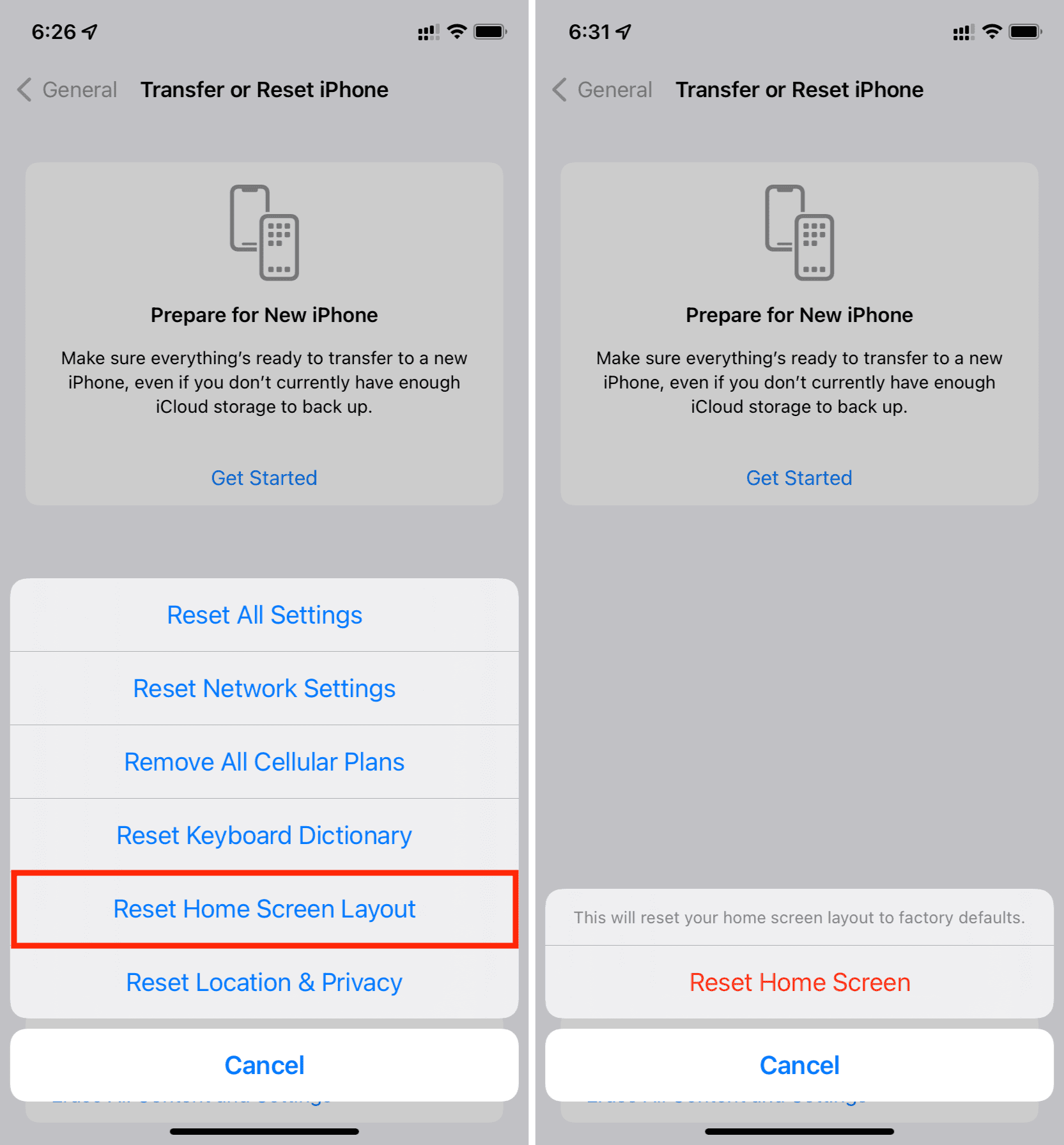
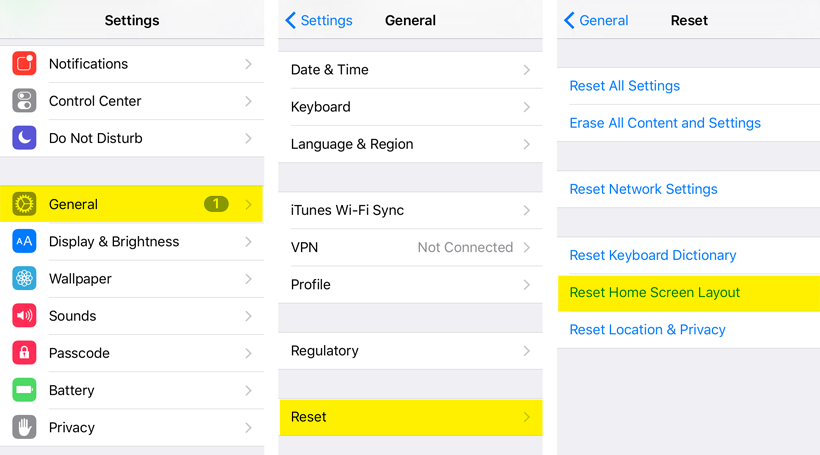
Web Go to Settings gt General gt Transfer or Reset iPhone Tap Reset tap Reset Home Screen Layout then tap Reset Home Screen Any folders you ve created are removed and apps you ve downloaded are arranged alphabetically after apps that came with your iPhone
Templates are pre-designed documents or files that can be used for different functions. They can conserve effort and time by providing a ready-made format and layout for creating different sort of material. Templates can be utilized for personal or expert projects, such as resumes, invitations, flyers, newsletters, reports, presentations, and more.
What Does Reset Home Screen Layout Do

Reset home screen layout iphone13 general TheCellGuide
Will Reset Home Screen Layout Delete My Apps Beachweddingoutfitguestmen

How To Reset Home Screen Layout On Apple Watch

Reset Home Screen Icons To Default Settings On IPhone IPad

Reset Your Home Screen App Icon Layout YouTube
How To Reset The Home Screen Layout On IPhone The IPhone FAQ

Web Nov 26 2022 nbsp 0183 32 What Happens When You Reset Home Screen Layout on iPhone Apps Layout The first thing that you will notice is your default iPhone Home Screen That is all the pre installed Widgets Any manually added widgets will be removed from the home screens Only the widgets that were present on the

Web Jun 19 2023 nbsp 0183 32 Similarly the iPhone has a Reset Home Screen Layout feature that lets you restore your iPhone Home Screen to its default What happens when you reset your iPhone s Home Screen When you reset your iPhone s Home Screen it restores the Home Screen layout to its original arrangement and layout when you purchased your iPhone

Web General If an app isn t available on your Home screen swipe left to access the App Library Tap Transfer or Reset iPhone then tap Reset Tap Reset Home Screen Layout Tap Reset Home Screen to confirm Share Connect with us on Messenger Visit Community 24 7 automated phone system call 611 from your mobile Chat with us

Web Sep 23 2022 nbsp 0183 32 Tap the Reset option at the bottom of the screen Select the Reset Home Screen Layout option from the list Tap on Reset Home Screen to confirm your selection That s it The home screen layout will now reset to factory defaults just like it was when you bought the iPhone

Web Jan 12 2014 nbsp 0183 32 Reset the iOS Home Screen to the Default Layout Open up the Settings panel go to General and then scroll down to the bottom to find the Reset item Inside of that screen you ll want to use the Reset Home Screen Layout option make sure not to use the other options
[desc-11] [desc-12]
[desc-13]