Virtualbox Nat Network Settings How to VirtualBox NAT Network Mode 2021 VirtualBox Add NAT Network YouTube Networking How VirtualBox NAT Network Is One direction Only Unix Networking Virtualbox NAT Network Not Showing In Linux Unix Linux Modificar El Rango Del DHCP De Virtualbox On The Dock In the VM Settings window click Network and select the Adapter 1 tab From the Attached To drop down select NAT Network and then from the Name drop down select the newly created NAT Network
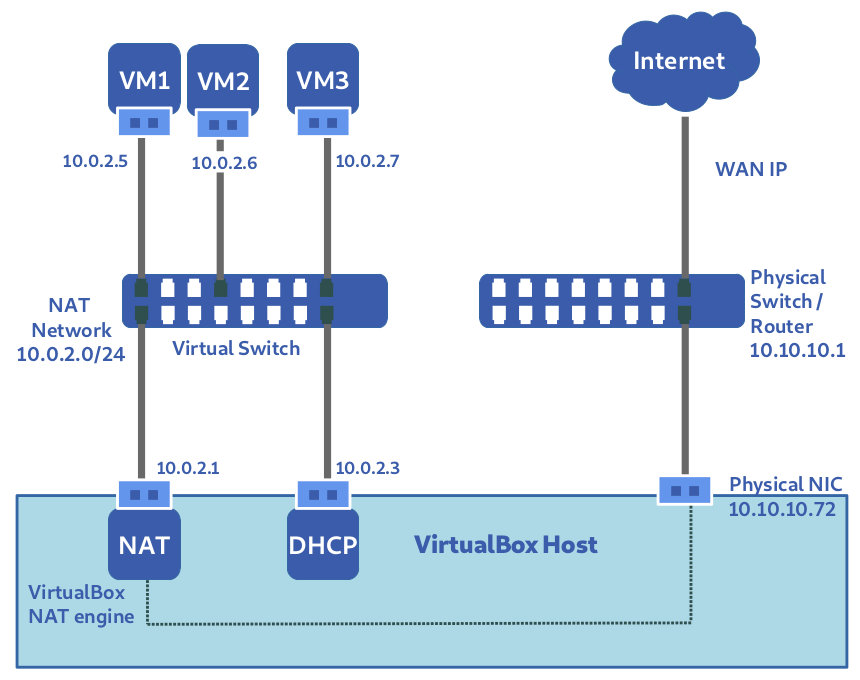
The following is an example command to create a NAT network VBoxManage natnetwork add netname natnet1 network 192 168 15 24 enable Here natnet1 is the name of the internal network to be used and 192 168 15 24 is the network address and mask of the NAT service interface By default in this static configuration the gateway will be The solution to this issue is to create a NAT network that all your relevant VMs will share This needs to be done as a first separate step through the Preferences menu in the VirtualBox main interface Simply add a network and then tweak its settings While the wizard is simple it s super powerful
Modificar El Rango Del DHCP De Virtualbox On The Dock VirtualBox SXWZ Machine Learning Corner Configure VirtualBox NAT As Network Adapter Red NAT En VirtualBox YouTube Understanding Virtualbox Network Interfaces Bots How To Emulate A Network Using VirtualBox Open Source Routing And How to VirtualBox NAT Network Mode 2021 Networking VirtualBox VM Cannot Connect To Internet Through NAT VirtualBox NAT Settings How To Configure So They Don t Have Same IPs
Virtualbox Nat Network Settings
 Virtualbox Nat Network Settings
https://1.bp.blogspot.com/-y1A4aSHGmFw/YDeTCNEbgLI/AAAAAAAADcw/7gQfTo5F2yI3l4I6hsMOF2y22e11F_TPACNcBGAsYHQ/s0/vbox_diagram_2_NAT_network_300dpi_860_680.jpg
VBoxManage natnetwork modify command modifies the settings of an existing internal network interface Disables the NAT network service Enables the NAT network service Enables or disables the DHCP server that you specify by using the Enables or disables IPv6 By default IPv6 is disabled and IPv4 is enabled
Templates are pre-designed documents or files that can be used for various functions. They can save effort and time by supplying a ready-made format and layout for creating various type of content. Templates can be used for individual or professional tasks, such as resumes, invitations, flyers, newsletters, reports, discussions, and more.
Virtualbox Nat Network Settings

Virtualbox Network Settings Interface Metric Dadspecialist

VirtualBox SXWZ
Machine Learning Corner Configure VirtualBox NAT As Network Adapter

Red NAT En VirtualBox YouTube

How To Emulate A Network Using VirtualBox Open Source Routing And

How to VirtualBox NAT Network Mode 2021

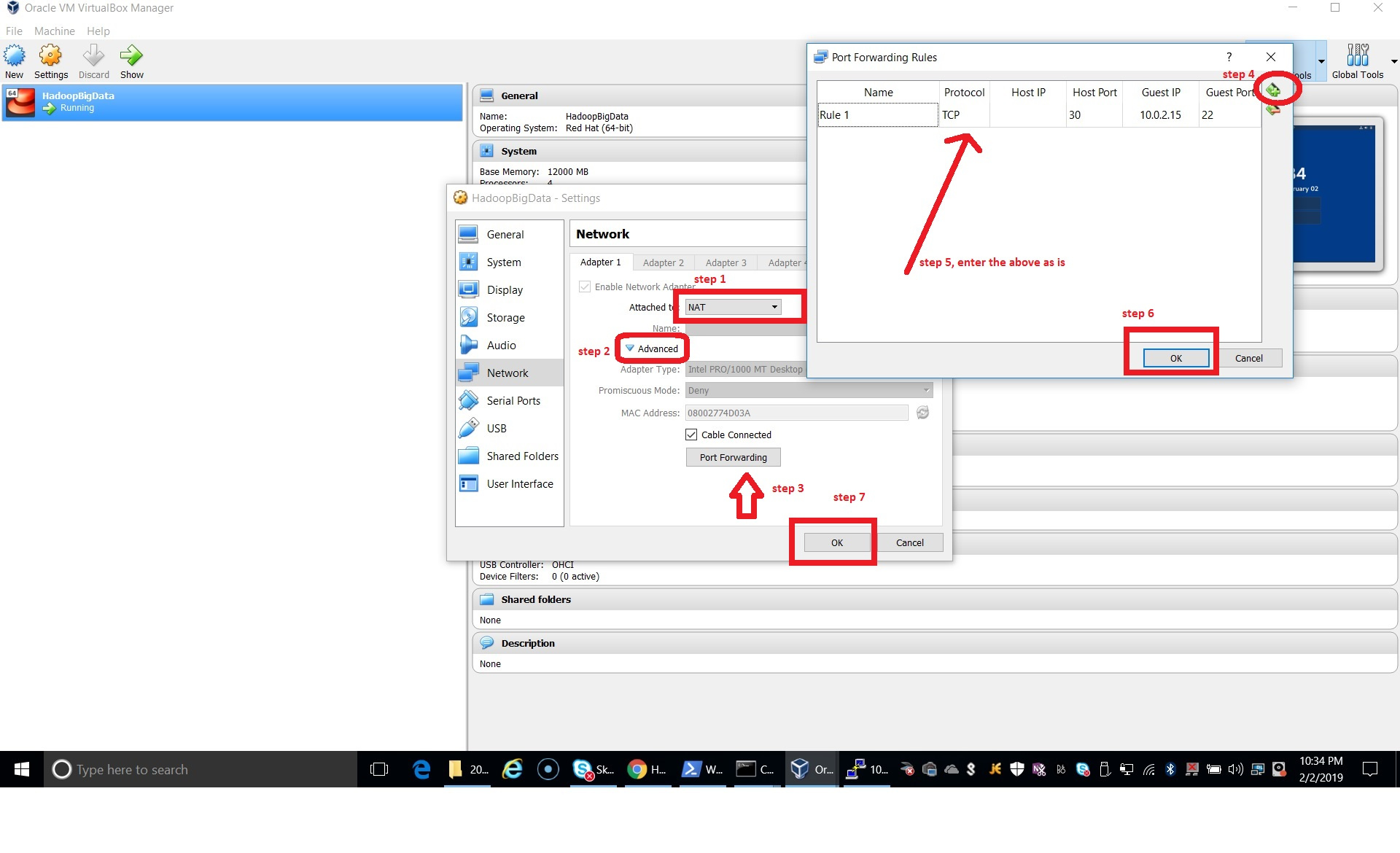
VirtualBox network adapter settings can be accessed in the virtual machine settings select your VM hit Settings and go to the Network section in the VM settings window There you should see four adapter tabs One virtual network adapter is enabled by default after virtual machine creation

To achieve what you need assign each VM the bridged adapter that is bridged to your current network adapter on your host this way all VMs will be able to communicate with your host and outside of your local network

Open VirtualBox Preferences File Preferences and go to Network Tab Click on the icon on right side Adds new NAT network It will create a new NAT Network without asking any questions You can modify the Network Name Network CIDR etc by clicking modify button or double click the NAT Network

Network Address Translation NAT is the simplest way of accessing an external network from a virtual machine Usually it does not require any configuration on the host network and guest system For this reason it is the default networking mode in Oracle VM VirtualBox
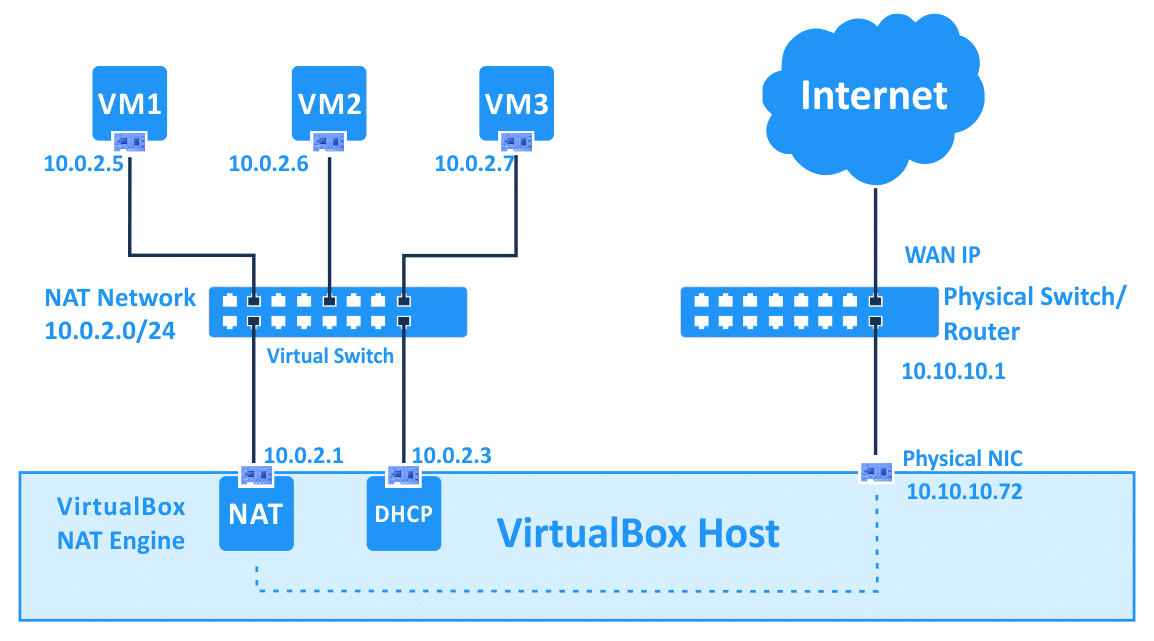
Go to File Tools Network Manager Click the Nat Networks tab If there is no NAT network then right click to create a new NAT Network here You can use the default 10 0 2 0 24 IP network if you wish and the task is complete You will need to configure the client VM s network setting to use this new NAT network Old Way prior to Version 7
Internal networking Host only networking NAT with Port forwarding The choice of NIC type comes down to whether the guest has drivers for that NIC VirtualBox suggests a NIC based on the guest OS type that you specify during creation of the vm and you rarely need to modify this NAT Network Bridged Host Only Adapter Internal Simulated Network When creating a virtual machine VM you have a lot of options regarding networking You can set up your VM to act as just another computer on your network secure it behind an internal router and firewall or even simulate a fully custom real world network
In this video we will be diving into the world of VirtualBox and exploring the various network settings available to you We will be covering NAT Internal