Uninstall Teamviewer Msi Command Line Run Msi From Command Line Powenstyle Start Teamviewer From Command Line Mac Rrsexi Execute Msi From Command Line Lockqtampa MSI Deployment Does Not Work With CustomConfigID AND APIToken Panu Saukko On Twitter The MEMCM Client Installation Is Immediately There s no TeamViewer item in Start Control Panel Uninstall a program list When I hit Start type TeamViewer right click it on search results list and select Uninstall from context menu I am redirected to the above list in Control Panel where there is no corresponding item
Windows XP From the Start Menu select Control Panel Click the Add or Remove Programs icon Select the program you wish to remove and click on the Remove or Change Remove button Follow the prompts to finish the uninstallation of the software Windows 95 98 Me NT 2000 and XP in Classic View 71 msiexec is command prompt software that installs an MSI program But I have found that you can install an MSI file from the command line by just typing in the name of the MSI file on the command line But in order to uninstall the MSI file it seems you have to call the msiexec program and give it a x or uninstall
Panu Saukko On Twitter The MEMCM Client Installation Is Immediately Remove TeamViewer From Mac Archives Tutorials For You To Uninstall Monat Loyalit t Mechanisch Msi Paket Anpassen Ich Werde Stark Sein Uninstall Teamviewer Command Line Mac Namebright How To Install Teamviewer On Ubuntu 20 04 Via Command Line Cmhy City Uninstall Teamviewer Command Line Mac Namebright Msi Administrative Install Browntribe Guides To Uninstall TeamViewer From PC With Uninstaller YouTube
Uninstall Teamviewer Msi Command Line
 Uninstall Teamviewer Msi Command Line
http://powenstyle.weebly.com/uploads/1/3/3/7/133749158/409378884_orig.jpg
4 Uninstalling an MSI from the command line using the msiexec exe command If you have access to the original MSI then you can use the msiexec x path to the MSI file command to uninstall your application Windows Installer technology uses msiexec exe for both the installation and uninstallation of MSI packages
Templates are pre-designed files or files that can be utilized for different purposes. They can save effort and time by offering a ready-made format and layout for producing various kinds of content. Templates can be used for personal or expert projects, such as resumes, invitations, leaflets, newsletters, reports, discussions, and more.
Uninstall Teamviewer Msi Command Line

Symantec Endpoint Protection 14 Silent Install Bustergasw
Remove TeamViewer From Mac Archives Tutorials For You To Uninstall

Monat Loyalit t Mechanisch Msi Paket Anpassen Ich Werde Stark Sein
Uninstall Teamviewer Command Line Mac Namebright

Cmhy City
Uninstall Teamviewer Command Line Mac Namebright

It s not complete uninstall TeamViewer Host MSI Package Pond Posts 8 May 2017 HI Folks I uninstall TeamViewer Host MSI Package but found that Teamviewer key still appear in HKLM Software Wow3264 TeamViewer How to complete uninstall Respectfully Pond Tagged Management Console MSI Welcome It looks like you re new here
How to use Command line parameters Parameters with and without value Note Some parameters are only available with TeamViewer Classic version 13 2 There are two types of parameters with value and without value Example for a parameter without value TeamViewer exe noInstallation Example for a parameter with value

Nov 14th 2013 at 9 13 AM OK so this is a challenge It looks like TV doesn t have an unattended uninstall setup No luck finding anything on their website either The default uninstall string runs a GUI uninstall program But I found an undocumented command line switch at this website Unattended installation of TeamViewer http
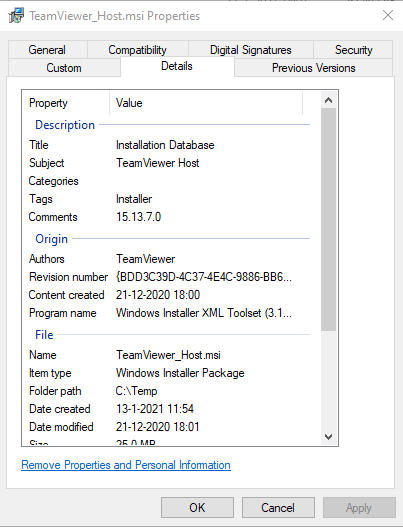
If teamviewer used a MSI installer you can simply copy the built in package MSI Uninstaller Firefox 27 0 and change it to uninstall teamviewer Otherwise I think what MD2Tech posted still works No mi instalaci n no fue MSI

English TeamViewer Classic can be uninstalled from a Windows PC like any other application Please see below for specific instructions on the uninstallation process This article applies to all TeamViewer Classic users using Windows OS Basic Uninstall Instructions 1 Locate the TeamViewer icon in the system tray
11 1K subscribers Subscribe 1K views 3 months ago TeamViewer Training Uninstall TeamViewer exe on a remote computer can be sometimes challenging With this video you will be able to At the Remote Background command prompt net stop TeamViewer programfiles x86 TeamViewer uninstall exe S That returns immediately Give it a minute and make sure the TeamViewer folder is empty Then install the previous version C Install TeamViewer Setup exe S
It sounds like you need a commercial PRO version of the Revo Uninstaller for forced uninstall and possibly a PowerShell script The TeamViewer from around 100 Clients over Network would certainly seem to stretch the free for non commercial use aspect of the Team Viewer license but you may get more focussed attention to your problem by posting at the TeamViewer support site