Uninstall Network Adapter Via Powershell Uninstall Network Adapter Windows 10 Or 11 Device Health Services Uninstall Signal Site Gallery Of Photos Sort Windows Network Adapter By PCI Slot Via PowerShell Windows 7 IT UNINSTALL THE NETWORK ADAPTER DRIVER AND RESTART WINDOWS 10 YouTube Web Sep 19 2021 nbsp 0183 32 Open File Explorer Copy and paste Control Panel Network and Internet Network Connections into the File Explorer address bar and press Enter Right click the network adapter you want to remove and select Delete The network adapter will uninstall and you ve removed it from your system
Web Mar 21 2022 nbsp 0183 32 In Windows 10 20H1 or newer you can call pnputil exe to do this via the remove device parameter but that s about it The delete driver parameter was available from version 1607 but I ve had mixed results in trying to use this plus it deletes the driver as well which may not be what he s after Web The Disable NetAdapter cmdlet disables a network adapter A network adapter must be enabled to connect to a network This cmdlet causes loss of network connectivity of the specified network adapter Do not disable the network adapter being used to manage a remote computer
UNINSTALL THE NETWORK ADAPTER DRIVER AND RESTART WINDOWS 10 YouTube How To Uninstall Your Network Adapter YouTube Is Network Adapter Not Working On Windows 11 10 Here Are Fixes In Configuring Network Adapter Settings With PowerShell IP Address DNS FIX Windows 10 Can t Connect To This Network Error Network Adapters Uninstall Drivers How To Uninstall Network Driver Videosfecol Top 6 Ways To Fix Windows Could Not Find A Driver For Your Network How To Fix Unable To Install GeeGee Launcher From PC
Uninstall Network Adapter Via Powershell

https://cdn.filestackcontent.com/HjnSe3uQRa25Oz1YUODE
Web The Remove VMNetworkAdapter cmdlet removes one or more virtual network adapters from a virtual machine Examples Example 1 PS C gt Remove VMNetworkAdapter VMName Redmond VMNetworkAdapterName Redmond NIC1 This example removes network adapter Redmond NIC1 from a virtual machine named Redmond Parameters
Pre-crafted templates provide a time-saving option for creating a diverse series of documents and files. These pre-designed formats and designs can be utilized for numerous personal and expert jobs, including resumes, invitations, leaflets, newsletters, reports, discussions, and more, improving the content development process.
Uninstall Network Adapter Via Powershell
Enable Or Disable Network Adapter Via PowerShell YouTube

How To Uninstall Your Network Adapter YouTube

Is Network Adapter Not Working On Windows 11 10 Here Are Fixes In
Configuring Network Adapter Settings With PowerShell IP Address DNS
Network Adapters Uninstall Drivers

How To Uninstall Network Driver Videosfecol

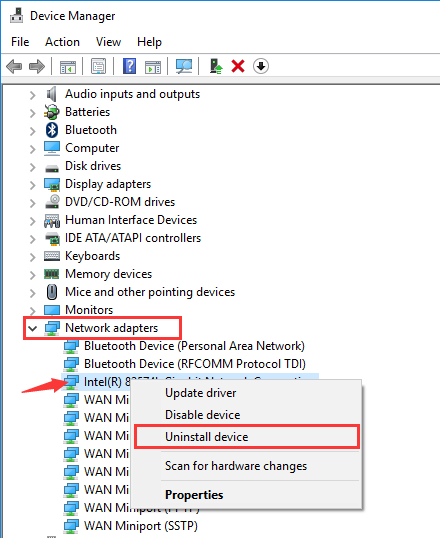
Web Sep 4 2019 nbsp 0183 32 Steps Open Device Manager from Control Panel Select Show hidden devices from View menu Expand Network adapters Find hidden adapters Manually these hidden adapters can be uninstall by below steps Right click on hidden adapter Click on uninstall Click on Ok button How to uninstall these adapters using

Web Apr 22 2020 nbsp 0183 32 I need to uninstall install the protocol list in the nic card network properties list through command or code I tried the below command it s list the network properties list only Get NetAdapterBinding Name quot MyAdapter quot AllBindings But my scenario is uninstall install the protocols

Web Nov 23 2017 nbsp 0183 32 13 Answers Sorted by 28 You can use WMI from within PowerShell to accomplish this Assuming there is a network adapter who s device name has Wireless in it the series of commands might look something like the following

Web Jun 8 2023 nbsp 0183 32 How to Remove Hidden Non Present Network Adapters with PowerShell and CMD Remove Network Adapter Settings from the Registry The IP Address is Already Assigned to Another Network Adapter The main problem with hidden network adapters is that you cannot assign an IP address of your old network adapter to a new

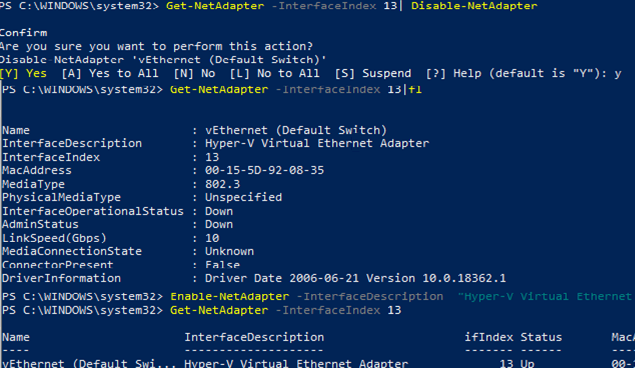
Web Mar 25 2015 nbsp 0183 32 Disabling a network adapter You can disable a specific network adapter or even all network adapters using Windows PowerShell For example the following command disables the adapter named Ethernet 2 with no confirmation prompt displayed PS C gt Disable NetAdapter Name quot Ethernet 2 quot Confirm false
Web Nov 26 2022 nbsp 0183 32 AFAIK Pnputil doesn t support the uninstall of devices only drivers Steps Open Device Manager from Control Panel Select Show hidden devices from View menu Expand Network adapters vmxnet3 network adapter Right click on adapter Click on uninstall Click on Ok button Web Jan 13 2014 nbsp 0183 32 Using Devcon Before Windows Vista and Windows Server 2008 when I needed to enable or disable a network adapter I would actually use Devcon Devcon is a command line tool that provides the ability to enable and disable various hardware devices It is billed as a command line device manager
Web Mar 24 2023 nbsp 0183 32 PowerShell Change Adapter from Static IP Address to DHCP To configure your computer to obtain a dynamic IP address for the network adapter from the DHCP server run this command Set NetIPInterface InterfaceAlias Ethernet0 Dhcp Enabled Clear the DNS server settings Set DnsClientServerAddress InterfaceAlias Ethernet0