Ubuntu Set Time Ntp Command Line Configure NTP Client Linux Configure NTP Client Linux Puppy Linux Ubuntu IBM I SNTP Automatic Time Adjustment PowerWire eu How To Check System s Current NTP Configuration Web sudo apt get install ntp Then check if ntp is running with sudo service ntp status If it s not running you can simply type sudo service ntp start Then to update the time sudo ntpdate u time nist gov time nist gov is not the only one of course
Web Dec 16 2020 nbsp 0183 32 Run the following command to do so sudo timedatectl set ntp off Step 4 Install NTP on client machine As you have seen form the output of ntpdate command that time difference is very less so we can now configure ntp conf on the client machine to automatically sync it with the NTP server First you will need to install NTP on the client Web Feb 20 2020 nbsp 0183 32 NTP which stands for Network Time Protocol is a TCP IP protocol for synchronizing time over a network By default Ubuntu 18 04 uses systemd s timesyncd service for time synchronization This tutorial will show you how to check whether time synchronization works on your Ubuntu 18 04 server
How To Check System s Current NTP Configuration How To Work With NTP Via PowerShell On Windows Systems Tutorial Lengkap Setting NTP Client Di Mikrotik Tutoring Content Verifying NTP Status With The Show Ntp Associations Command Contents PAN 9 0 Firewall Getting Started Part 2 Pin By TecMint Linux Howto s Guide On Linux In 2020 Linux System How To Sync The Ubuntu System Clock GUI TimeDateCtl NTP Ubuntu Ve Debian in NTP Network Time Protocol Kurulumu Netkolik Start Linux Mail Server Web Hosting Host Unlimited Websites For FREE
Ubuntu Set Time Ntp Command Line
 Ubuntu Set Time Ntp Command Line
https://geek-university.com/wp-content/images/linux/ntpq_p_command_example.jpg
Web Dec 4 2022 nbsp 0183 32 If you want to synchronize the system time with external time servers use the command below sudo timedatectl set ntp on Example 3 Or if you want to turn this synchronization off sudo timedatectl set ntp off Update System Time to a Specific Time Zone Example 1 To show the list of all time zones execute the next command
Templates are pre-designed documents or files that can be utilized for numerous functions. They can conserve effort and time by supplying a ready-made format and layout for developing various type of material. Templates can be utilized for personal or professional tasks, such as resumes, invitations, leaflets, newsletters, reports, discussions, and more.
Ubuntu Set Time Ntp Command Line
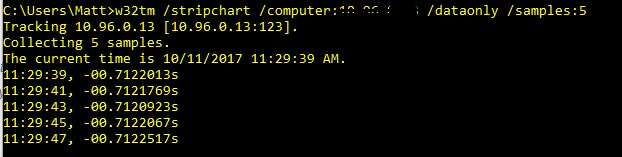
How To Check NTP Server Date Time Using Windows Command Line VCallaway
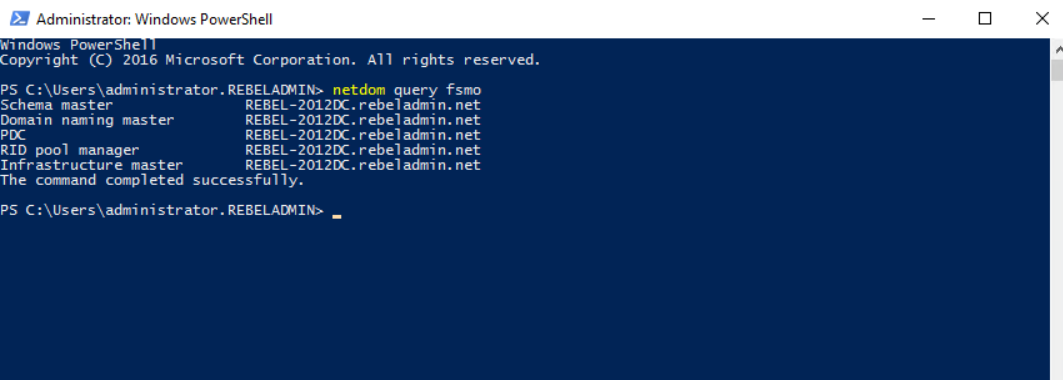
How To Work With NTP Via PowerShell On Windows Systems
Tutorial Lengkap Setting NTP Client Di Mikrotik Tutoring Content

Verifying NTP Status With The Show Ntp Associations Command Contents

Pin By TecMint Linux Howto s Guide On Linux In 2020 Linux System

How To Sync The Ubuntu System Clock GUI TimeDateCtl NTP
Web Dec 26 2006 nbsp 0183 32 All you have to do is install simple client called ntpdate ntpdate sets the local date and time by polling the Network Time Protocol NTP server s given as the server arguments to determine the correct time It must be run as root on the local host
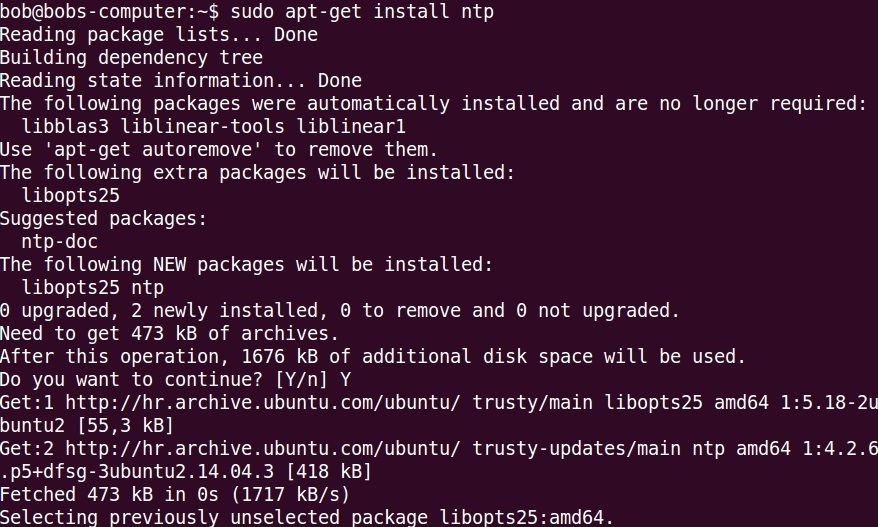
Web Apr 23 2020 nbsp 0183 32 In this article we learned about the National Time Protocol NTP and how to setup our own NTP server on Ubuntu 20 04 Focal Fossa We also saw how to configure a client machine or multiple machines as is usually the case to connect to the NTP server for time synchronization

Web Feb 14 2013 nbsp 0183 32 sntp S ntpserver somewhere With suitable privilege run as a command or from a cron 8 job sntp S ntpserver somewhere will set step the local clock from a synchronized specified server like the dep recated ntpdate 8 or rdate 8 commands It does work with any ntp time server

Web Sep 30 2015 nbsp 0183 32 Notice the period before the ss But beside the date command maybe you prefer the NTP quot solution quot network time protocol Serverguide NTP much easier to handle and more precise than setting the date by hand You can use a cronjob or the ntp daemon ntpd to update you time every x hours minutes

Web In recent versions of Ubuntu at least since 18 10 or possibly earlier but I m not sure this is taken care of by the systemd timesyncd service which is installed and enabled by default so there s no need to do anything special If the service is available and active running timedatectl status should tell you so
Web Install and configure NTP daemon Following are the steps to install and configure NTP daemon First synchronize the server s time with any Internet time server using the ntpdate command ntpdate s ntp ubuntu To install ntpd enter the following command in the terminal sudo apt get install ntp Web Jul 10 2019 nbsp 0183 32 Sync Time to NIST Atomic Clock Set the Ubuntu system to synchronize to the NIST atomic clock with the following command To adjust the time and date manually turn off NTP synchronizing with Note NTP stands for Network Time Protocol
Web Jul 24 2023 nbsp 0183 32 Quick Answer To configure NTP time synchronization on an Ubuntu server you need to install the NTP package configure the desired NTP server in the etc ntp conf file restart the NTP service verify the synchronization using the ntpq command and allow NTP traffic through the firewall Table of Contents What is NTP