Ubuntu Change Keyring Password Command Line Ubuntu How To Enter The Default Keyring Password Via The Command Line 3 Solutions YouTube WIZAMONY Natural Kiln Change Hand Drawn Blank Cover Bowl Hand Painted Crane Bowl Jingdezhen How To Change Root Password On Ubuntu 22 04 20 04 Change MySQL User Password Using Command Line Using Ubuntu Keyring Password Issue In Ubuntu Operating System Web Jul 6 2020 ubuntu nmcli openvpn vpn By storing passwords in the GNOME keyring they are protected and automatically unlocked when you log in Here is how to manage them via the command line Preliminaries I m using Ubuntu 20 04 with all relevant software for this post installed via apt Issue
Web Feb 24 2024 nbsp 0183 32 How to Change the Password of Keyring Some users might decide to keep this security feature as it is but they may find themselves unable to unlock their keyring using their account s password This problem arises when they ve recently changed their account s login password Web 6 Answers Sorted by 13 This can happen if your machine is configured to auto login You can work your way around this by setting a blank password for the keyring manager Follow this guide to do this This allows anyone using
Keyring Password Issue In Ubuntu Operating System Change Password On Ubuntu Easily Change Password Of Any User How Do I Change The Default Keyring Password Ask Ubuntu How To Change Keyring Password In Ubuntu 20 04 Ubuntu 18 04 Google Chrome Always Asks To Unlock Keyring After Login Ask Ubuntu How To Change Keyring Password In Ubuntu 20 04 Ubuntu 18 04 IBM WebSphere Application Server Installing Installation Manager IM V 1 8 By Using The Imcl How To Change Password On Ubuntu 18 04 Bionic Beaver Linux Linux Tutorials Learn Linux Pata Ubuntu Change User Password Command Line
Ubuntu Change Keyring Password Command Line
 Ubuntu Change Keyring Password Command Line
https://i.ytimg.com/vi/wTVSqrt2caY/maxresdefault.jpg
Web Oct 21 2011 nbsp 0183 32 To change the keyring password do the following Go to System gt Preferences gt Passwords and Encryption Keys which will display the following dialogue From here select Passwords Login gt right mouse click gt and select Change Password From here you can change the new password for the login keyring
Pre-crafted templates provide a time-saving solution for creating a diverse series of documents and files. These pre-designed formats and layouts can be used for different individual and expert tasks, consisting of resumes, invitations, flyers, newsletters, reports, presentations, and more, streamlining the material development procedure.
Ubuntu Change Keyring Password Command Line

How To Change Keyring Password In Ubuntu Linux Mint CYANOGEN MODS
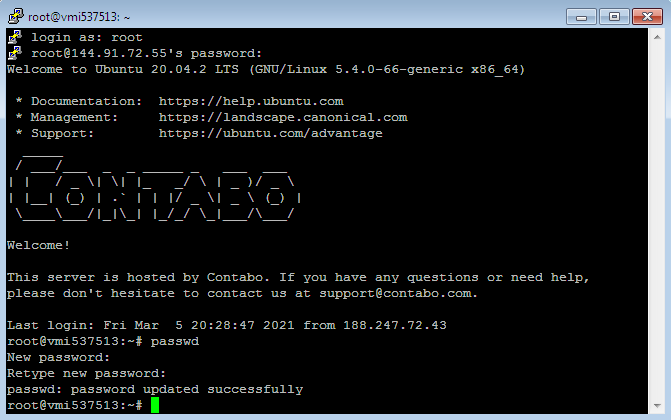
Change Password On Ubuntu Easily Change Password Of Any User

How Do I Change The Default Keyring Password Ask Ubuntu

How To Change Keyring Password In Ubuntu 20 04 Ubuntu 18 04

How To Change Keyring Password In Ubuntu 20 04 Ubuntu 18 04

IBM WebSphere Application Server Installing Installation Manager IM V 1 8 By Using The Imcl

Web Edit to make it look like this exec echo ENTER YOUR PASSWORD HERE PATH TO PAM KEYRING TOOL pam keyring tool keyring login u s exit 0 That s it This definitely works

Web Nov 20 2017 nbsp 0183 32 2 Answers Sorted by 19 I ve found the best solution to use the seahorse package which can handle changing the password of the keyring deleting the keyring creating new keyring an so on So if you have some derivative of Ubuntu like Lubuntu you should first install seahorse apt install seahorse

Web sudo chmod a x usr bin unlock keyring From then you can always just type unlock keyring and be prompted for a password Don t do this with the version that contains your password You can replace None with the name of your keyring e g session if you want to unlock one that isn t the default

Web Mar 28 2020 nbsp 0183 32 You can change the keyring password on your own You can export by unlocking the keyring first and import it on some other computer to get your manually saved passwords Change keyring password Suppose you changed your account password Now when you login your system tries to unlock the keyring automatically
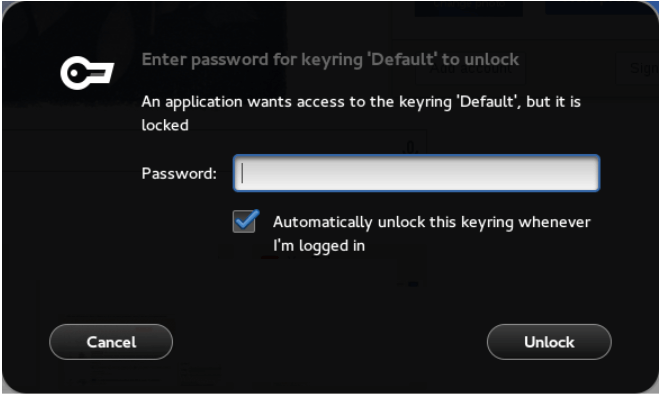
Web Aug 1 2020 nbsp 0183 32 For some use cases it can be handy to just remove the password on the keyring Therefore there s no need to unlock it On Ubuntu 22 04 search for seahorse and open Right click on Login under Passwords might need to do a few times didn t work at first In the context menu pick Change Password
Web 4 Answers Sorted by 45 You can use secret tools to store and retrieve the password from the keyring To store a new password secret tool store label Password for mydrive drive mydrive I let you check in the keyring how it appears To look it up this command can easily be inserted in your script Web Apr 26 2022 nbsp 0183 32 service username optional arguments h help show this help message and exit p KEYRING PATH keyring path KEYRING PATH Path to the keyring backend b KEYRING BACKEND keyring backend KEYRING BACKEND Name of the keyring backend list backends List keyring backends and exit
Web Sep 12 2022 nbsp 0183 32 1 Want to set blank password for Login keyring through command line and not through passwords and Keys Case of automatic login and don t need to be bothered by keyring pass popup Came across multiple docs using seahorse but I need to achieve using command line Secret tool isn t working for me Any help would be appreciated