Test If Winrm Is Enabled TIL Things Or Today I Learned Ansible Windows Jump Host For Windows Node What Is Ansible Understanding Ansible Fundamentals Study CCNP Cloudhouse WinRM Configuration Screenshot Showing The Server Certificate Web Apr 1 2021 nbsp 0183 32 Right click on the new GPO and click Edit Expand Computer Configuration gt Policies gt Administrative Templates gt Windows Components gt Windows Remote Management WinRM gt WinRM Service Find the setting Allow remote server management through WinRM and double click on it Select Enable
Web Feb 1 2020 nbsp 0183 32 Test WSMan should test the availability of Windows RM service but it only works if the WinRM works otherwise the computer is off or WinRM is not running it gives an error Test WSMan The client cannot connect to the destination specified in the request Verify that the service on the destination is running and is accepting requests Web Jul 25 2022 nbsp 0183 32 By default WinRM is enabled on Windows Server OS since Windows Server 2012 but not on Windows 10 operating system This means that you need to enable it on Windows 10 machines To enable WinRM on a Windows 10 machine open PowerShell and run the following cmdlet Enable PSRemoting force
Screenshot Showing The Server Certificate Peekaboo WinRM Windows Remote Management Checking Whether Windows Remote Management WinRM Is Started System Center 2016 Virtual What Is Windows Ws Masaauthority Verify WinRM 3 0 Service Is Installed Jocha Blog 4 Techniques To Troubleshooting WinRM Errors With VMM Screenshot Showing Thumbprint Information In The Certificate Learn About WinRM WinRS
Test If Winrm Is Enabled
 Test If Winrm Is Enabled
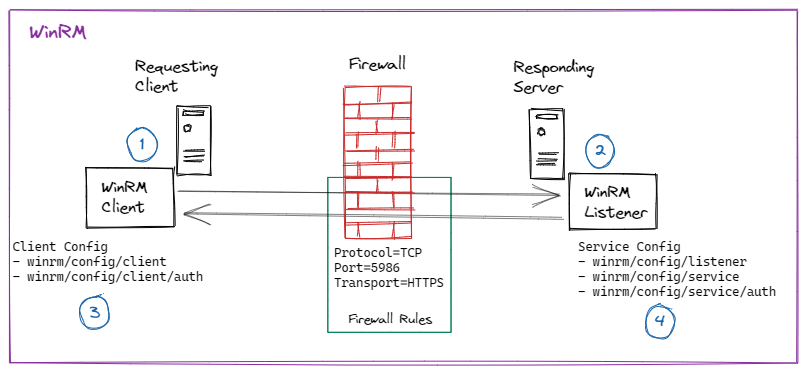
https://til.juliusgamanyi.com/assets/2022-06-23-setup-winrm/WinRM-Client-with-Server.png
Web Jan 6 2021 nbsp 0183 32 Tests whether the WinRM service is running on a local or remote computer See the Test WSMan cmdlet for examples and detailed information about the parameters SessionOption Defines a set of extended options for the WS Management session See the Connect WSMan cmdlet for examples and detailed information about the possible values
Templates are pre-designed documents or files that can be used for various functions. They can save time and effort by offering a ready-made format and layout for creating different kinds of content. Templates can be used for personal or expert tasks, such as resumes, invites, leaflets, newsletters, reports, presentations, and more.
Test If Winrm Is Enabled

Solved WinRM Cannot Complete The Operation Verify That 9to5Answer

Peekaboo
WinRM Windows Remote Management

Checking Whether Windows Remote Management WinRM Is Started System Center 2016 Virtual

Verify WinRM 3 0 Service Is Installed Jocha Blog

4 Techniques To Troubleshooting WinRM Errors With VMM
Web Dec 19 2022 nbsp 0183 32 Testing whether WinRM also known as WS Management or PSRemoting is enabled and responsive can be arduous There are several ways to check the configuration and whether it is contactable as below Powershell Test WSMan ComputerName test machine This will provide an output like this

Web Feb 8 2023 nbsp 0183 32 If the firewall profile is changed for any reason then run winrm quickconfig to enable the firewall exception for the new profile otherwise the exception might not be enabled To retrieve information about customizing a configuration type the following command at a command prompt
Web Oct 14 2014 nbsp 0183 32 Summary Learn how to easily use Windows PowerShell to check if WinRM is running on a remote computer How can I use Windows PowerShell to ensure that WinRM is running and configured on my three remote computers Create an array of computer names and pipe them to the Test WsMan cmdlet for example quot s1 quot quot s2 quot quot dc1 quot
Web Jan 30 2018 nbsp 0183 32 When you run the Test WSMan command on a local computer then you can see if PowerShell Remoting is enabled or not Of course you can run the command for another computer by using the ComputerName parameter Test WSMan
Web May 29 2012 nbsp 0183 32 Checks about WinRM service in remote machine I have this issue I have two computers in domain in network First Test OK Remoting to a computer in domain from a computer in domain COMPANY DOMAIN desmonitor is Domain User
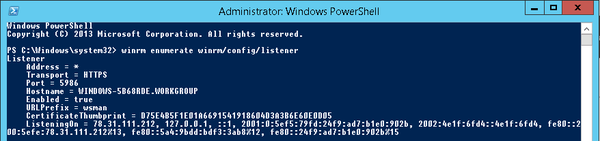
Web Sep 9 2022 nbsp 0183 32 To check it run the command below on a client WinRM enumerate winrm config listener You will see an error saying that the WinRM is not configured WSManFault Message The client cannot connect to the destination specified in the request Verify that the service on the destination is running and is accepting requests Web May 28 2015 nbsp 0183 32 You can use the Test WSMan cmdlet to check whether the WinRM service is running on a remote computer bool Test WSMan ComputerName ComputerName ErrorAction SilentlyContinue
Web Oct 6 2015 nbsp 0183 32 These steps are Does WinRM respond Is the WinRM service running Is the WinRM service listening on the appropriate TCP ports The easy way to see if WinRM is responding is to use the WinRM command and specify id Winrm id If you receive back error messages the WinRM service is not responding