Terminal Get Macos Version What Is My Current Version Of Mac Os X Prettytide Get The MacOS High Sierra Default Wallpaper Latest Version Of Mac Os For Macbook Pro How To Get Macos Version 10 13 Masopscale Get Macos Catalina Tikloyoutube Oct 3 2020 nbsp 0183 32 Is there a way to save all my typed terminal commands and view it like history in a log book
Terminal Jun 15 2016 nbsp 0183 32 How can I shut down or reboot Ubuntu using terminal commands
Get Macos Catalina Tikloyoutube Download The Official MacOS Ventura Wallpaper How To Check Which Version Of MacOS Your Mac Computer Is Running And A Better Terminal On MacOS MacOS Ventura Mac MacOS 11 Ventura Koncept Takto By Mohol Vyzera Svetapple sk Download The Newest Mac Os Yellowscapes MacOS 13 Ventura 13 0 1 Dispo Topic Unique Mac OS X Apple Learn About MacOS Big Sur System Requirements
Terminal Get Macos Version
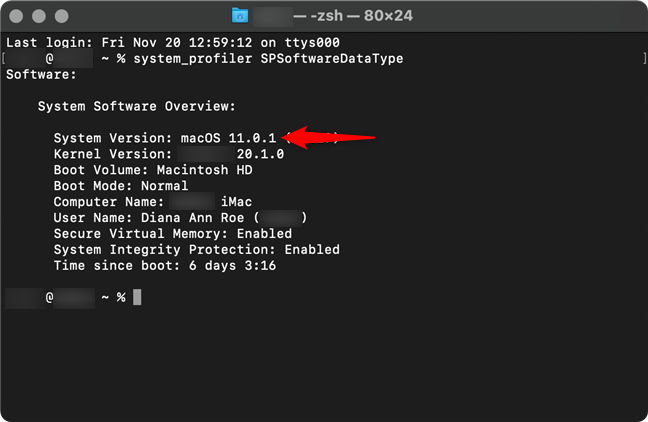 Terminal Get Macos Version
http://www.digitalcitizen.life/wp-content/uploads/2019/12/mac_version-4.png
Apr 29 2011 nbsp 0183 32 I only have access to the command line I need to backup my data on the user folder to a pen USB DOK How can I mount a flash drive manually What should be the copy
Templates are pre-designed files or files that can be used for various purposes. They can conserve effort and time by offering a ready-made format and design for creating various kinds of content. Templates can be utilized for individual or expert jobs, such as resumes, invites, flyers, newsletters, reports, presentations, and more.
Terminal Get Macos Version

How To Find Out MacOS Version Using Terminal Command NixCraft

Download The Official MacOS Ventura Wallpaper
How To Check Which Version Of MacOS Your Mac Computer Is Running And

A Better Terminal On MacOS

MacOS 11 Ventura Koncept Takto By Mohol Vyzera Svetapple sk
Download The Newest Mac Os Yellowscapes

Is there a simple command to display the total aggregate size disk usage of all files in a directory folder I have tried these and they don t do what I want ls l which only displays the s

Feb 16 2012 nbsp 0183 32 Instead of going to sites like speedtest I want to check my current Internet speed from the terminal on Ubuntu How can I do it

Oct 13 2017 nbsp 0183 32 Just downloaded a zip file from the internet I want to use the terminal to unzip the file What is the correct way to do this

Aug 21 2018 nbsp 0183 32 When I make some changes to the shell bash behavior such as setting up an alias is there a quick command to reinitialize the terminal window instead of closing and

Nov 28 2015 nbsp 0183 32 I can navigate down in directory using cd in the terminal How do I navigate back up if I go too far
[desc-11] [desc-12]
[desc-13]