Systemctl List Services Enabled On Boot Analyzing Boot init Process Using Systemd On Linux OpenTori Systemctl List All Possible including Disabled Services 2 Solutions Systemctl List unit files Qiita Systemctl Command With All Possible Options How To List Services On Linux Junos Notes In Linux a service is a program that runs in the background Services can be started on demand or at the boot time If you are using Linux as your primary operating system or development platform you will deal with different services such as webserver ssh or cron Knowing how to list running services or check the service status is important when debugging system issues
List Enabled Services With systemctl To see which services are enabled to start automatically at boot time on your system run this command in the terminal sudo systemctl list unit files type service state enabled This will show you a table with two columns UNIT FILE and STATE The UNIT FILE column shows the name of the service unit file New services that you want to start on boot need enabling systemctl enable service There we go your system now understands it needs to start the new service on boot If you want to skip the reboot go ahead and start it now systemctl disable service And there we go Service stopped
How To List Services On Linux Junos Notes Solved Can Systemctl List All Enabled Services 9to5Answer How To List Start And Stop Services At Boot Time In Linux Ubuntu Ubuntu CodePre How To List Services In Linux Using Systemctl How To List All Enabled Services From Systemctl YouTube How To Setup And Use Systemd In Debian 11 List Running Services On Linux Ubuntu Debian CentOS Cloudzy How To Configure Network Services To Auto Start On Boot
Systemctl List Services Enabled On Boot
 Systemctl List Services Enabled On Boot
http://opentori.com/wp-content/uploads/2022/09/Screenshot_2022-09-02_03-47-12.png
Systemctl list unit files state enabled type service When you run this command you ll see a list of services with their names and statuses The enabled state means that these services are configured to start at boot time Example output looks like UNIT FILE STATE auditd service enabled cronie service enabled
Templates are pre-designed documents or files that can be used for different purposes. They can conserve time and effort by providing a ready-made format and design for producing different kinds of material. Templates can be utilized for individual or professional jobs, such as resumes, invites, leaflets, newsletters, reports, presentations, and more.
Systemctl List Services Enabled On Boot

Daemons In Linux Systemctl List Services DevOpsTuT

Solved Can Systemctl List All Enabled Services 9to5Answer
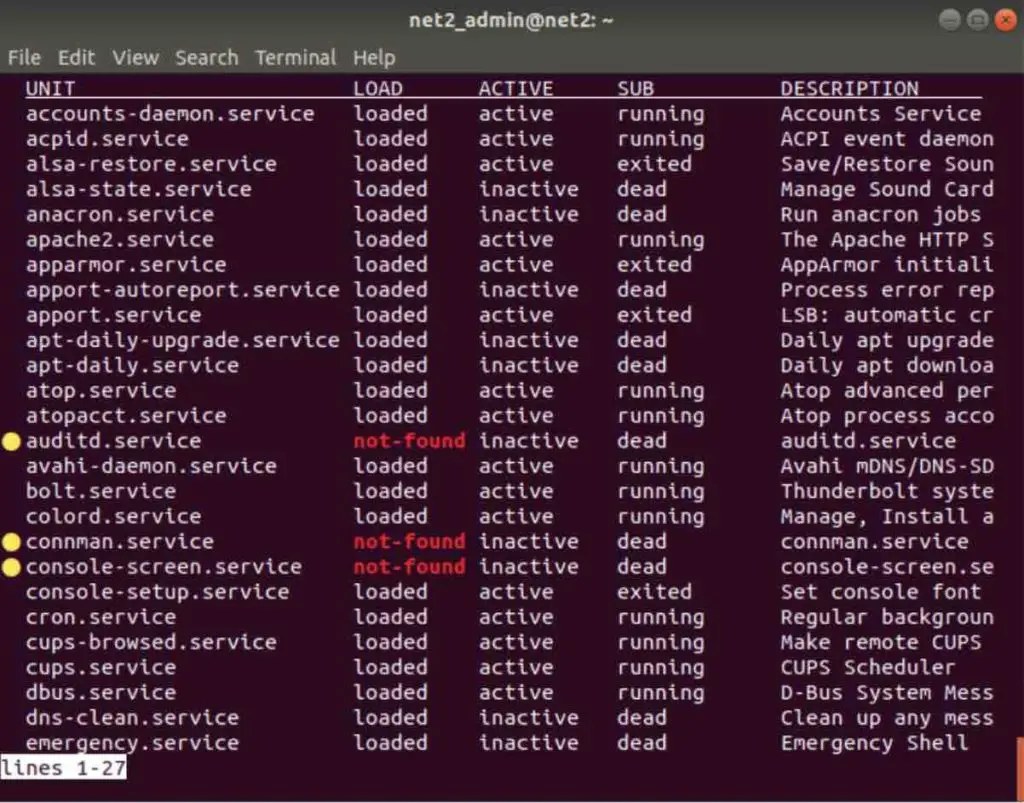
How To List Start And Stop Services At Boot Time In Linux Ubuntu

Ubuntu CodePre

How To List All Enabled Services From Systemctl YouTube

How To Setup And Use Systemd In Debian 11

To list all disabled services at system boot run sudo systemctl list unit files type service state disabled all Like I already said some older Linux distributions may use either SysV or Upstart as their default init system If your system uses sysv run the following command to list all services sudo service status all

2 4 Listing Disabled and Enabled Service Unit Files By slightly modifying the previous command we can also get a list of all enabled and disabled services systemctl list unit files type service state disabled enabled UNIT FILE STATE VENDOR PRESET anacron service enabled enabled apache htcacheclean service disabled enabled apache

List of services that are enabled to start automatically Change the state to disabled if you want to see disabled services which won t start up automatically systemctl list unit files state disabled List of disabled services You can always check for more information about a specific service by checking its status in systemd For example

To restart a running service you can use the restart command sudo systemctl restart application service If the application in question is able to reload its configuration files without restarting you can issue the reload command to initiate that process sudo systemctl reload application service
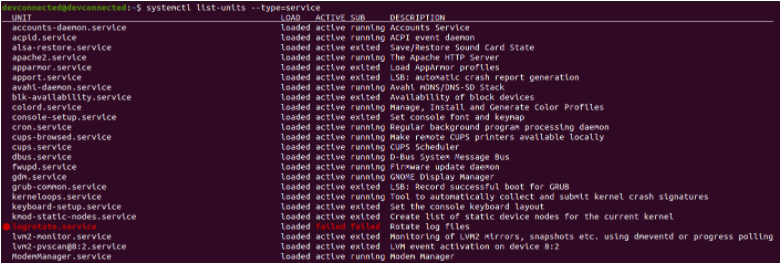
Quick Links Services and Daemons init Or systemd Based Using systemctl To List Services Using systemctl To List Unit Files Looking at One Service in Detail The Autonomic Systems Key Takeaways Use systemctl type service state running to see all running services on a Linux system with systemd
Download now Services such as SSH pull their settings from configuration files during the startup process To let the service know about changes to the file you need to restart the service so that it rereads the file You can use the systemctl command to manage services and control when they start Restart a service The following systemctl command will list all enabled services on Ubuntu 20 04 Desktop Server systemctl list unit files grep enabled On the other hand to list all disabled services execute systemctl list unit files grep disabled Enabled services will automatically start after system reboot
How to List Systemd Services in Linux Check what systemd services run on your Linux system in this tutorial Jul 23 2020 Abhishek Prakash How to List Systemd Services in Linux While systemd solves many problems with system management it is also confusing sometimes Even a simple task like listing systemd services could send you thinking