System Reboot Time SQLArchive Find Last Reboot Time Of Local Or Remote Windows System Measuring Reboot Time With PowerShell Ipswitch Check Last Reboot Time In Windows 10 Password Recovery Difference Between Boot And Reboot In Windows PowerShell 3 0 use the Get CimInstance cmdlet and select the LastBootUptime property from the Win32 Operatingsystem WMI class PS C Get CimInstance ClassName win32 operatingsystem select csname lastbootuptime In Windows PowerShell 2 0 and Windows PowerShell 1 0 use the Get WmiObject cmdlet and then translate the returned
Control Panel Command Prompt PowerShell On Windows 11 you have several ways to determine your computer s uptime and in this guide we ll show you how to complete this task with five different Windows 10 How to check your computer uptime on Windows 10 By Mauro Huculak published 27 September 2022 Do you need to know your PC s uptime In this guide we show you four ways to check on
Difference Between Boot And Reboot System Reboot Vector Line Icon Linear Concept Outline Sign Symbol How To Check The Reboot History In Linux CertSimple How To Quickly Check Last Reboot Time For Windows Box Mike s Blog How To Check When A Service Was Last Restarted Linux CertSimple Petition Reboot Time Warp Trio On Netflix For An Older Audience How To Check Who Rebooted The Server In Linux CertSimple Dope D O D The System Reboot Respecta The Ultimate Hip Hop Portal System Reboot Clip Art At Clker Vector Clip Art Online Royalty
System Reboot Time
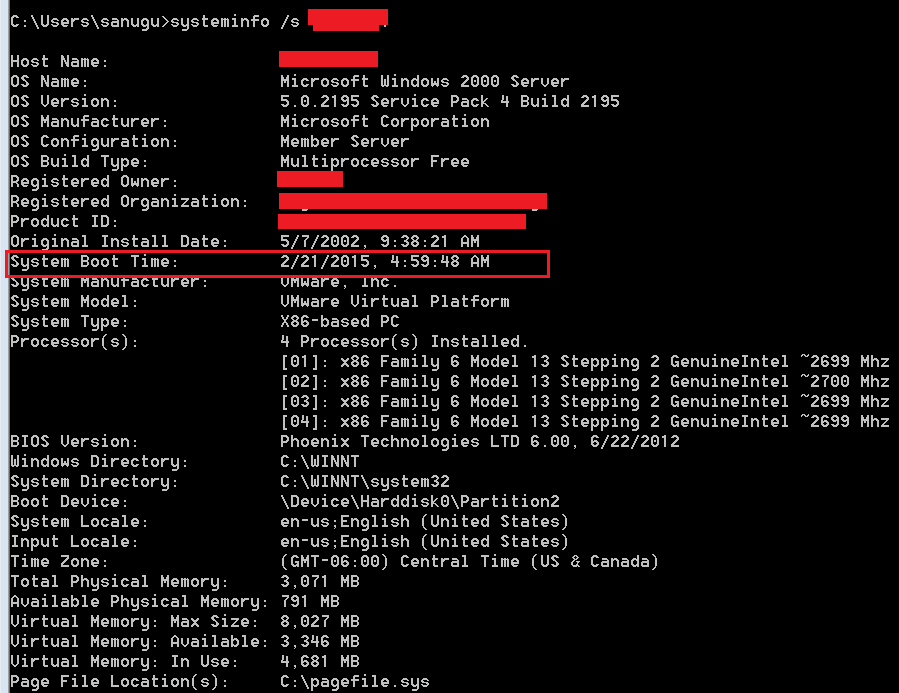 System Reboot Time
https://1.bp.blogspot.com/-f2jK_gHdvbY/VwUpdjSgmkI/AAAAAAAAAO4/AcUyKOTkVZ8WHeEhtzonewE-aHxP0U9Wg/s1600/sysinfo.png
The above command gets the last reboot time of the local computer and prints Host Name and System Boot Time on the terminal as given below PS C systeminfo Select String Host Name System Boot Time Host Name INCORP EU D101 System Boot Time 21 10 2021 16 00 35 You can use the systeminfo command to get the last boot time of the remote
Pre-crafted templates offer a time-saving solution for developing a diverse variety of files and files. These pre-designed formats and designs can be used for various personal and expert jobs, including resumes, invites, flyers, newsletters, reports, presentations, and more, enhancing the material development process.
System Reboot Time

10 Reasons To Reboot Your Business Strategy Applied Vision Works

System Reboot Vector Line Icon Linear Concept Outline Sign Symbol

How To Check The Reboot History In Linux CertSimple

How To Quickly Check Last Reboot Time For Windows Box Mike s Blog

Petition Reboot Time Warp Trio On Netflix For An Older Audience

How To Check Who Rebooted The Server In Linux CertSimple
16 Answers Sorted by 211 systeminfo command is almost right what you need On English Windows 7 you can also do systeminfo find i Boot Time Or with the help of WMIC wmic os get lastbootuptime The main difference between Windows 7 and Windows XP that in Windows 7 Microsoft can show only last boot up time Also in Task Manager Share

You can find the time windows was last rebooted on your computer using systeminfo or wmic commands Both the commands are explained below Using Systeminfo You can run the below command to find the Windows boot time systeminfo findstr C System Boot Time The above command works on Windows 7
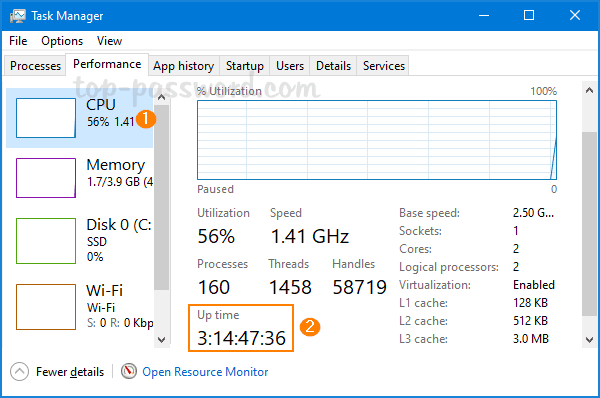
Step 1 Launch the Command Prompt There are several ways you can do this but if you re using Windows 8 x or above then simply bring up the Charms bar Windows key C and do a search for Command Prompt Step 2 When the Command Prompt is open copy and paste the following command and press return systeminfo find i Boot Time

Restart reboot your PC Go to Start select the Power button and then select Restart

2 answers Sort by Most helpful S Sengupta 13 801 MVP Jul 20 2022 6 14 PM If you are talking about Windows Boot duration then there are a number of third party applications BootRacer AppTimer We can find the boot time using wmic os command c wmic os get lastBootUpTime Please sign in to rate this answer 2 comments Report a concern
Sorted by 29 To help diagnose the restart what you should first check is Event Viewer Just enter eventvwr in the run dialog which can be called by pressing Win R Under Windows Logs System look for events from the Kernel Power This will also show if the system unexpectedly restarted by a blue screen and show events prior to it 1 From a PowerShell window run the following the S in Statistics must be capitalized net statistics workstation select string Statistics You can shortcut it as well using net stats work select string Stat Result 2 This next method uses the command systeminfo
31 Oct 2016 1 systeminfo System Boot Time I have just noticed that systeminfo System Boot Time gives the time of the last re boot not the last cold startup as I believe it used to do This applies to the other methods such as C NET STATISTICS SERVER too e g Yesterday 30 10 2016 evening at 23 00 I did a Restart on the PC