System Boot Time Command Verbatim Vi3000 SSD 256 GB PCIe 3 0 X4 NVMe 70871 Solid Get System Boot Time Using Powershell How To Analyze Linux System Boot Time With Systemd Linux Shout v13 x AlwaysUp Run Any Application As A Windows Service At Boot Hoe Lang Staat Mijn Windows PC Of Server Al Aan Uptime To confirm the computer uptime with Command Prompt use these steps Open Start Search for Command Prompt right click the top result and select the Run as administrator option Type the
How to Check Boot Time in Windows 10 and Windows Server Task Manager Event Viewer PowerShell WMIC System Information Utility Net Statistics Command Uptime Command Introducing the Get ServerUptimeReport script Finding Windows Uptime Across Many Servers Summary How can I find the last boot time for my computer by using Windows PowerShell In Windows PowerShell 3 0 use the Get CimInstance cmdlet and select the LastBootUptime property from the Win32 Operatingsystem WMI class PS C Get CimInstance ClassName win32 operatingsystem select csname lastbootuptime csname lastbootuptime
Hoe Lang Staat Mijn Windows PC Of Server Al Aan Uptime Spacedesk Server Automatic Start PC BSD 10 1 As Main Operating System TuIT February 2022 Andreas Blog Linux 3 1 An Introduction To Virtual Partitions HP UX CSE c Official Study Get System Boot Time Using Powershell Operating System Boot Time Benchmark GreatEmerald s Domain Techrena Dot Net A Technology Blog That Provides Solutions And Updates
System Boot Time Command

https://webobjects2.cdw.com/is/image/CDW/6341445?$product-detail$
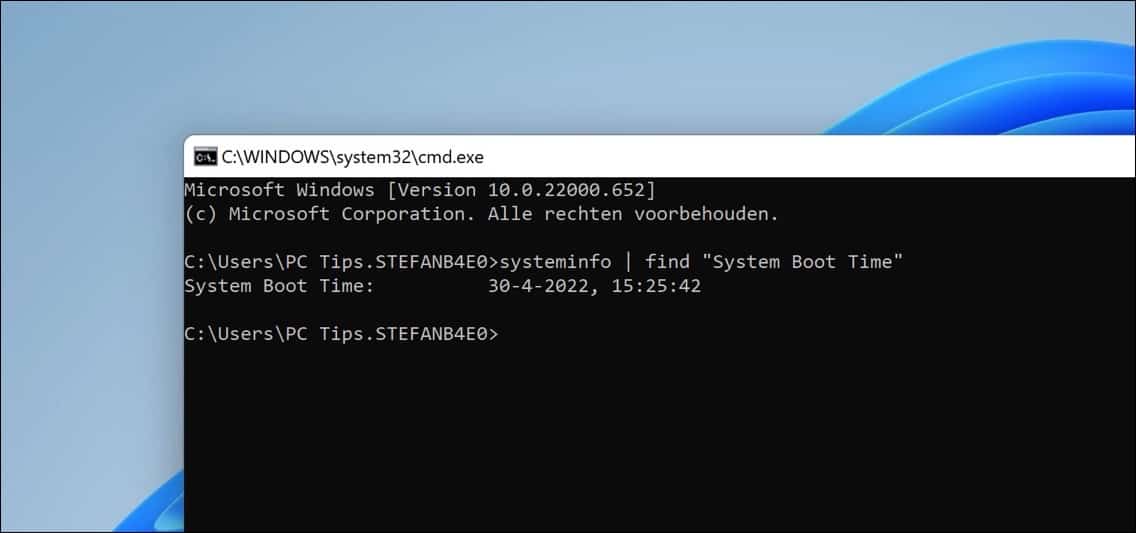
You can use the systeminfo command to get the last boot time of the remote computer using the below command systeminfo S incorp eu D102 Select String Host Name System Boot Time In the above command systeminfo uses the S parameter to specify the server name It returns the last boot time for the remote computer
Pre-crafted templates offer a time-saving option for developing a diverse variety of files and files. These pre-designed formats and layouts can be used for numerous personal and expert jobs, including resumes, invites, flyers, newsletters, reports, discussions, and more, streamlining the material production process.
System Boot Time Command
CentOS 7 6 RPM Oracle19c Systemd Oracle

Spacedesk Server Automatic Start

PC BSD 10 1 As Main Operating System TuIT
February 2022 Andreas Blog

3 1 An Introduction To Virtual Partitions HP UX CSE c Official Study

Get System Boot Time Using Powershell

The below gcim command displays the uptime of a windows system in a list manner with days hours and minutes Instead of the last boot time it just shows the uptime of a system since the last boot get date gcim Win32 OperatingSystem LastBootUpTime Here gcim stands for Get CimInstance Sample Output

2 answers Sort by Most helpful S Sengupta 13 801 MVP Jul 20 2022 6 14 PM If you are talking about Windows Boot duration then there are a number of third party applications BootRacer AppTimer We can find the boot time using wmic os command c wmic os get lastBootUpTime Please sign in to rate this answer 2 comments Report a concern

1 Answer Sorted by 0 A pause to let me read it press any key to continue then exit cmd when I press a key With systeminfo find Boot Time alone I get this and have to exit manually systeminfo find Boot Time pause move nul 2 0 for f tokens 3 delims i in systeminfo find Boot Time do echo j pause

Open Start Search for Task Manager and click the top result to open the experience Quick tip You can also open Task Manager using the Ctrl Shift Esc keyboard shortcut or by right clicking
Description This cmdlet returns the time elapsed since the last boot of the operating system The Get Uptime cmdlet was introduced in PowerShell 6 0 Examples Example 1 Show time since last boot PowerShell
Even though there is still no built in Windows uptime command the actual uptime of the server workstation or the system boot time can be checked from the command line In this note i will show several methods of how to check Windows uptime from the command line prompt and PowerShell Windows Uptime Command The exact command to find the system boot time using the wmic command is wmic OS get lastbootuptime The command output for this command looks like the screenshot below The number 20221207093431 contains the actual timestamp of the system boot time From this number we infer that the system booted on 7th December 2022 at 0934 hours
The Task Manager is a Windows 10 tool that lets you see which programs are running and how many system resources they use To find the boot time follow these steps Open the Task Manager You can do this by pressing Ctrl Shift Esc or right clicking on the Start button and selecting Task Manager from the menu Select the Performance tab