Sumif Function In Excel With Multiple Criteria Sumif Met Meerdere Criteria Op Basis Van OR En AND logica SUMIF With Multiple Criteria Excel Function And Examples Excel Sumifs Kaanobu Sumif Formula In Google Sheets Iweky How To Use SUMIFS Function In Excel Syntax SUMIF range criteria sum range The SUMIF function syntax has the following arguments range Required The range of cells that you want evaluated by criteria Cells in each range must be numbers or names arrays or references that contain numbers Blank and text values are ignored
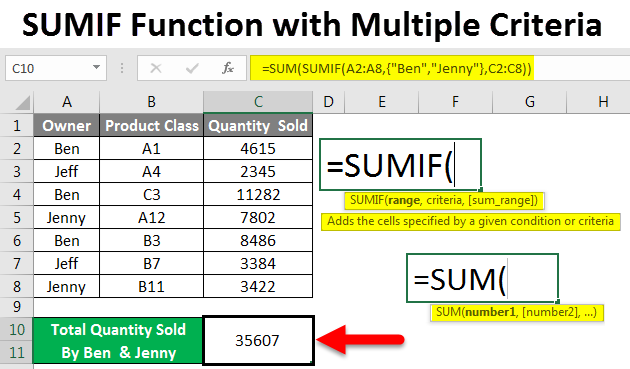
If you need to sum with 3 or more criteria the formula will become too big and difficult to read To achieve the same result with a more compact formula supply your criteria in an array constant SUM SUMIF range crireria1 crireria2 crireria3 sum range Please remember that this formula works based on OR logic a cell is summed The SUMIFS function sums the cells in a range that meet multiple conditions referred to as criteria Each condition is provided with a separate range and criteria To define criteria SUMIFS supports various logical operators and wildcards
How To Use SUMIFS Function In Excel Excel Sumifs With Multiple Sheets Multiple Criteria My XXX Hot Girl Excel Formula SUMIFS With Multiple Criteria And OR Logic Exceljet SUMIF Function In Excel With Multiple Criteria Coupler io Blog Sum If Multiple Criteria Excel Formula Exceljet SUMIFS On Multiple Columns With Criteria In Excel Sheetaki Excel SUMIF Function For Multiple Criteria 3 Easy Methods Excel SUMIFS With Multiple Date Range Criteria And Multiple Criteria SUMIFS Function Adding With Criteria 36 Examples SUMIF Function
Sumif Function In Excel With Multiple Criteria
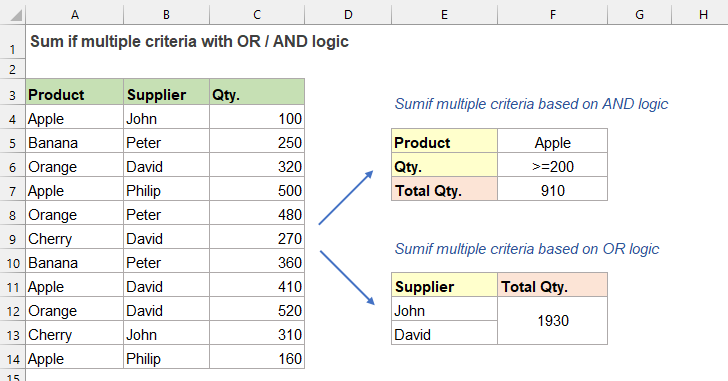 Sumif Function In Excel With Multiple Criteria
https://www.extendoffice.com/images/stories/excel-formulas/sumif-multiple-criteria/doc-sumif-multiple-criteria-1.png
The SUMIF function sums cells in a range that meet a single condition referred to as criteria The SUMIF function is a common widely used function in Excel and can be used to sum cells based on dates text values and numbers Note that SUMIF can only apply one condition To sum cells using multiple criteria see the SUMIFS function Syntax
Pre-crafted templates offer a time-saving solution for producing a diverse range of documents and files. These pre-designed formats and layouts can be utilized for numerous personal and expert projects, including resumes, invites, leaflets, newsletters, reports, discussions, and more, enhancing the content creation process.
Sumif Function In Excel With Multiple Criteria

How To Use SUMIF With Multiple Criteria In Excel Excelchat Excel
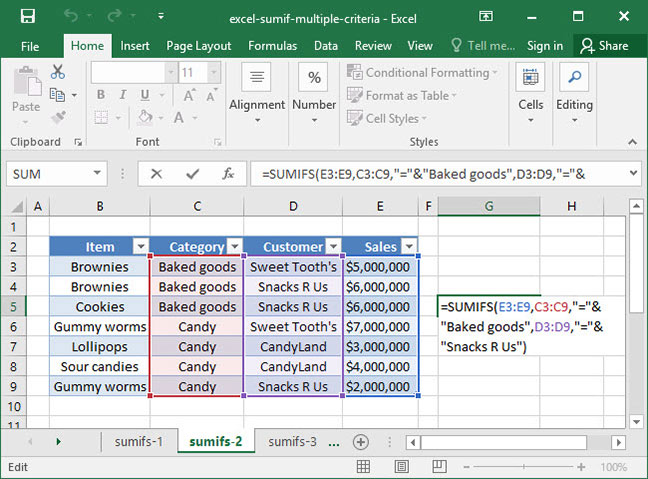
Excel Sumifs With Multiple Sheets Multiple Criteria My XXX Hot Girl
Excel Formula SUMIFS With Multiple Criteria And OR Logic Exceljet

SUMIF Function In Excel With Multiple Criteria Coupler io Blog
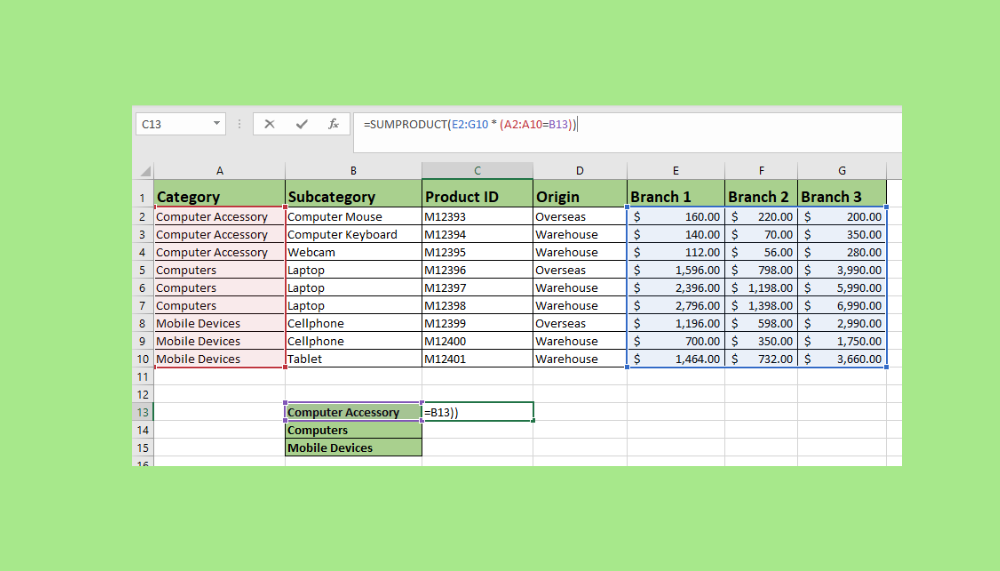
SUMIFS On Multiple Columns With Criteria In Excel Sheetaki
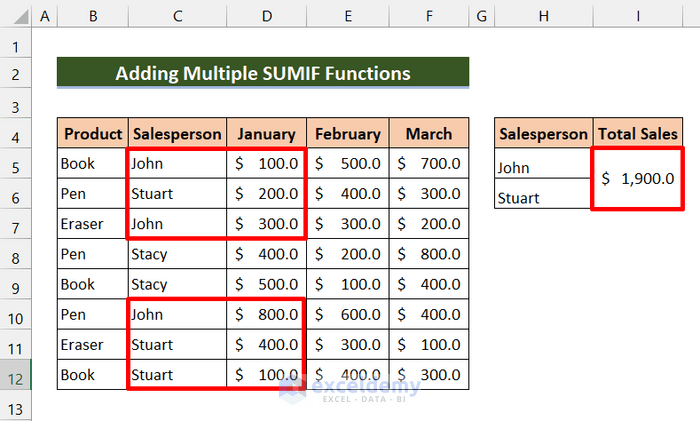
Excel SUMIF Function For Multiple Criteria 3 Easy Methods

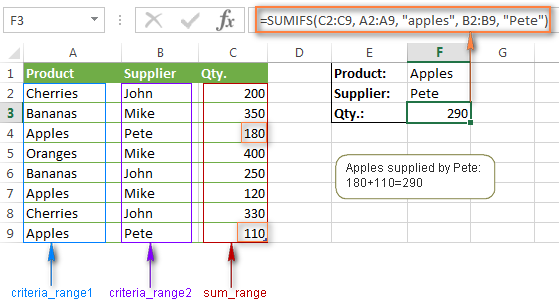
The SUMIFS function one of the math and trig functions adds all of its arguments that meet multiple criteria For example you would use SUMIFS to sum the number of retailers in the country who 1 reside in a single zip code and 2 whose profits exceed a specific dollar value Syntax
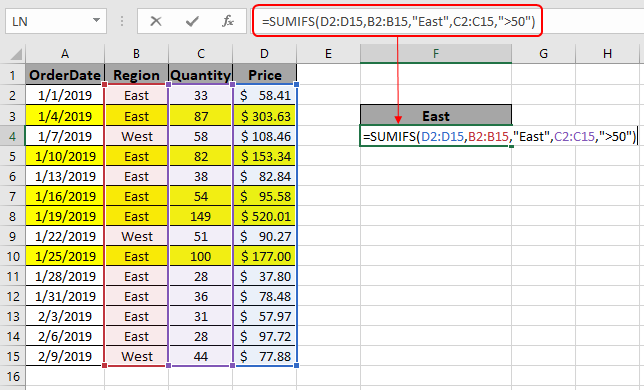
The first step is to specify the location of the numbers SUMIFS D2 D11 In other words you want the formula to sum numbers in that column if they meet the conditions That cell range is the first argument in this formula the first piece of data that the function requires as input
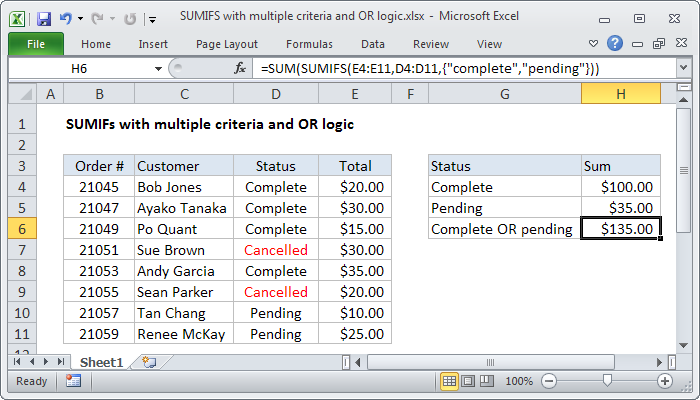
To sum based on multiple criteria using OR logic you can use the SUMIFS function with an array constant In the example shown the formula in H7 is SUM SUMIFS E5 E16 D5 D16 complete pending The result is 200 the total of all orders with a status of Complete or Pending Note that the SUMIFS function is not case sensitive

To sum numbers based on multiple criteria you can use the SUMIFS function In the example shown the formula in I6 is SUMIFS F5 F16 C5 C16 red D5 D16 tx The result is 88 00 the sum of the Total in F5 F16 when the Color in C5 C16 is Red and the State in D5 D16 is TX Note that the SUMIFS function is not case sensitive
The SUMIF function is designed to sum numbers based on one criterion By default it considers one range one criterion and one sum range as per its syntax But if you want to add numbers based on multiple criteria then you have the following options to use Use SUMIF with multiple criteria
SUMIF range criterion sum range range these are all of the cells being evaluated from the first with a particular condition to the last criterion it is a condition which may include names of people products goods dates months etc sum range it is the collection of values that will be summarized Users can use the SUMIF with multiple criteria to find the sum of the data values in a row or column with multiple conditions However they can apply the SUMIFS to determine the sum of the given cell range based on checking the specified conditions For example the following image shows three tables
The SUMIF function with multiple criteria is SUMIF range criteria sum range The following operators are used in the criteria argument Comparison operators Greater than less than greater than or equal to less than or equal to Equal to not equal to Wildcard characters