Sudo Apt Get Install Qt5 Qmake Ubuntu18 04 pip3 socks TinyChen s Studio Linux Qt5 Apt get Deepin Qt sudo Apt get Install Qt5 default Linux Qt5 Apt get Deepin Qt sudo Apt get Install Qt5 default 3b QT5 QWT sudo Apt get Install Libqt5 dev zhangjun62 CSDN Galaxy Kirin Desktop System V10 Compila E Instala Capturas De Pantalla Hello If I run in ubuntu 20 04 sudo apt get install qt5 default qmake version I get Using Qt version 5 12 8 in usr lib x86 64 linux gnu Can I install update other version of Qt from package I don t need QtCreator Are my only alternatives online i
The first step is to add the PPA from the ubuntu sdk team This PPA contains the packages for qt5 qmake and qt4 qmake To add the PPA open a terminal and enter the following command sudo add apt repository ppa ubuntu sdk team ppa This command adds the PPA to your system s software sources The sudo command is used to execute commands To install these packages open a terminal and run the following command sudo apt get install qtbase5 dev qt5 qmake qtbase5 dev tools This command uses the apt get install command to install packages The sudo command is used to run the command with root privileges which are necessary for installing packages
Galaxy Kirin Desktop System V10 Compila E Instala Capturas De Pantalla Sudo Apt get Uninstall Qt5 default Kresnaevib Ubuntu20 04 qt5 12 qt opensource linux x64 5 12 5 run Ubuntu18 04 QT qt CSDN 3b QT5 QWT sudo Apt get Install Libqt5 dev zhangjun62 CSDN Ubuntu22 04 AnimeEffects uos qt5 15 2 qtcreator 2 Ubuntu16 04 Qt5 1 Ubuntu qt qt5
Sudo Apt Get Install Qt5 Qmake
 Sudo Apt Get Install Qt5 Qmake
https://resource.tinychen.com/20210111102947s.jpg
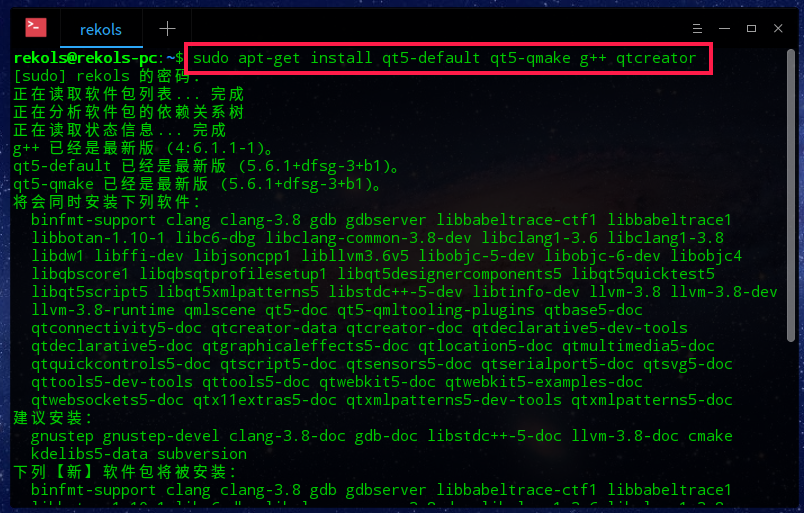
Here are three methods to install QT5 on Ubuntu 20 04 Method 1 Installing from Ubuntu Repository Step 1 Open Terminal CTRL ALT T Step 2 Update packages and dependencies in your system sudo apt get update sudo apt get upgrade y Step 3 Install QT5 using the following command sudo apt get install qt5 default y
Pre-crafted templates use a time-saving solution for developing a varied variety of files and files. These pre-designed formats and designs can be utilized for different individual and expert jobs, including resumes, invites, leaflets, newsletters, reports, presentations, and more, simplifying the material creation process.
Sudo Apt Get Install Qt5 Qmake

Ubuntu Qt5 Tiny Wang s Forbidden City
Sudo Apt get Uninstall Qt5 default Kresnaevib
Ubuntu20 04 qt5 12 qt opensource linux x64 5 12 5 run
Ubuntu18 04 QT qt CSDN

Ubuntu22 04 AnimeEffects

uos qt5 15 2 qtcreator

1 Answer Sorted by 2 You can compile VNote by following their official build documentation at https vnotex github io vnote en us docs Developers Build 20VNote md So on Ubuntu 20 04 LTS you have to open terminal and then execute
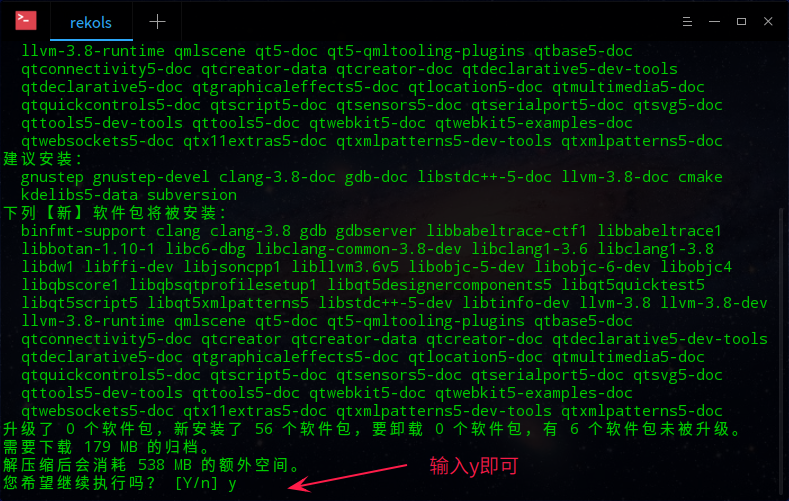
Type the following command and hit Enter sudo apt get install qt5 default Qt 5 x will be installed Installation Guide Qt download page Download Visit Qt downloads page an download a 32 bit or 64 bit Linux installation depending your version of Ubuntu The installation file can be also downloaded through the command line using wget Example
To uninstall qt5 qmake and its dependencies that are no longer needed by Ubuntu 22 04 we can use the command below sudo apt get y autoremove qt5 qmake Remove qt5 qmake Configurations and Data To remove qt5 qmake configuration and data from Ubuntu 22 04 we can use the following command

2 Uninstall Remove qt5 qmake package This guide let you learn how to uninstall qt5 qmake package sudo apt remove qt5 qmake Copy sudo apt autoclean sudo apt autoremove Copy 3 Details of qt5 qmake package

Procedure Setup Linux You ll need git and all the usual tools for building stuff in Linux For more details see the full list of requirements on Qt s wiki Get Dependency Packages In Ubuntu sudo apt get build dep qt5 default sudo apt get install libxcb xinerama0 dev
At this point Fedora does not offer a Qt5 development pattern for convenient installation Not a major concern because with the help of the wildcard character you can easily install both the Qt5 development packages and Qt Creator with command sudo dnf install qt creator qt5 devel qt5 doc Sounds that qt5 default removed from debian testing bullseye repository Suggestion there sudo apt mark manual qtbase5 dev qtchooser qt5 qmake qtbase5 dev tools should have almost the same effect as having qt5 default installed Or sudo apt install qtbase5 dev qtchooser qt5 qmake qtbase5 dev tools
5 This question does not show any research effort it is unclear or not useful Save this question Show activity on this post I m trying to install Qt Creator to my Raspberry Pi 3 for a GUI project However when I use the command sudo apt get install qt5 default it gives an error saying that