Substance Painter Scale Layer Substance Painter Ders 2 Layer Fill Layer YouTube Just One slensk tg fa Nexus Vefverslun Fill Layer Ou Blank Layer L Substance Painter Tutorial 002 YouTube How To Add An Overall Layer Effect With The Position Map In Substance How To Layer Different Materials In Substance Painter YouTube Web You can use this as a Material in Substance Painter to add scales to your textures You have 4 types of scales to choose from And some other parameters to tweak Theres 4 presets to choose from to faster workflow And you can use it as a base to your material just using the height maps from this and adding other materials colors over it
Web Jul 12 2023 nbsp 0183 32 Use the Layer Stack Learn how to work with the Layer Stack in Substance 3D Painter The Layer Stack lets you manipulate the layers of a Texture Set The layer stack displays layers with a specific hierarchy The layer at the bottom will be drawn first on the mesh then the layer on top will follow Therefore the layer at the top of the stack Web Jan 28 2020 nbsp 0183 32 1 Answer The trick is when you are in the UV editing panel to select the individual faces and apply the the texture needed to each one So if on the left hand side of your image you want the graffiti you select that face and assign the image with graffiti to it You would then select the remaining face faces and just apply the brick texture
How To Layer Different Materials In Substance Painter YouTube Substance Painter Basic Ep 05 Paint Layer Brush Filter L G Substance Painter Espa ol B sico 2 Materiales Layer Y Relleno Espa ol Maya I Substance Painter I Layer Height YouTube Scale Invariance Show At Schrager Clarke In Eugene Kate Bollons Like My Facebook Page zz zwyanezade 21 Warhammer Warhammer Paint Solved Substance Painter Layer Opacity Adobe Support Community Substance Painter 08 Th m Layer V D ng C T M u Paint YouTube ArtStation FREE Basic Scales Generator Procedural Resources
Substance Painter Scale Layer
 Substance Painter Scale Layer
https://i.ytimg.com/vi/M1E3xgSnmgc/maxresdefault.jpg
Web Jun 12 2016 nbsp 0183 32 In this tutorial we will learn the importance of the fill and paint layers in substance painter Get this scene https gum co IKNEY Resources https www allegorithmic pbr guide
Templates are pre-designed files or files that can be utilized for various functions. They can save time and effort by offering a ready-made format and design for creating various sort of material. Templates can be used for personal or expert projects, such as resumes, invitations, leaflets, newsletters, reports, discussions, and more.
Substance Painter Scale Layer
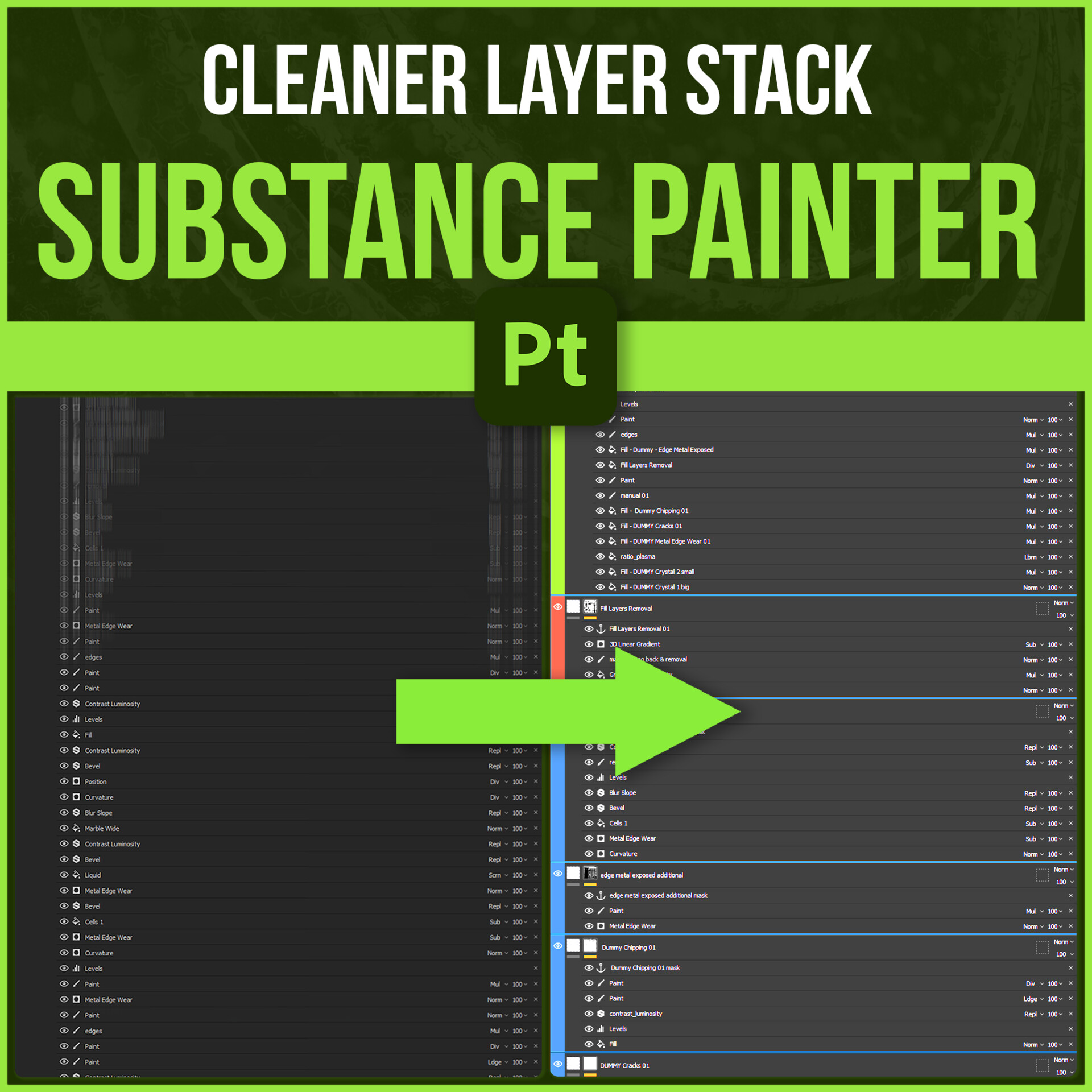
ArtStation Cleaner Layer Stack In Substance Painter

Substance Painter Basic Ep 05 Paint Layer Brush Filter L G

Substance Painter Espa ol B sico 2 Materiales Layer Y Relleno Espa ol

Maya I Substance Painter I Layer Height YouTube

Like My Facebook Page zz zwyanezade 21 Warhammer Warhammer Paint

Solved Substance Painter Layer Opacity Adobe Support Community

Web Jul 13 2023 nbsp 0183 32 Scale tool R R Set the manipulator mode to scale Surface tool Shift W Shift W Set the manipulator mode to snap on the 3D model surface Symmetry L L Enable the symmetry along a given axis Pause engine computation Shift Escape Shift Escape Toggle engine computations Select Paint tool 1 1 Select Paint tool
Web Jul 13 2023 nbsp 0183 32 It is possible to quickly setup a layer with the warp projection by drag and dropping a resource from the Assets window onto the mesh When releasing the mouse a menu will open allowing to choose in which channel the resource should be assigned Compatible resource types are Alpha Procedural Texture Material requires pressing

Web Dec 27 2021 nbsp 0183 32 Substance Designer Scale Tutorial YouTube 169 2023 Google LLC Learn to make a scale patter generator for substance painter in this substance designer tutorialTable of Contents

Web Sep 6 2023 nbsp 0183 32 Transform Substance 3D Sampler Last updated on Sep 6 2023 Transform In Tools Description Use the Transform tool to move scale or rotate your image or material Parameters Basic parameters Control Mode Choose whether to display parameters to control the transform with sliders in addition to the 2D view handles

Web Jul 13 2023 nbsp 0183 32 Layer instancing Layer instancing allows to synchronize layer parameters across multiple layers and Texture Sets while still being able to generate a mesh dependent result When a layer instance is created the original layer or source layer is used to replicate parameters across all the existing instances
Web I recently learned how to use Substance Painter s material layering feature and was asked to show a quick demo on it This feature has a range of uses such as setting up a character or prop to more readily take on different aesthetic skins and variations or enabling seamless materials to be updated continuously without having to take every asset that uses it back Web Jul 21 2023 nbsp 0183 32 Substance Painter is a 3D painting tool that lets you texture your 3D models in a way that s both intuitive and incredibly detailed But before you can start painting there are a few things you need to do First you need to install Substance Painter
Web Feb 5 2016 nbsp 0183 32 Last Update standalone not steam version With last update UV scale of Fill layer is 3 by default and not 1 why how do I change it to normal state Is it me or is this update