Stop Frame After Effects Download Modern Freeze Frame After Effects Projects Freeze Frame In After Effects Step by step Guide Time Reverse Time Stretch Freeze Frame Freeze On Last Frame After Videohive Freeze Frame Trailer 26542921 Project For After Effects FREE Intro Freeze Frame After Effects Templates Free After Effects Web Apr 24 2023 nbsp 0183 32 Go to the Effects amp Presets panel and search for Drop Shadow Apply it to the layer by clicking and dragging it on to the footage We ll use the following settings in the Effect Controls panel Color 000000 Opacity 50 Direction 135 176 Distance 17 Softness 0 Now select the top layer and press S on the keyboard to bring up the scale
Web Sep 19 2012 nbsp 0183 32 Video Editing Learn how to manipulate time and create speed ramps in Adobe After Effects Let s dig into all of the helpful AE tools you can use to give your project unique speed effects Leverage the tools in Adobe After Effects to create unique speed ramps constant speed change and freeze frames Web Step 2 Selecting the Layer for the Freeze Frame Effect Next select the layer that you want to freeze and right click on it to access the Time menu From the Time menu click on Freeze frame to hold the entire layer on the current frame You can press the freeze frame button again to remove the effect
FREE Intro Freeze Frame After Effects Templates Free After Effects How To Change Frames In After Effects Webframes Alphabets With Wooden Blocks Featuring Toy Block Block Shape And After Effects Basics Key Frames Position Rotation Animated Movie Freeze Frame Effect After Effects How To Freeze Frame In After Effects Webframes How To Freeze Frame In After Effects Webframes Next Frame After Effects Prizefasr Frame After Effects Premiere Faq mac
Stop Frame After Effects
 Stop Frame After Effects
https://i2.wp.com/aedownload.com/wp-content/uploads/2020/03/preview-361806-y6cJMUbwJg-high_0016.jpg?fit=750%2C422&ssl=1
Web Feb 18 2014 nbsp 0183 32 angie taylor Guide Apr 14 2018 Add your wiggle Create a new Null called quot Control Layer quot To this add two Expression Control sliders rename one quot frequency quot the other quot amplitude quot Click on the padlock button in the effects Control panel to keep this visible for the next step
Pre-crafted templates provide a time-saving option for creating a varied variety of documents and files. These pre-designed formats and layouts can be made use of for numerous personal and expert jobs, consisting of resumes, invites, flyers, newsletters, reports, presentations, and more, enhancing the content development procedure.
Stop Frame After Effects

Videohive Trailer Freeze Frame 36049029 Project For After Effects
How To Change Frames In After Effects Webframes

Alphabets With Wooden Blocks Featuring Toy Block Block Shape And

After Effects Basics Key Frames Position Rotation Animated Movie

How To Freeze Frame In After Effects Webframes

How To Freeze Frame In After Effects Webframes

Web Feb 10 2017 nbsp 0183 32 Dave LaRonde LEGEND Feb 09 2017 Feb 09 2017 Dave LaRonde LEGEND Feb 09 2017 Feb 09 2017 Time Remapping to the rescue Here s What you do Highlight the layer in question Go to Layer gt Time gt Enable Time Remapping The keyboard shortcut is Ctl Alt t Win or Cmd Opt t Mac
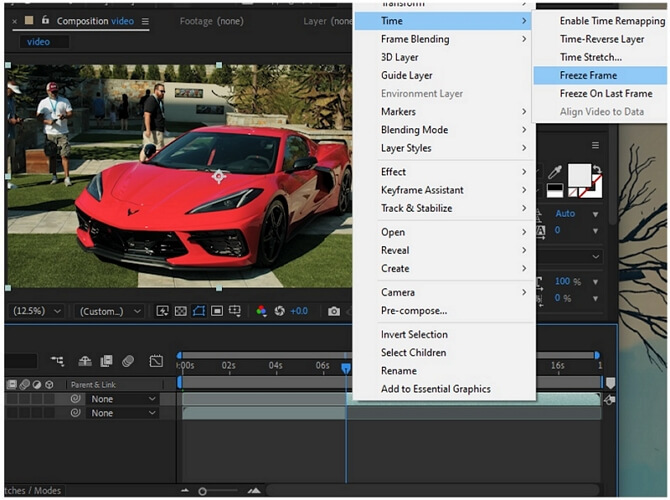
Web In this tutorial you will learn how to freeze frame videos in After Effects Link to article https youwantpizzazz 2021 04 30 after effects tutorial ho

Web Apr 19 2017 nbsp 0183 32 22K views 6 years ago In many cases it may be necessary that after the footage file has come to the end it shall freeze at the last frame and may be extended to any length Or you may not

Web Dec 26 2023 nbsp 0183 32 Step by Step Guide to Freeze Frames in After Effects A freeze frame is a technique used to hold a specific frame of a video for an extended period creating a dramatic effect or emphasizing a particular moment Follow these instructions to achieve freeze frame effects in your videos Step 1 To create a freeze frame in After Effects

Web Sep 7 2023 nbsp 0183 32 The freeze frame lets you freeze or stop the specific frame that you wish to focus on or feature Just pick or select the frame you want to freeze and refer to the following steps to learn how to make a freeze frame in After Effects
Web 1 I understand your problem as follows There are three timepoints T0 T1 and T2 At T0 you place the image in an initial position At T1 you place the first keyframe position x1 y1 And at T2 you have the second keyframe position x2 y2 You want it to stay at T1 for several seconds before moving on to T2 Web Community Expert Mar 02 2020 To make wiggle start at one second and end at 3 seconds add an expression with if statements like this if time gt 1 amp amp time lt 3 wiggle 10 20 else value time is always counted in seconds unless you divide it by the comp frame rate but that should get you started 1 Upvote
Web Mar 31 2021 nbsp 0183 32 After Effects CC 2021 How to use Toggle Hold Keyframes to Pause Freeze Animations This tutorial will show you how to add toggle hold keyframes to stop or pause an animation f more