Start Ssh Server Centos 7 NTP And SSH Server CentOS 7 Part 3 YouTube NTP SSH Server CentOS 7 YouTube Konfigurasi SSH Server CentOS 7 TECHNOW Exfoliating Foot Mask Bath Hardware Sets AliExpress How To Start An SSH Server On The Linux Subsystem Systran Box You must log in as root Use the following commands to start the sshd service etc init d sshd start OR for modern Linux distro with systemd sudo systemctl start sshd service In some cases the actual script name is different For example it is ssh service on a Debian Ubuntu Linux
In the new window we need to begin a new connection to our server This time instead of using the root account we want to use the new account that we created For the server that we configured above connect using this command Substitute your own information where it is appropriate ssh demo SERVER IP ADDRESS On CentOS Desktop or Server whatever you have we will install two part of the OpenSSH an open source SSH tool one will be OpenSSH client to access other systems using SSH and another one is OpenSSH server to run an SSH server daemon so that you can access your CentOS remotely
How To Start An SSH Server On The Linux Subsystem Systran Box 10 P25Q40H SSH IT P25Q40H P25040H SOP 8 IC AliExpress How To Install SSH Server On CentOS 7 E Learning Jenkins Github Actions SSH 003GA P0 2 H Termianls Connectors Terminals Housing 100 New And Bowl Bath Hardware Sets AliExpress Configurar Servidor Ssh Centos 7 Mobile Legends Solution SSH Connection Refused Problem In Linux Backtrack Creatorb Gitea Windows gitea freesheep720 CSDN
Start Ssh Server Centos 7
 Start Ssh Server Centos 7
https://i.ytimg.com/vi/oW0BccEfTI0/maxresdefault.jpg?sqp=-oaymwEmCIAKENAF8quKqQMa8AEB-AH6CYAC0AWKAgwIABABGGUgZShlMA8=&rs=AOn4CLBV0HJmEeHEKlnXCmRaC60mnumumA
This tutorial will guide you through the process of enabling SSH on your CentOS Rocky or AlmaLinux 7 8 and 9 system configuring the appropriate firewall rules to allow inbound connections and changing the default SSH port for enhanced security
Templates are pre-designed files or files that can be utilized for different purposes. They can save effort and time by offering a ready-made format and layout for creating different kinds of content. Templates can be used for individual or professional jobs, such as resumes, invites, flyers, newsletters, reports, discussions, and more.
Start Ssh Server Centos 7
Install And Enable Ssh Server On Centos 7 H2S Media

10 P25Q40H SSH IT P25Q40H P25040H SOP 8 IC AliExpress

How To Install SSH Server On CentOS 7 E Learning
Jenkins Github Actions

Bowl Bath Hardware Sets AliExpress
Configurar Servidor Ssh Centos 7 Mobile Legends

To enable SSHD service at boot time on CentOS version 7 x 8 x or above run systemctl enable sshd Sample outputs Created symlink from etc systemd system multi user target wants sshd service to usr lib systemd system sshd service Start SSHD on CentOS version 7 x 8 x or above

Before you get started refresh your package index using the DNF package manager as below sudo dnf check update Next install OpenSSH packages on the CentOS RHEL systems using the following command This command will install OpenSSH server packages as well as OpenSSH client software sudo dnf install openssh server
1 Enter the following code into your command line utility sudo yum y install openssh server openssh clients 1 This code installs the appropriate SSH server and client type 2 Enter the following code sudo systemctl start sshd

Step 1 Creating the RSA Key Pair The first step is to create a key pair on the client machine usually your computer ssh keygen By default ssh keygen will create a 2048 bit RSA key pair which is secure enough for most use cases you may optionally pass in the b 4096 flag to create a larger 4096 bit key

SSH Server 08 Use SSHPass DNS DHCP Server Dnsmasq 01 Install Dnsmasq 01 Configure for Internal Network 06 Set Alias CNAME 01 Configure NFS Server 03 NFS 4 ACL Tool
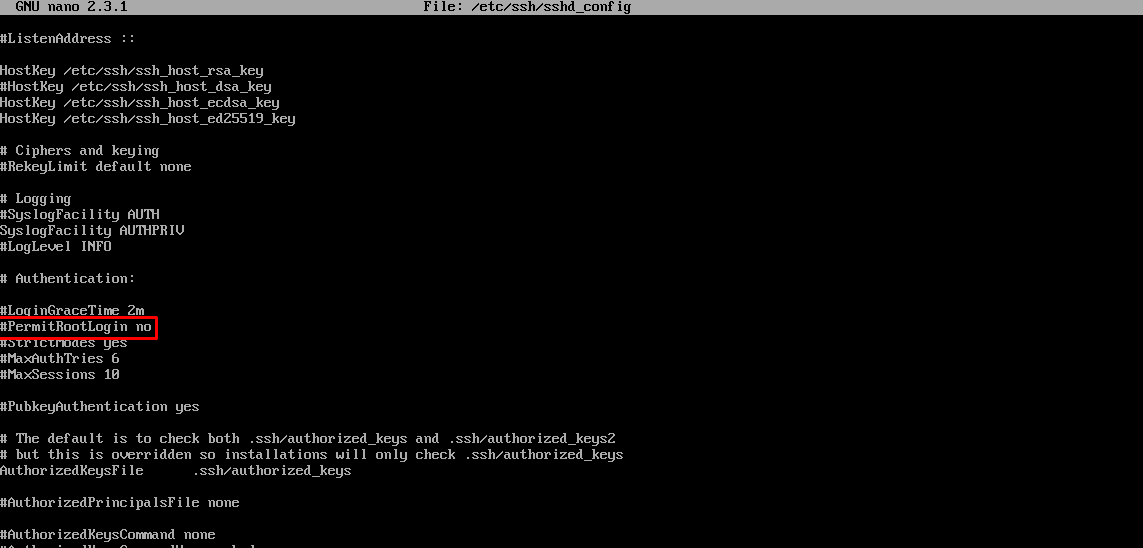
CentOS 7 provides opensshopenssh server and openssh clients packages The openssh package requires openssl libs to be installed on the system since it provides some very important cryptographic libraries If you order a CentOS VPS Hosting with us you will have all these packages installed on your server May 3 2021 by cyberithub Table of Contents Step by Step Guide to Configure OpenSSH Server on Linux RHEL Centos 7 8 Step 1 Prerequisites Step 2 Install OpenSSH Server Step 3 Configure X11 Forwarding Step 4 Configure Root Login Step 5 Configure LogLevel Step 6 Configure SSH Port Step 7 Start and Enable SSH Service
CentOS SSH Installation You need to install the following packages which are installed by default until and unless you removed it or skipped it while installing CentOS openssh clients The OpenSSH client applications openssh server The OpenSSH server daemon Let us see all steps in details OpenSSH Installations under