Ssl Certificate In Java Application How To Add Ssl Certificate In Java YouTube How To Trust An SSL Certificate In Java Tutorial Works How To Bypass SSL Certificate Checking In Java Crunchify How To Add SSL Or TLS Certificate In Java CodersTea Java Course Learn Java Programming Online With Certification Ad 1 Never tried this might be a hell of a task to start from scratch Ad 2 Check out this link especially two questions about SSL and client certificate authentication There is far more to it so read Glassfish docs about security but like I said it s all about configuration not coding npe Jun 21 2012 at 18 07 Add a comment 4 Answers
1 Overview In this tutorial we ll explore using Java HttpClient to connect to HTTPS URLs We ll also learn how to use the client with URLs that don t have a valid SSL certificate In older versions of Java we preferred to use libraries like Apache HTTPClient and OkHttp to connect to a server To use a certificate in a Java application the preferred way is to add it to a separate keystore file The Java Runtime Environment JRE ships with a tool called keytool to create certificates and manipulate key stores Adding certificates to a keystore can be done by using OpenSSL and the keytool
Java Course Learn Java Programming Online With Certification Certificate Java Certificates Templates Free JavaFX Tutorial Show Current Time In Java Application YouTube Java Certification Exam Ubicaciondepersonas cdmx gob mx Troubleshoot Azure Monitor Application Insights For Java Azure How To Add Or View SSL Certificate In Java KeyStore Or TrustStore Import SSL Certificate Into Java Keystore HelpEzee Certificate In JAVA Programming Maharishi Skills SSL Certificate For An Azure App Services
Ssl Certificate In Java Application
 Ssl Certificate In Java Application
https://i.ytimg.com/vi/lLy2TJGsVwY/maxresdefault.jpg
What you need is the java keystore The keystore is a repository of security certificates used in SSL encryption You can read here about the Server Authentication During SSL Handshake This is a keystore tutorial As an alternative to keytool i would suggest a tool with a Graphical User Interface called Portecle
Pre-crafted templates offer a time-saving service for producing a varied series of files and files. These pre-designed formats and layouts can be made use of for different personal and expert projects, consisting of resumes, invites, flyers, newsletters, reports, discussions, and more, enhancing the material development process.
Ssl Certificate In Java Application

How To Add SSL Or TLS Certificate In Java CodersTea

Certificate Java Certificates Templates Free

JavaFX Tutorial Show Current Time In Java Application YouTube

Java Certification Exam Ubicaciondepersonas cdmx gob mx
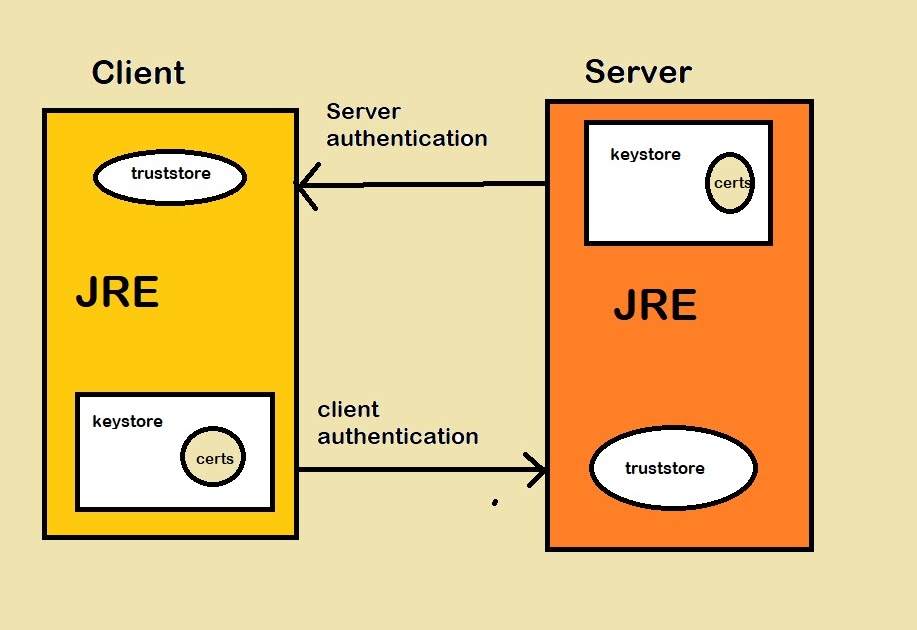
How To Add Or View SSL Certificate In Java KeyStore Or TrustStore

Import SSL Certificate Into Java Keystore HelpEzee

1a Generate a self signed SSL certificate First of all we need to generate a pair of cryptographic keys use them to produce an SSL certificate and store it in a keystore The keytool documentation defines a keystore as a database of cryptographic keys X 509 certificate chains and trusted certificates

It s Java s SSL stack that will validate the web site certificate just as a browser does Do you import the certificate of all the SSL websites you visit before visiting them No The browser validates their certificate because it s certified by a well known certificate authority that the browser knows

Java s list of trusted certificates is stored in a file called a truststore Trusted public root certificates Most public websites on the internet are signed by one of the certificates in the truststore

The Java Developer s Guide to SSL Certificates Amir Follow 6 min read Dec 31 2017 19 Overview When developing web applications we often need to integrate with other applications

Overview HTTPS is an extension of HTTP that allows secure communications between two entities in a computer network HTTPS uses the TLS Transport Layer Security protocol to achieve secure connections TLS can be implemented with one way or two way certificate verification
I also tried converting the certificate to a format with no password using openssl Convert a PKCS 12 file pfx p12 containing a private key and certificates to PEM openssl pkcs12 in keyStore pfx out keyStore pem nodes So the alternate implementaion of the my method could be Create a self signed certificate in a keystore of type JKS using the default key algorithm keytool genkey noprompt trustcacerts alias cert alias dname dn name keypass key pass keystore keystore file storepass keystore pass
There must be valid keystore and certificate files The location of the keystore file and its password must be specified in the server deployment descriptor You can verify whether or not SSL is enabled by following the steps in Verifying SSL Support Specifying a Secure Connection in Your Application Deployment Descriptor