Sql Alter Table Change Column Order SQL ALTER TABLE BestProg SQL Server ALTER TABLE ADD Columns In A Table Interiore Clip Controparte Sql Server Alter Column Nostro Speranza Continua Sql Alter Table Statement Power Bi Docs Hot Sex Picture SQL Tutorial How To Change The Order Of Columns In A Table Using ALTER TABLE changes the structure of a table For example you can add or delete columns create or destroy indexes change the type of existing columns or rename columns or the table itself You can also change characteristics such as the storage engine used for the table or the table comment
Modifies a table definition by altering adding or dropping columns and constraints ALTER TABLE also reassigns and rebuilds partitions or disables and enables constraints and triggers The syntax for ALTER TABLE is different for disk based tables and memory optimized tables First specify the table that you want to add column denoted by the table name after the ALTER TABLE clause Second place the new column definition after the ADD clause If you want to specify the order of the new column in the table you can use the optional clause AFTER existing column
SQL Tutorial How To Change The Order Of Columns In A Table Using SQL Create Table SQL Alter And Drop Table DataFlair Change Datatype Of Column In SQL Scaler Topics SQL And SQL Only ALTER TABLE Adding Column Column Order Impact SQL Server Table Alter Column YouTube Atticus Cleanse Struggle Sql Server Alter Column Set Default Twisted Ms Sql Server Alter Table Change Column Type Brokeasshome Alter Table Column Default Letter G Decoration Ideas How To Change A Column Name In MySQL Devart Blog
Sql Alter Table Change Column Order
 Sql Alter Table Change Column Order
https://www.bestprog.net/wp-content/uploads/2022/08/10_03_03_01_.jpg
SQL Tutorial How to change the order of columns in a table using Alter table statement in SQL YouTube 2023 Google LLC In this video I have explained how to change the
Pre-crafted templates provide a time-saving solution for creating a diverse variety of documents and files. These pre-designed formats and layouts can be made use of for various individual and professional tasks, including resumes, invites, flyers, newsletters, reports, presentations, and more, enhancing the material development process.
Sql Alter Table Change Column Order

Sql Alter Table Change Column Order Brokeasshome
SQL Create Table SQL Alter And Drop Table DataFlair

Change Datatype Of Column In SQL Scaler Topics

SQL And SQL Only ALTER TABLE Adding Column Column Order Impact
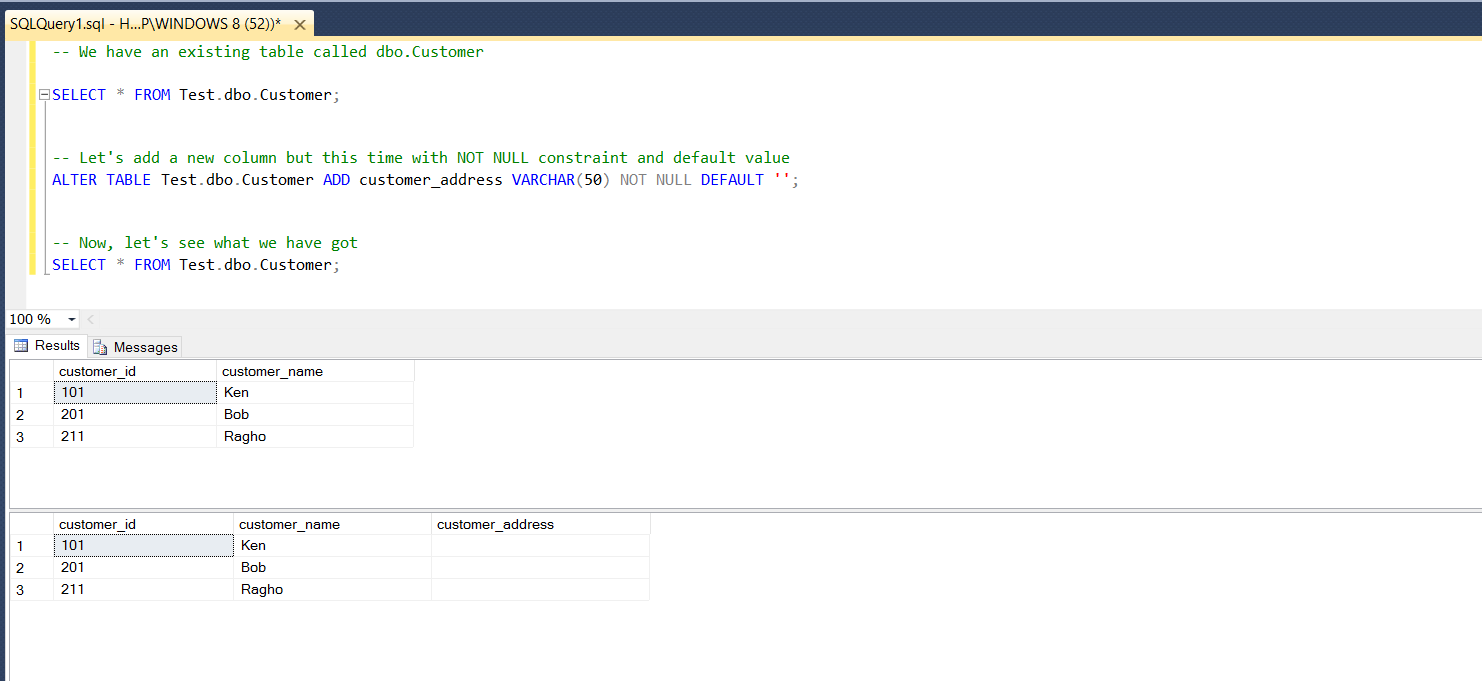
Atticus Cleanse Struggle Sql Server Alter Column Set Default Twisted

Ms Sql Server Alter Table Change Column Type Brokeasshome

There s no real way to change the column order Although SSMS will pretend there is it actually creates a new table copies the data over deletes the original and renames the new one You should really just learn to live with the fact that the columns may be in any order and that there s no inherent meaning to the order

To change the data type of a column in a table use the following syntax SQL Server MS Access ALTER TABLE table name ALTER COLUMN column name datatype My SQL Oracle prior version 10G ALTER TABLE table name MODIFY COLUMN column name datatype Oracle 10G and later ALTER TABLE table name MODIFY column name datatype SQL ALTER TABLE Example
Select the box to the left of the column name that you want to reorder Drag the column to another location within the table I moved a above b because I m OCD and wanted the columns in alphabetical order

Solution Microsoft supports the SQL ALTER TABLE syntax to help the database administrator make changes to a table Today we will explore the three main tasks add a column change a column and delete a column in this SQL Tutorial Business Problem

Summary in this tutorial you will learn how to use the SQL Server ALTER TABLE ALTER COLUMN statement to modify a column of a table SQL Server allows you to perform the following changes to an existing column of a table Modify the data type Change the size Add a NOT NULL constraint Modify column s data type
Method 1 Add column in Management Studio using GUI and visual aid and create the table with necessary order of column If table is too large this put lock on entire table and create temporary outage for that table to be used Method 2 Create new table with the name New YourTable name with your desired table structure and column order The primary key column names can be specified in any order table name Is the user defined table on which to obtain change tracking information Change tracking must be enabled on the table A one two three or four part table name can be used The table name can be a synonym to the table column name
What is the best way to accomplish this using Oracle Assume the table name is ORDERDETAILS and as it is the first two columns are ITEM ID and ORDER ID Once the rename is complete the table name should still be ORDERDETAILS but the first two columns will be ORDER ID and ITEM ID