Spring Boot Devtools Auto Reload Not Working Faster Development With Spring Boot DevTools Vojtech Ruzicka s Spring Boot IntelliJ Live Reload CH Blog Hot Restart Con Spring Boot DevTools SACAViX Tech Blog Spring Boot DevTools Live Reload Not Working IDEs Support IntelliJ IntelliJ Idea Spring Boot DevTools If you use Spring Tool Suite IDE enable Spring Boot DevTools is easy right click on the project then click Spring Add DevTools from the context menu Then Maven will download and add the spring boot devtools version jar to the project
In this config we are enabling SpringBoot DevTools restart functionality setting quick polling and a short quiet period We re also adding the source path as an additional monitored path to trigger restart or classpath reload Author peanutpi commented on Feb 22 2017 For now I am closing the issue I am not able to make time for this peanutpi closed this as completed on Feb 22 2017 snicoll removed the status waiting for triage label on Feb 28 2017
IntelliJ Idea Spring Boot DevTools Spring Boot Devtools for Intellij IDEA Spring Boot Reload Static File Is Not Working Use Spring Boot DevTools For Automatic Restarts And Live Reload Code Hot Reload Spring Boot Freemarker And Thymeleaf Template On Idea IDE Spring Boot DevTools CSDN IntelliJ Spring boot devtools Xaml Hot Reload Not Working Properly With Some Tags ViewCell Spring Boot Auto Reload Spring Tips 1
Spring Boot Devtools Auto Reload Not Working
 Spring Boot Devtools Auto Reload Not Working
https://www.vojtechruzicka.com/static/97a5ba18daef214b4cef0ab62f847b94/0e329/spring-dev-tools.jpg
Open the spring boot project folder in vscode Change the application properties file to application yml Start debugging Edit and save the java code Auto restart should work fine at this point but it doesn t roblourens closed this as completed locked and limited conversation to collaborators 2 weeks ago
Pre-crafted templates offer a time-saving option for creating a varied series of documents and files. These pre-designed formats and layouts can be made use of for numerous personal and expert tasks, consisting of resumes, invites, flyers, newsletters, reports, discussions, and more, streamlining the material creation process.
Spring Boot Devtools Auto Reload Not Working
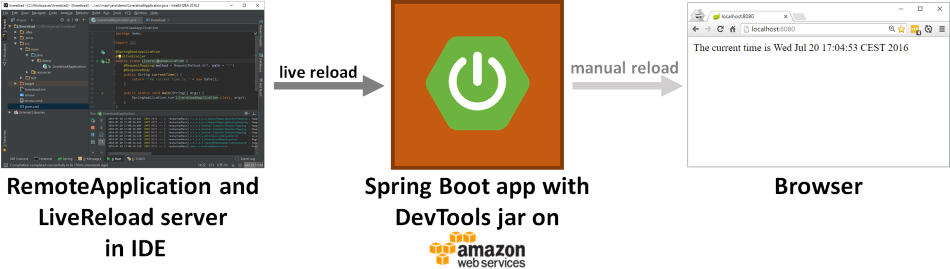
Live Reloading Of Spring Boot Apps On AWS With DevTools Blog

Spring Boot Devtools for
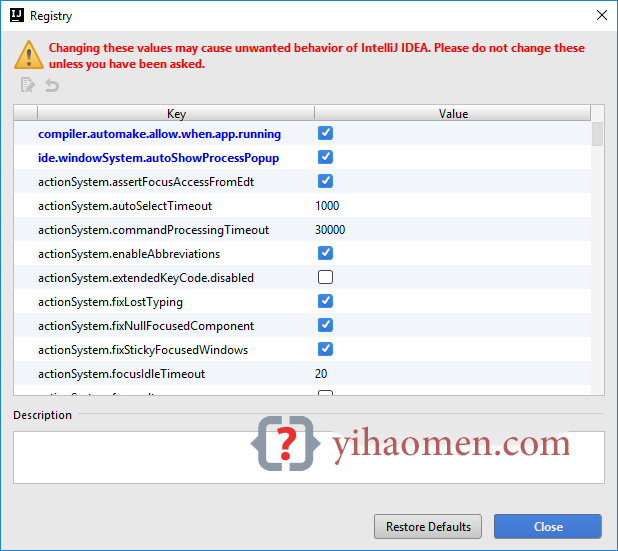
Intellij IDEA Spring Boot Reload Static File Is Not Working

Use Spring Boot DevTools For Automatic Restarts And Live Reload Code
Spring Boot DevTools CSDN

IntelliJ Spring boot devtools

1 Enabled Build Automatically in Settings of the project 2 Registry compiler automake allow when app running THIS IS NOT FOUND IN MY REGISTRY Searched as well as looked for it manually No luck Here is a screenshot Upload ID 2021 07 31 8Dw5isT5E5NiuhAK file IDEA PNG Help me please Votes 6 comments Sort by Arina Efremova

Devtools reload doesn t work with spring boot maven plugin 3315 Closed donovanmuller opened this issue on Jun 23 2015 37 comments philwebb added this to the 1 3 0 M2 milestone on Jun 25 2015 philwebb modified the milestones 1 3 0 RC1 1 3 0 M2 on Jul 7 2015 type bug snicoll self assigned this

To fix the problem and let IntelliJ IDEA triggers Spring Boot DevTools restarts the application really automatically you need to do 2 extra steps First enable Build project automatically in the Settings dialog Click menu File Settings Build Execution Deployment Compiler as shown below Then open IntelliJ IDEA Registry

Here are the steps Add the dependency spring boot devtools to your project s build file pom xml Install LiveReload extension for your browser Restart your Spring Boot application That s it and you re all set Enjoy better Spring Boot development experience

Applications that use spring boot devtools will automatically restart whenever files on the classpath change This can be a useful feature when working in an IDE as it gives a very fast feedback loop for code changes By default any entry on the classpath that points to a folder will be monitored for changes
Wow what an awesome app Now modify your source code First edit one of your static resources such as a thymeleaf template and save For instance I changed Name to be First Name Next change one of your Java Classes in this project I added an extra mapping for anotherForm Now from the menu select Build Build Project or Command F9 and check your browser Note Developer tools are automatically disabled when running a fully packaged application If your application is launched using java jar or if it s started using a special classloader then it is considered a production application Flagging the dependency as optional is a best practice that prevents devtools from being transitively applied to other modules using your project
Below are all the steps required to make auto reload work in IntelliJ Add Spring DevTools dependency dependency groupId org springframework boot groupId artifactId spring boot devtools