Special Characters Alt Codes Check Mark Repareer ALT codes Werken Niet Op Windows 10 Tutorials Voor Windows Bulletin Dentrodabiblia Alt Codes Alt Alt alt QQzovo How To Get Special Characters Using Alt Key Codes Or The Word Symbols Library PCWorld Simple TipsHacksandinfo Special Characters Using ALT Key Combination Type check mark symbol in Word using Alt Code The alt code to type the checkbox symbol in Word is 10003 Use 10004 for a heavy checkmark To use this alt code type the check mark symbol in Word obey the following instructions Place the cursor where you want to type the checkmark Press and hold the Alt key on your keyboard
ALT 0 ALT 31 and ALT 127 produces a range of whimsical graphical special characters and symbols from Code Page 437 such as the smiley face and heart symbol In ASCII codes 0 31 and 127 are for non printable control characters associated with old teletype transmissions such as line feed LF and carriage return CR To insert a check mark symbol in a Word document using Alt Position the cursor where you want to insert the check mark symbol Press Alt 0252 or Alt 0254 on the numeric keypad If the sequence doesn t work press NumLock on the numeric keypad Word will insert a different character
Simple TipsHacksandinfo Special Characters Using ALT Key Combination Simple TipsHacksandinfo Special Characters Using ALT Key Combination Alt Codes Google Search Electronic World Alt Symbols Coding Alt Codes Computer Tastatur Computertechnik Excel Tipps Image Result For All Alt Key Codes Symbols Keyboard Symbols Computer Basics Computer How To Get Special Characters Using Alt Key Codes Or The Word Symbols Library PCWorld Word ALT Codes Alt Key Codes Computer Shortcuts Computer Basics Hacking Computer How To Get Special Characters Using Alt Key Codes Or The Word Symbols Library PCWorld How To Get Special Characters Using Alt Key Codes Or The Word Symbols Library PCWorld
Special Characters Alt Codes Check Mark
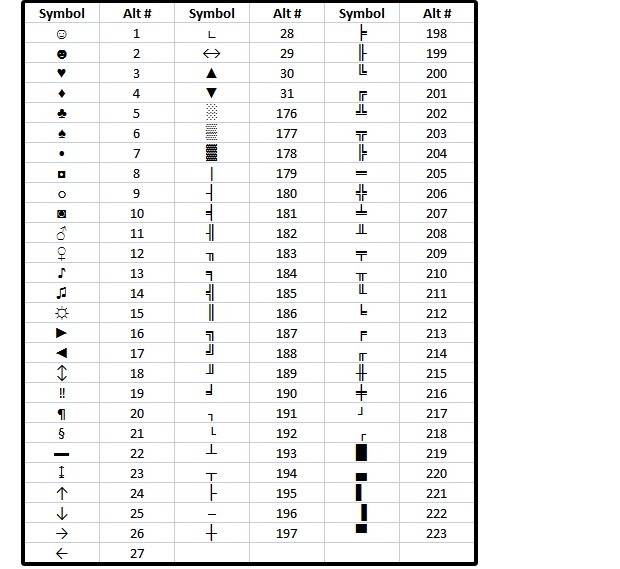 Special Characters Alt Codes Check Mark
https://windowsbulletin.com/wp-content/uploads/2019/10/ALT-Codes.jpg
Press Win keys in Windows PC to open emoji keyboard You can either search for check mark or type tick or check to filter the symbol Check Mark Emoji in Windows 11 On Mac press Command Control Space to open emoji keyboard Use the search box to find the check mark symbol Insert Check Mark in Mac
Pre-crafted templates provide a time-saving solution for developing a varied range of files and files. These pre-designed formats and layouts can be used for numerous personal and expert projects, including resumes, invites, flyers, newsletters, reports, presentations, and more, simplifying the material production process.
Special Characters Alt Codes Check Mark

Here Is All Of The Info Again Reddit Computer Shortcut Keys Computer Basics Life Hacks Computer

Simple TipsHacksandinfo Special Characters Using ALT Key Combination

Alt Codes Google Search Electronic World Alt Symbols Coding

Alt Codes Computer Tastatur Computertechnik Excel Tipps

How To Get Special Characters Using Alt Key Codes Or The Word Symbols Library PCWorld Word

ALT Codes Alt Key Codes Computer Shortcuts Computer Basics Hacking Computer

Alt 0149 Alt 0405 Alt 0661 Alt 0917 Alt 1031 Alt 1287 Alt 1543 etc Alt 9991 Alt 00149 Alt 00405 etc Alt 99847 However I can t seem to find any combination which allows me to make any other more interesting symbols and definitely no checkmark

For the the complete list of the first 256 Windows ALT Codes visit Windows ALT Codes for Special Characters Symbols Learn easy ALT code keyboard shortcuts for check mark cross mark and ballot box symbols Or click any check mark symbol to copy and paste

Make sure you switch on the NumLock press and hold down the Alt key type the Alt Code value of the degree symbol 0 1 7 6 on the numeric pad release the Alt key and you got a degree symbol Above mentioned procedure is not aplicable for MacOS For more information on how to use symbols emojis please check our How to use Alt Codes page

You can easily insert a check mark also known as a tick mark in Word Outlook Excel or PowerPoint These marks are static symbols If you re looking for an interactive check box that you can click to check or uncheck see Add a check box or option button Excel or Make a checklist in Word In your file place the cursor where you want to insert the symbol
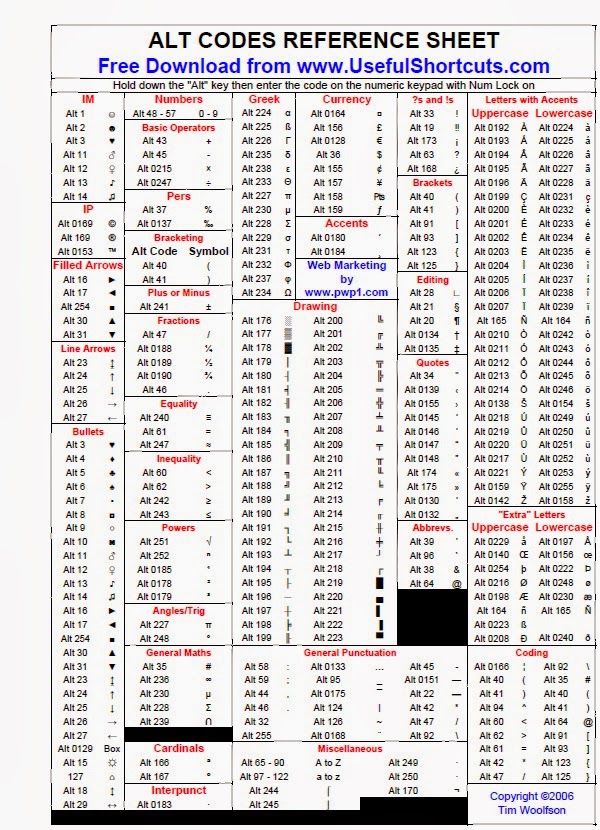
Alt Codes How to Type Special Characters and Keyboard Symbols on Windows Using the Alt Keys Quincy Larson In Windows you can type any character you want by holding down the ALT key typing a sequence of numbers then releasing the ALT key
Note that you can type special letters with multiple ALT keyboard shortcuts Just use the one that works best for you Keyboard Shortcut Character Description Alt 128 Alt 0199 Latin Special characters also known as diacritical marks may be more common in certain languages but there are plenty of circumstances in which English speakers may need to use them But because
Method 1 Insert Symbols Navigating Insert Tab Symbols and select More Symbols Navigate to Symbols in Word 2 Select Symbol Tab Wingdings Font and double click on desired symbol i e or 3 Select Close Method 2 Alt Code Requires dedicated Number pad keys Ms Word Alt code for Tick or Check Mark and Tick in Box are