Slide Transition Effects How To Add Random Transition Effects To PowerPoint Slides How To Apply Slide Transition Effects Ncert Books Set Slide Transition Effects In PowerPoint Exciting Transitions Powerpoint Powerpoint Presentation How To Apply Lesson No 9 Adding Transitions To Your PowerPoint Presentation The Help Desk 4 All October 26 2022 One of the best ways to capture the audience s attention is by using transitions and animations in your presentations For this reason it s common for presentation software to include a wide array of these effects However this can make it harder for you to decide which ones to incorporate into your show
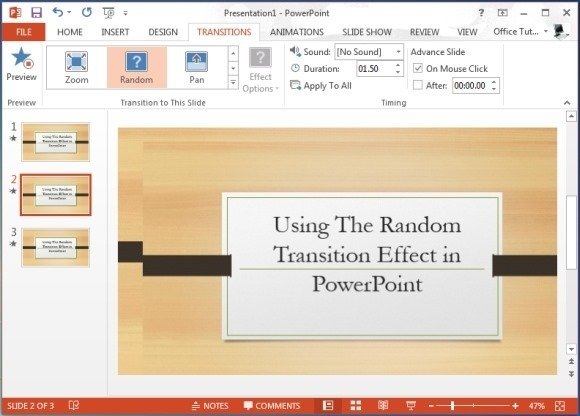
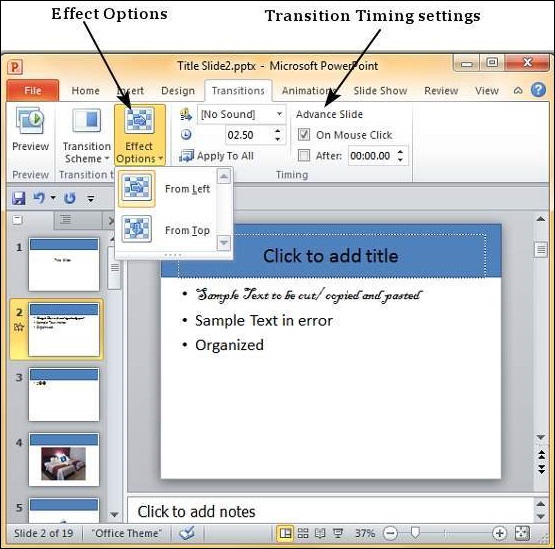
To apply a transition Select the desired slide from the Slide Navigation pane This is the slide that will appear after the transition Click the Transitions tab then locate the Transition to This Slide group By default None is applied to each slide Click the More drop down arrow to display all transitions The only slide transition I suggest you consider is a quick 0 5 second Fade between slides if you want to have something other than a quick appearance of the next slide It is subtle and does not distract the audience
Lesson No 9 Adding Transitions To Your PowerPoint Presentation The Help Desk 4 All Image To Video GUI For Businesses With 2D And 3D Slide Transition Effects ByteScout Prestige Transition Effect In PowerPoint YouTube 13234042645518256220 how To Create Time Sliders In React Native By Saad Khan HooDoo Wallpaper Keynote Magic Move How To Use Slide Transition Effects YouTube Slide Transition Effects Featured FreePowerPointTemplates Free PowerPoint Templates Slide Transition Effects In Microsoft PowerPoint In Hindi YouTube How To Add Slide Transition Effects ActivePresenter 8 YouTube Farm Slideshow Indigo Farms
Slide Transition Effects
 Slide Transition Effects
https://cdn.free-power-point-templates.com/articles/wp-content/uploads/2014/04/Random-Transition-Effect-in-PowerPoint.jpg
Q A Tips Is your PowerPoint presentation boring Spice it up by adding transitions between your slides Slide transitions are effects that happen when you move from one slide to the next during a presentation and can make your presentation a little more interesting
Pre-crafted templates offer a time-saving option for producing a diverse variety of files and files. These pre-designed formats and layouts can be utilized for different individual and professional jobs, including resumes, invitations, leaflets, newsletters, reports, discussions, and more, simplifying the material creation process.
Slide Transition Effects
Add Preview Transitions In Powerpoint Tutorial Desk

Image To Video GUI For Businesses With 2D And 3D Slide Transition Effects ByteScout
Prestige Transition Effect In PowerPoint YouTube
13234042645518256220 how To Create Time Sliders In React Native By Saad Khan HooDoo Wallpaper

Slide Transition Effects Featured FreePowerPointTemplates Free PowerPoint Templates

Slide Transition Effects In Microsoft PowerPoint In Hindi YouTube
A slide transition is the visual effect that occurs when you move from one slide to the next during a presentation You can control the speed add sound and customize the look of transition effects Windows macOS Web Android iOS Add slide transitions to bring your presentation to life Select the slide you want to add a transition to
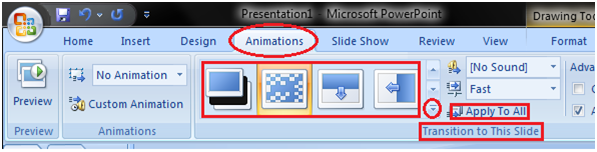
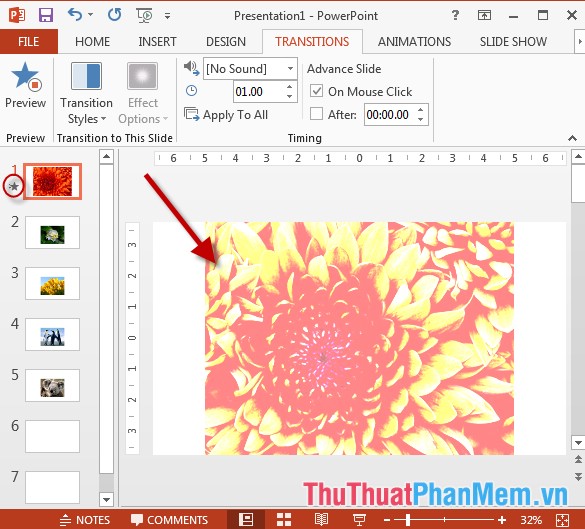
Slide transitions are the animation like effects that happen when you move from one slide to the next during a presentation Add slide transitions to bring your PowerPoint presentation to life Select the slide you want to add a transition to Select the Transitions tab and choose a transition Select a transition to see a preview
If you re a Google Slides user you ll find your transition effects by first clicking on a slide in the navigation pane step 1 Then look for the Transition button in the menu bar step 2 The Transitions pane will appear on the right Choose from the 7 different transition options step 3 as you see below Where to Find Animation Effects

Slide transitions are the effects that occur when you move from one slide to the next during an on screen presentation Here s how to work with them Add a transition to a slide In the thumbnail pane click the slide that you want to apply a transition to The transition setting dictates how that slide enters and the preceding slide exits

Updated November 3 2022 Instead of jumping from slide to slide you can make your presentation more pleasing Here s how to use slide transitions in PowerPoint If you re trying to impress
To add a PowerPoint transition Click on the slide that is the endpoint of the transition process Click on the Transitions tab in the navigation ribbon In the Transition gallery click Right click the slide in the side panel Duplicate Click on the duplicated slide and group all objects together CTRL A to select everything on the slide and CTRL G to group it This will be your bottom layer and you ll create the transition on top of it On the second slide draw several rectangles the width of the slide
Add Slide Transitions For slide transitions go to the Transitions tab and select the preferred transition effect Adjust the transition settings such as timing and sound to suit the presentation style PowerPoint offers a plethora of animation and transition effects to enhance presentations and captivate audiences However merely