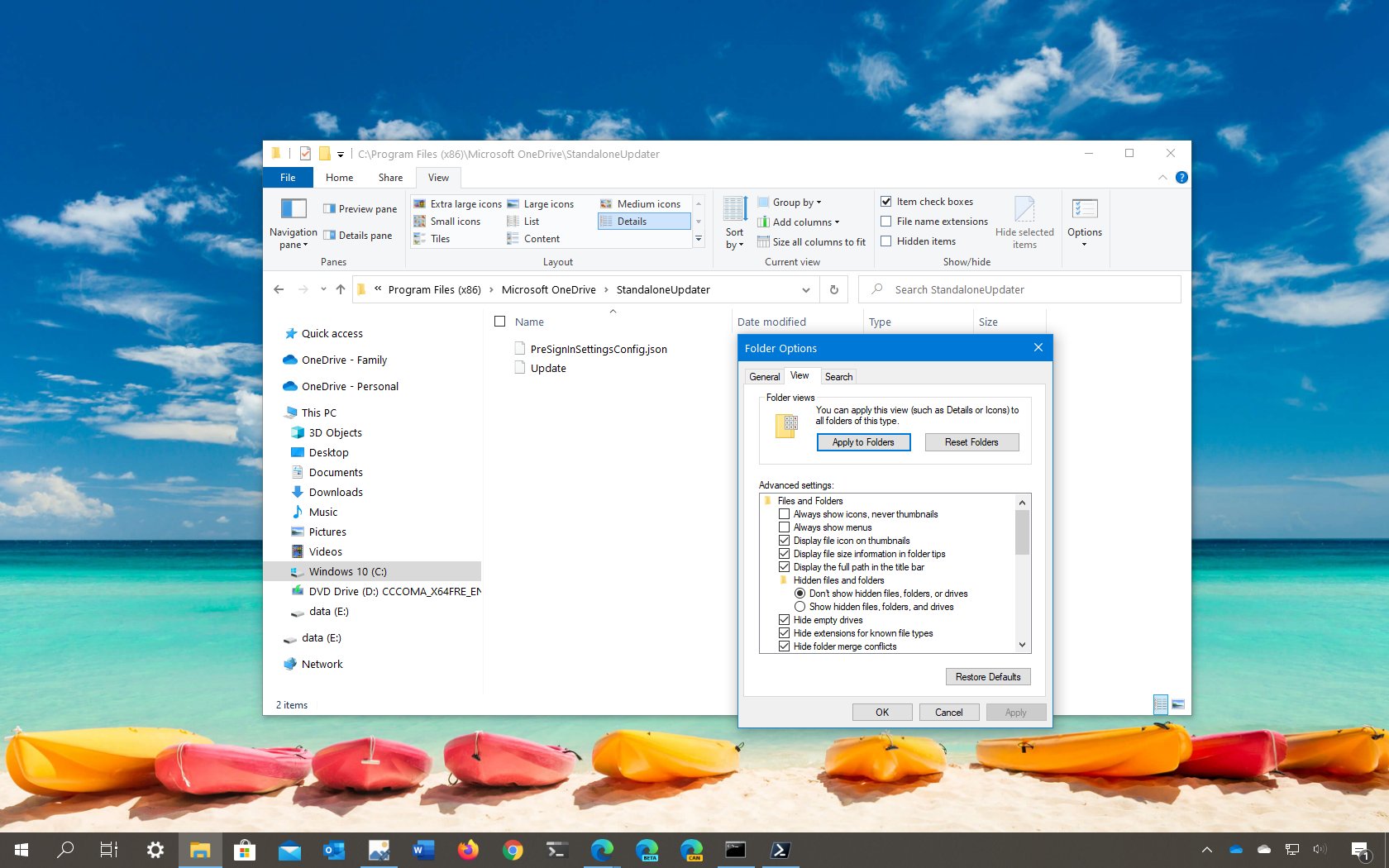
Show Full Path Mac Terminal Mac MacPilot EditPlus Solved Mac OS X Remote Shared Directory Full Path 9to5Answer How To Show Full Path In Finder On MacOS Video AnsonAlex How To Show Full Path In File Explorer On Windows 10 Pureinfotech Method 1 Info window If you know which file you want to reference later knowing how to find the path of a file in Mac is actually pretty simple Here s how Locate the file you re looking for on your Mac Right click the file Choose Get Info The file path on Mac will be listed under Where in the Get Info window that appears
To specify another user s Document folder use the short name preceded by the tilde character for example jsmith Documents In macOS this folder is in the local Users folder or on a network server For a list of short names on your server enter dscl list Users Most of these users aren t traditional user accounts with home Use the Terminal to Reveal a File Path on Mac Many Terminal commands require you to enter in the full path of the file As such the Terminal app has the ability to show you the full path of any file located on your machine Here s how to do it First launch Terminal through your preferred method
How To Show Full Path In File Explorer On Windows 10 Pureinfotech Ubantu weixin 33845881 CSDN Windows Way To Show Full Path In Windows Explorer Back Button Show Full Path In Title Bar Of File Explorer In Windows 10 Gambaran IntelliJ IDEA Angular Cli Webpack Angular Sublime Text sublime captain9911 CSDN Editplus 5 6 USB How IT How To Find File Path In Mac Terminal Coloradoasl
Show Full Path Mac Terminal
 Show Full Path Mac Terminal
https://pic4.zhimg.com/v2-d2dd3718adbf6aeca164016777a00fd3_r.jpg
How to find path names on Mac Use any of these six ways hide 1 Finder Path Bar 2 Finder context menu 3 Spotlight 4 Get Info 5 Terminal 6 Finder title bar Finder Path Bar The simplest way to always see the full path of a file or folder on macOS is with the Finder Path Bar Open Finder and go to View Show Path Bar
Templates are pre-designed documents or files that can be utilized for different functions. They can save time and effort by supplying a ready-made format and layout for producing different type of content. Templates can be utilized for personal or expert jobs, such as resumes, invites, leaflets, newsletters, reports, discussions, and more.
Show Full Path Mac Terminal
Show Full Path In File Explorer Address Bar In Windows 11 Tutorial

Ubantu weixin 33845881 CSDN

Windows Way To Show Full Path In Windows Explorer Back Button

Show Full Path In Title Bar Of File Explorer In Windows 10 Gambaran

Sublime Text sublime captain9911 CSDN

Editplus 5 6
Open a Finder window and from the top menu bar click the View button In the menu that appears click Show Path Bar Instantly you will see a new Path Bar at the bottom of every finder window It will show you the system path to the current folder You can double click any folder listed in the bar to quickly jump to it
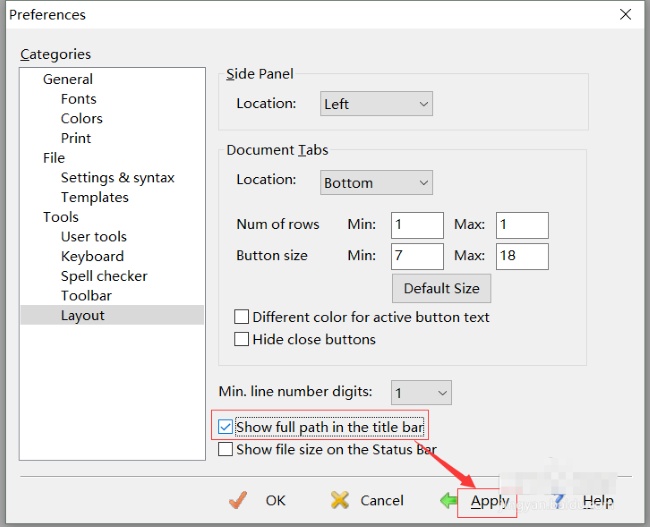
6 Mar 11 2021 1 Hello Forum Unter Linux I was used that the full directory path was always shown in the shell CLI Under the ZSH of macOS Catalina by default this is not the case Even

How to have full directory path always shown in mac terminal Ask Question Asked 9 years 1 month ago Modified 3 years 4 months ago Viewed 21k times 2 I found answers but they don t work I added this line in bash profile export PS1 u H w It outputs u H w Instead of user host my Current Path In This Terminal Window terminal Share

To use the pwd command to get the path on Mac Terminal follow these steps 1 Open the Terminal application on your Mac 2 Navigate to the directory for which you want to obtain the path 3 Type pwd without quotes and press Enter 4 The full path of the current directory will be displayed in the Terminal Method 2 Using the find
9 Answers Sorted by Reset to default This answer is useful 72 This answer is not useful Save this answer Show activity on this post You can also enter the following in Terminal defaults write com apple finder FXShowPosixPathInTitle bool YES then killall Finder This will display the full path in the titlebar
When looking at a Finder window you can get the Finder to display the full path to the current folder like this You can t just show that drop down menu by clicking on it with the mouse however But you can show it using this hidden key mouse combination Press and hold the Apple key Left click the Finder menu bar which it displays the How to show full path of a file including the full filename in Mac OSX terminal I hope you found a solution that worked for you The Content except music
Hello ForumUnter Lenox I was used that the full directory path used always display in the shell CLI Under the ZSH of macOS Catalina by default this is not the case Even can there are may tips in which web how to build ZSH behave like that I i ineffective to do so Question What is the