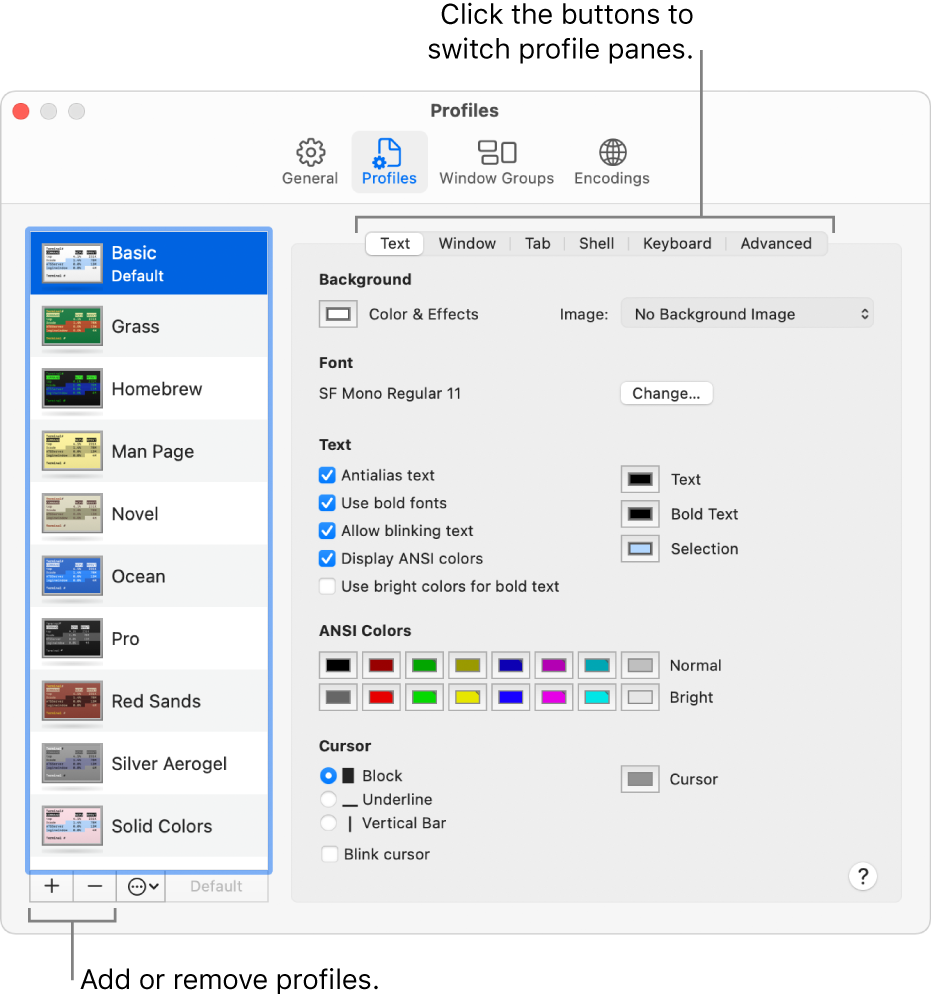
Show Current Path Terminal Mac Mac Os Create File Terminal Pickbinger How Measure Current And Voltage In Proteus Series Circuit Proteus How To Show Current Path In Finder Title Bar Compsmag How To Download And Install Proteus Software On Windows GeeksforGeeks How To Use Find Command Mac Terminal Hotlinedamer Go in the Terminal app menu select Terminal Preferences Profiles Basic Default Window and enable the Path checkbox to show the entire path You can drag the icon of the window to insert the path as text into the terminal window You can type pwd to see the current path Last edited Mar 16 2021 B
Teams Q A for work Connect and share knowledge within a single location that is structured and easy to search Learn more about Teams Method 2 How to get a file path from Mac context menu Here s how to surface and copy the file path for any file or folder in your Mac s Finder app Open Finder on your Mac In the menu choose View Choose Show Path Bar This surfaces the path for any file selected at the bottom of the Finder window If you try to copy the text at the
How To Use Find Command Mac Terminal Hotlinedamer Oni Mac Os X Download Networktree Learn 8086 Microprocessor With Proteus Circuit Simulations By Mustafa Phoenix Contact Safety Relays PSR SCP 24UC ESA4 3X1 1X2 B Ll Santiago Calatrava Valencia Voor Beginners HURRICANE IVAN How To Navigate Files And Folders In Terminal Macworld How To Show Current Path In Mac OS X Finder Stugon How To Show Current Path In Mac OS X Finder Stugon
Show Current Path Terminal Mac
 Show Current Path Terminal Mac
https://help.apple.com/assets/6152754A4192845C4361C49A/6152754B4192845C4361C4A1/en_US/30008db6a44b57415fe5cb18208c2265.png
The green name is the branch the symbol before the closing parenthesis is the status You need to put djromero s usage sample into bash profile By default you probably won t have one on Mac so you need to create the file and then use the above verbatim assuming git prompt sh is saved at git prompt sh
Templates are pre-designed files or files that can be used for numerous functions. They can save time and effort by providing a ready-made format and layout for producing different sort of content. Templates can be utilized for personal or professional jobs, such as resumes, invites, flyers, newsletters, reports, presentations, and more.
Show Current Path Terminal Mac

Hurricane Ian Current Projected Path HUIRENAH

Oni Mac Os X Download Networktree

Learn 8086 Microprocessor With Proteus Circuit Simulations By Mustafa

Phoenix Contact Safety Relays PSR SCP 24UC ESA4 3X1 1X2 B Ll

HURRICANE IVAN

How To Navigate Files And Folders In Terminal Macworld
In Mac OSX do the following steps cd into the directory of the target file Type either of the following terminal commands Terminal ls pwd file txt echo pwd file txt Replace file txt with your actual file name Press Enter

Teams Q A for work Connect and share knowledge within a single location that is structured and easy to search Learn more about Teams

I am not able to see path of my current directory or even username in terminal while using zsh I was able to see it until few days back Now it just shows blank I tried uninstalling oh my zsh but it dint work If I switch to bash then I can see path I have tried restarting my mac as well but no luck Currently terminal looks like below
Open a Finder window and from the top menu bar click the View button In the menu that appears click Show Path Bar Instantly you will see a new Path Bar at the bottom of every finder window It will show you the system path to the current folder You can double click any folder listed in the bar to quickly jump to it

1 Open the Terminal application on your Mac 2 Navigate to the directory in which the file or directory is located 3 Type the following command replacing filename with the name of the file or directory you want to find the path for ls d pwd filename
1 Open a Finder window on your Mac You can do that by opening any folder and it will launch in the Finder app 2 Once a Finder window launches click on View on the top and then select Show Path Bar 3 As soon as you click the option in the above step you will see the current directory path in the bar at the bottom of the Anytime that you run a command through the Terminal directly by a command name like ls or dscacheutil your Mac is looking through a series of directories for that command to exist This list of directories is called the PATH and it s a carry over from the unix underpinnings of Mac OS X
Show Current Path in Mac OS X Finder To show the current path in Mac OS X finder you have two ways The first is to use the build in option and the second is that use the hidden terminal tweak First Method Using Finder To start off open up the Finder window navigate to View and then select the option Show Path Bar