Setting To Open Pdf In Browser Download Adobe Reader Can Uncheck Display Pdf In Browser EDGE DOWNLOAD PDF INSTEAD Of OPENING Edge Don t Open PDF In Browser Document To Open In Adobe Not Edge Australia Tutorials Cognitive Ceruzka arv tka Z ves Can Pdf Open As Ppt Presentation ahko Milovn k FIX Something s Keeping This PDF From Opening In Edge Web How to enable the native Chrome PDF viewer The native Chrome PDF viewer is the default way to open PDF files and view them in Chrome It s relatively simple to adjust your Chrome PDF viewer settings You can toggle it on and off to either read PDFs in the browser or have them downloaded directly
Web View PDF files in Firefox or choose another viewer Firefox includes a built in PDF viewer to display PDF files inside the browser window This article explains how to use the built in PDF viewer how to fix the common issues you might Web May 23 2023 nbsp 0183 32 Click the Enable extension button Using Open in Acrobat Reader option for PDFs opened in Chrome browser When you open a PDF in Chrome you see the Adobe Acrobat prompt in the upper right corner of the window Click Open in Acrobat Reader Disable the Chrome extension Right click the extension and then choose
FIX Something s Keeping This PDF From Opening In Edge How To Open Pdf In Browser In Firefox YouTube How To Stop Microsoft Edge From Opening Tabs Automatically Bxaverse Open PDF Files In The Browser From SharePoint YouTube How To Open PDF In Word Words Pdf Thoughts Preview Pdf Viewer For Pc Loplv Easiest Way To Open PDF In Word For Editing On Windows Mac How To Open Pdf In Word Document Holoserfiles Open PDF Files In Browser From SharePoint 2010 SharePoint Diary
Setting To Open Pdf In Browser
 Setting To Open Pdf In Browser
http://2.bp.blogspot.com/-5uhxcn5glOA/UQTpGzphitI/AAAAAAAABNM/ufV2O8Af_dI/s1600/Open+PDF+in+Adobe+Reader+instead+of+Browser.png
Web Sep 30 2022 nbsp 0183 32 To show the toolbar roll your cursor near the bottom of the window To page through the PDF use the navigation buttons in the toolbar To close Read mode and display the work area click the Acrobat icon in the toolbar To disable Read mode within the browser open the Acrobat or Reader Preferences in Windows choose Edit gt
Templates are pre-designed files or files that can be utilized for different functions. They can save effort and time by providing a ready-made format and layout for producing various type of content. Templates can be utilized for personal or expert projects, such as resumes, invites, leaflets, newsletters, reports, discussions, and more.
Setting To Open Pdf In Browser
Web Browser

How To Open Pdf In Browser In Firefox YouTube
How To Stop Microsoft Edge From Opening Tabs Automatically Bxaverse

Open PDF Files In The Browser From SharePoint YouTube

Preview Pdf Viewer For Pc Loplv

Easiest Way To Open PDF In Word For Editing On Windows Mac

Web Click the Change button Select Adobe Acrobat DC or Reader from the list as your default Click OK to save and apply changes Change from Preview to the Acrobat PDF viewer Right click on the thumbnail of any PDF file On the menu click Get Info Navigate to the Open With section and select Adobe Acrobat DC or Reader from the dropdown list

Web Sep 5 2023 nbsp 0183 32 Press Windows i to open the Settings app then navigate to Apps gt Default Apps gt Choose Default App By File Type and locate PDF Click the icon to change the default app Microsoft Edge is not only the default web browser in Windows 10 but also the default PDF reader

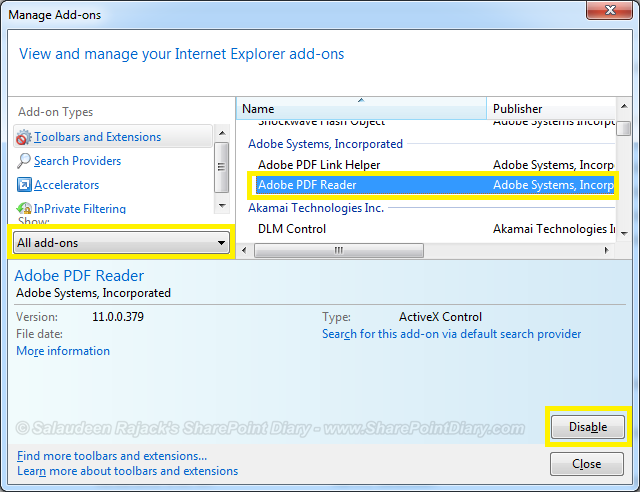
Web May 23 2023 nbsp 0183 32 Enable sets the Adobe PDF Reader add on to open PDFs in the browser Disable turns off the add on so it does not open PDFs in the browser Select Adobe PDF Reader and click the Enable Disable button
Web May 23 2023 nbsp 0183 32 Choose Firefox gt Options gt Applications In the Content Type area scroll to Portable Document Format PDF Click the Action column next to Portable Document Format PDF and then select an application to open the PDF For example to use the Acrobat plug in within the browser choose Use Adobe Acrobat in Firefox
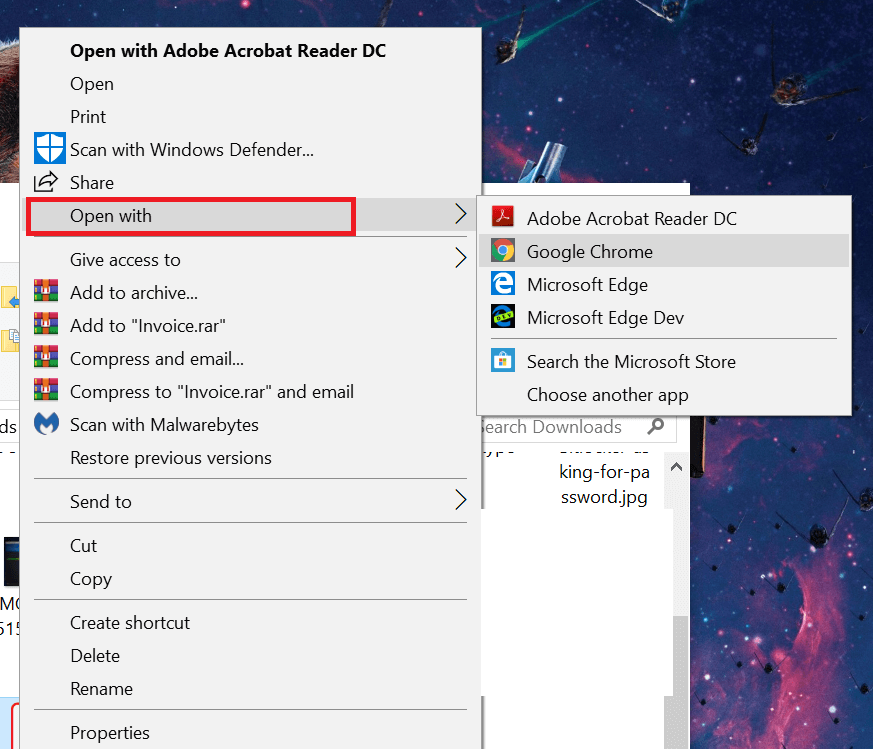
Web Updated on May 16 2022 What to Know In the Chrome browser select the three vertical dots in the upper right corner Choose Settings gt Advanced gt Privacy and security Select Site Settings gt PDF documents Use the toggle switch next to Download PDF files instead of automatically opening them in Chrome to turn the feature on and off
Web Sep 19 2023 nbsp 0183 32 Solution You need to set the Default behavior to Open PDFs in Chrome from chrome settings content pdfDocuments Workaround Got to Chrome Browser Navigate to Settings gt Privacy and Web Aug 30 2023 nbsp 0183 32 Step 1 Open the Chrome Browser Step 2 Navigate to the quot Plug ins quot Select the PDF viewer from the list of options given and that s quot Chrome PDF Viewer quot You can now toggle the given option to enable the viewer Click quot Enable quot to set Chrome PDF Viewer as the default PDF viewer on Google Chrome Step 3 Right click on your document
Web May 23 2023 nbsp 0183 32 Make Acrobat the default PDF viewer in your browser The PDF may not open in Acrobat viewer if multiple PDF extensions are installed Do the following to make Acrobat the default PDF viewer in Edge to use commenting fill and sign and more PDF tools Launch the Microsoft 174 Edge browser