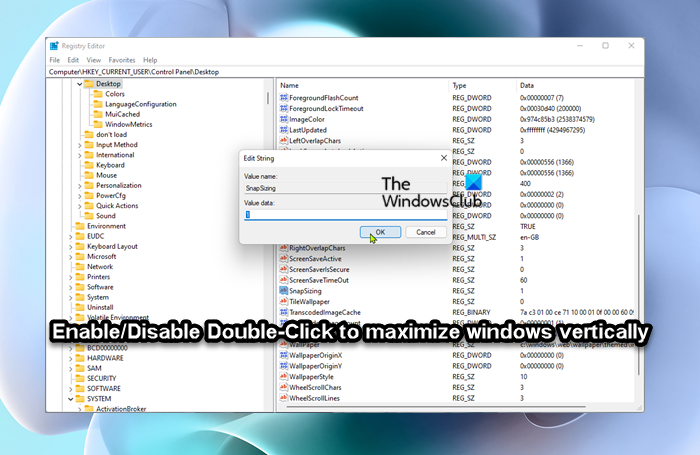
Selenium Command To Maximize Window How To Maximize The Browser Window In Selenium WebDriver Maximize Window Using Selenium Automated End to End Testing With Selenium And Cypress io Disable Double Click To Maximize Window Vertically In Windows 11 10 Thewindowsclub Selenium Webdriver Tutorial With Examples BrowserStack Maximize Browser Window Selenium Java TutorialKart Dec 1 2019 nbsp 0183 32 In Selenium waiting for an element to be present visible and interactable is a common requirement to ensure that your test scripts are robust and reliable You can achieve this by using WebDriverWait along with ExpectedConditions
May 12 2013 nbsp 0183 32 The Selenium documentation mentions that the Chrome webdriver can take an instance of ChromeOptions but I can t figure out how to create ChromeOptions I m hoping to pass the disable extensions I m looking for a quick way to type the Enter or Return key in Selenium Unfortunately the form I m trying to test not my own code so I can t modify doesn t have a Submit button When working w
Maximize Browser Window Selenium Java TutorialKart How To Maximize Browser Window In Selenium Different Methods To Maximize Window Or Tabs SN Useful Keyboard Shortcuts KCTC Maximize Browser Window Using Selenium WebDriver And By Using Abstract Window Toolkit Selenium Navigate To Url Python Maximize Website Window Using Selenium Webdriver 5 Ways The Fairmont San Francisco Hotel Spells Luxury Initial Render Issue Issue 164 Azouaoui med react pro sidebar GitHub Keyboard Shortcut To Full Screen A Window Kopatwork Code Example Selenium Chrome I Just Can t Use Driver maximize window To Maximize Window
Selenium Command To Maximize Window
 Selenium Command To Maximize Window
https://i.pinimg.com/736x/82/70/b3/8270b38cc0e5afc3a1b21c803b1aa3ee.jpg
An answer from 2020 The following code solves this A lot of people new to selenium seem to have to get past this step Install the chromedriver and put it inside a folder on your desktop Also make sure to put the selenium python project in the same folder as where the chrome driver is located Change USER NAME and FOLDER in accordance to your computer For Windows
Templates are pre-designed files or files that can be used for numerous purposes. They can conserve time and effort by supplying a ready-made format and design for creating various type of material. Templates can be used for personal or professional projects, such as resumes, invites, leaflets, newsletters, reports, presentations, and more.
Selenium Command To Maximize Window
How To Maximize Window Space For Plants

How To Maximize Browser Window In Selenium Different Methods To Maximize Window Or Tabs SN
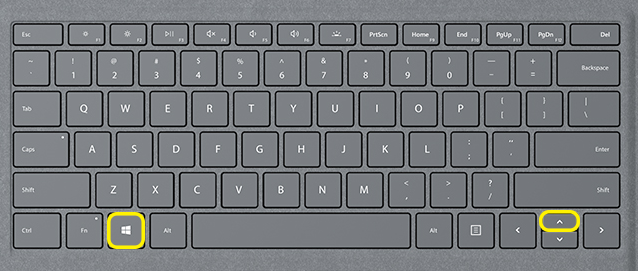
Useful Keyboard Shortcuts KCTC

Maximize Browser Window Using Selenium WebDriver And By Using Abstract Window Toolkit

5 Ways The Fairmont San Francisco Hotel Spells Luxury

Initial Render Issue Issue 164 Azouaoui med react pro sidebar GitHub

Jun 25 2025 nbsp 0183 32 If you have Chrome 137 installed and it is available on your PATH and you want to use the appropriate ChromeDriver with it you can set the browser version property before instantiating Chrome chrome options webdriver ChromeOptions chrome options browser version quot 137 quot driver webdriver Chrome options chrome options

Jan 31 2019 nbsp 0183 32 What is Selenium Selenium is a framework where scripts are written to run and execute webDriver which in turn controls browser What is WebDriver WebDriver is an API the name itself suggests driving the web browser or controlling the web browser by using libraries and commands The one and only job of WebDriver is to control the browser it doesn t know
Mar 4 2022 nbsp 0183 32 Note This is a workaround and not the exact solution to your problem Install webdriver manager pip install webdriver manager import from webdriver manager chrome import ChromeDriverManager Then instead of your local chromedriver path use this driver webdriver Chrome ChromeDriverManager install this should work Basically it takes care

Apr 13 2016 nbsp 0183 32 I am trying to automate some test cases using Java and Selenium WebDriver I have the following scenario There is a page named Products When I click on View Details link in the Product page
Apr 12 2018 nbsp 0183 32 For any driver that Selenium must use to open the browser chromedriver geckodriver etc you don t have to worry about where it is installed as long as it s set in the PATH variable
[desc-11] [desc-12]
[desc-13]