Select First X Rows Pandas Pandas Select First N Rows Of A DataFrame Data Science Parichay Like Follow And Share panda world official For More Pandas Reposted How To Select Filter And Subset Data In Pandas Dataframes Panda Cubs And Pension Protests Wednesday s Top Photos Zoo Baby Panda The Atlanta Zoo s Baby Panda Cub Just Wants To Say Hey PHOTOS How to get the first N rows in Pandas DataFrame May 28 2021 You can use df head to get the first N rows in Pandas DataFrame For example if you need the first 4 rows then use df head 4 Alternatively you can specify a negative number within the brackets to get all the rows excluding the last N rows
Pandas DataFrame loc is a function used to select rows from Pandas DataFrame based on the condition provided In this article let s learn to select the rows from Pandas DataFrame based on some conditions Syntax df loc df cname condition Parameters df represents data frame cname represents column name The axis labeling information in pandas objects serves many purposes Identifies data i e provides metadata using known indicators important for analysis visualization and interactive console display Enables automatic and explicit data alignment Allows intuitive getting and setting of subsets of the data set
The Atlanta Zoo s Baby Panda Cub Just Wants To Say Hey PHOTOS Pandas Apply Function To Every Row Spark By Examples How To Select Rows By List Of Values In Pandas DataFrame How To Select Particular Rows And Columns Without Hardcoding In Pandas Pandas Read Only The First N Rows Of A CSV File Data Science Parichay How To Iterate Over Rows In Pandas And Why You Shouldn t Real Python Select Rows With Different Column Value Pandas Design Talk Pandas Iterate Over A Pandas Dataframe Rows Datagy How Many Giant Pandas Are Left In The World Panda Bear Cute Panda
Select First X Rows Pandas
 Select First X Rows Pandas
https://i2.wp.com/datascienceparichay.com/wp-content/uploads/2021/01/pandas-select-first-n-rows.png?fit=900%2C520&ssl=1
This works very similar to indexing lists in Pythom where we can use a colon to denote selecting an entire list This means that we can parse our a particular row by selecting its row index and simply selecting all columns Let s see how we can access the first row using the loc operator Accessing the first row in a Pandas dataframe print df loc 0 Returns date 8 22 2022
Templates are pre-designed files or files that can be utilized for numerous functions. They can conserve effort and time by supplying a ready-made format and design for developing different kinds of content. Templates can be used for individual or professional tasks, such as resumes, invites, flyers, newsletters, reports, presentations, and more.
Select First X Rows Pandas
Appending Rows To A Pandas DataFrame Accessible AI

Pandas Apply Function To Every Row Spark By Examples
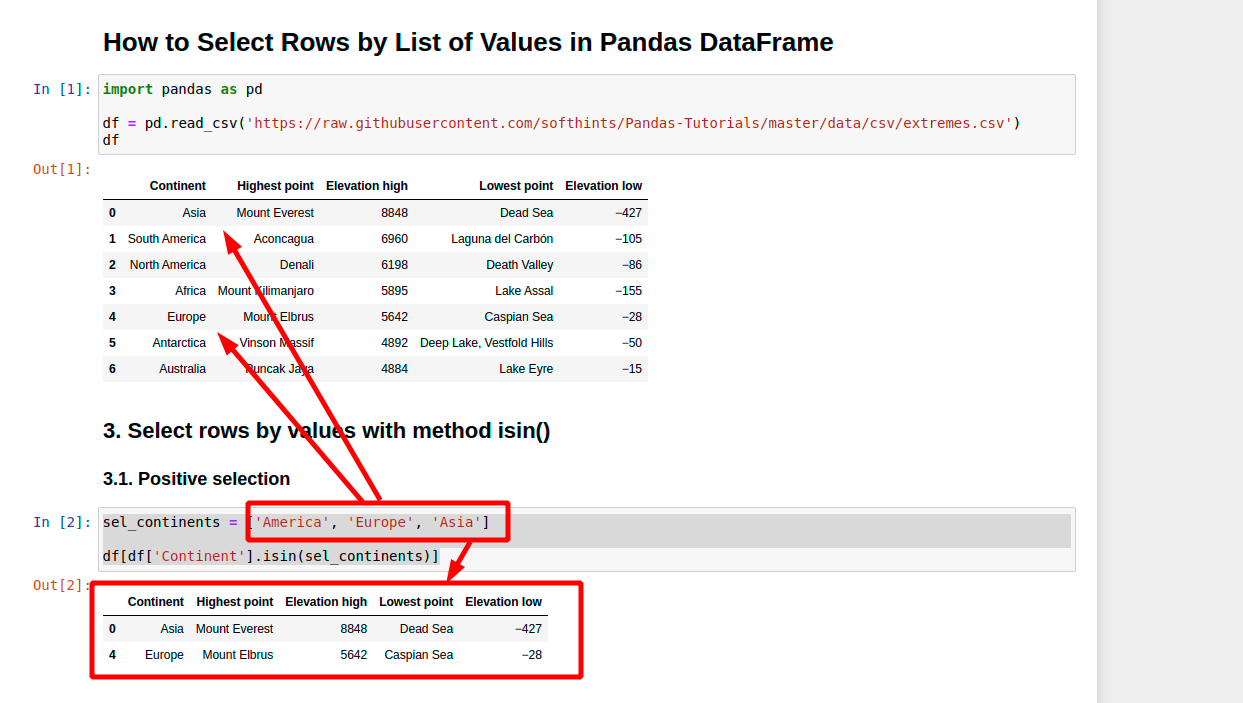
How To Select Rows By List Of Values In Pandas DataFrame

How To Select Particular Rows And Columns Without Hardcoding In Pandas

How To Iterate Over Rows In Pandas And Why You Shouldn t Real Python

Select Rows With Different Column Value Pandas Design Talk

91 I have a Pandas Data Frame object that has 1000 rows and 10 columns I would simply like to slice the Data Frame and take the first 10 rows How can I do this I ve been trying to use this df shape 1000 10 my slice df ix 10 my slice shape 10 Shouldn t my slice be the first ten rows ie a 10 x 10 Data Frame

Select first N Rows from a Dataframe using head function pandas DataFrame head In Python s Pandas module the Dataframe class provides a head function to fetch top rows from a Dataframe i e Copy to clipboard DataFrame head self n 5 It returns the first n rows from a dataframe If n is not provided then default value is 5

In Python the Pandas head method is used to retrieve the first N number of rows of data from Pandas DataFrame This function always returns all rows except the last n rows This method contains only one argument which is n and if you do not pass any number in the function then by default it will return the first 5 rows element Syntax

To select a single column use square brackets with the column name of the column of interest Each column in a DataFrame is a Series As a single column is selected the returned object is a pandas Series We can verify this by checking the type of the output In 6 type titanic Age Out 6 pandas core series Series

Method 1 Using head method Use pandas DataFrame head n to get the first n rows of the DataFrame It takes one optional argument n number of rows you want to get from the start By default n 5 it return first 5 rows if value of n is not passed to the method df first 3 df head 3 print df first 3 Output
Step 3 Select Rows from Pandas DataFrame You can use the following logic to select rows from Pandas DataFrame based on specified conditions df loc df column name condition For example if you want to get the rows where the color is green then you ll need to apply df loc df Color Green If you select by column first a view can be returned which is quicker than returning a copy and the original dtype is preserved In contrast if you select by row first and if the DataFrame has columns of different dtypes then Pandas copies the data into a new Series of object dtype So selecting columns is a bit faster than selecting rows
Example 2 Get the First Row of a Dataframe using the head function The head function in pandas retrieves the first n rows of a dataframe The top n the default value is 5 DataFrame s rows or series are returned using this method To retrieve just the first row we pass 1 as an argument to the head function