Restore Trash Ubuntu Command Line Install Slack Ubuntu Command Line Lalapabrain Restoring From The Trash How To Restore Trash Can Icon On Ubuntu 22 04 Desktop Resuelta 9 10 Hay Una Manera De Organizar Archivos En A Trash Bin For The Ubuntu Command Line VITUX Web DESCRIPTION Use for restore a trashed file or directory in the original path This command is a part of trash cli package that provides a command line interface trashcan utility compliant with the FreeDesktop Trash Specification It remembers the name original path deletion date and permissions of each trashed file
Web Jun 7 2021 nbsp 0183 32 If you want to empty the trash in all available partitions you can use the following command to empty the trash gio trash empty giois provided by glib2 which is used by most GTK based applications and the giobinary should be available out of the box in most of the cases if you are using a desktop environment Web Jun 26 2018 nbsp 0183 32 Command to move a file to Trash via Terminal Open the terminal and type the below command gedit bashrc This command will open your bashrc file which is the configuration file for your terminal If you are using any other terminal open their rc file e Paste the below command at the end of
A Trash Bin For The Ubuntu Command Line VITUX linux U Trash Trashing Files From The Linux Command Line Is Easy With Trash cli How To Empty Trash From Ubuntu Terminal How To Uninstall Software In Ubuntu Command Line Ubuntu Italic Font Connect Wireless Router Via Ubuntu Command Line BENISNOUS Ubuntu 14 04 Terminal Command To Delete Files Folders From Trash Bin Restore Trash Undelete Icon
Restore Trash Ubuntu Command Line
 Restore Trash Ubuntu Command Line
https://computingforgeeks.com/wp-content/uploads/2019/06/launch-zoom-debian-ubuntu.png
Web Jun 30 2010 nbsp 0183 32 4 Answers Sorted by 9 If you are worried you might do this in the future you could create an alias for the rm command and have it link to a script This script would take the command line argument and move that file to Recycle or whatever You could then create a cron job to empty the trash every month or so
Pre-crafted templates use a time-saving option for producing a varied series of documents and files. These pre-designed formats and layouts can be utilized for numerous personal and expert jobs, including resumes, invitations, flyers, newsletters, reports, presentations, and more, improving the material production process.
Restore Trash Ubuntu Command Line
linux U Trash

linux U Trash

Trashing Files From The Linux Command Line Is Easy With Trash cli
How To Empty Trash From Ubuntu Terminal

Ubuntu Italic Font
Connect Wireless Router Via Ubuntu Command Line BENISNOUS

Web Oct 3 2017 nbsp 0183 32 Command Description restore trash Restore file from trash trash Command line

Web Jun 14 2011 nbsp 0183 32 Sorted by 3 If you delete a file from the trash or delete it without even sending it to the trash like with shift del or rm it can t be recovered Technically the data may be there somewhere on the disc which you may get back with reading the disc contents directly which is a Not Easy task but theoretically possible if you deleted

Web Dec 1 2022 nbsp 0183 32 Empty the Trash Can Use the following command in order empty the Trash can this will remove the files permanently from the system trash empty Restore Files from the Trash Can Use one of the following commands in order to restore the files to the location from where they were deleted trash restore Or restore trash When you

Web Click on Files to open the file manager Click Trash in the sidebar If you do not see the sidebar press the menu button in the top right corner of the window and select Sidebar If your deleted file is there click on it and select Restore From Trash It will be restored to the folder from where it was deleted

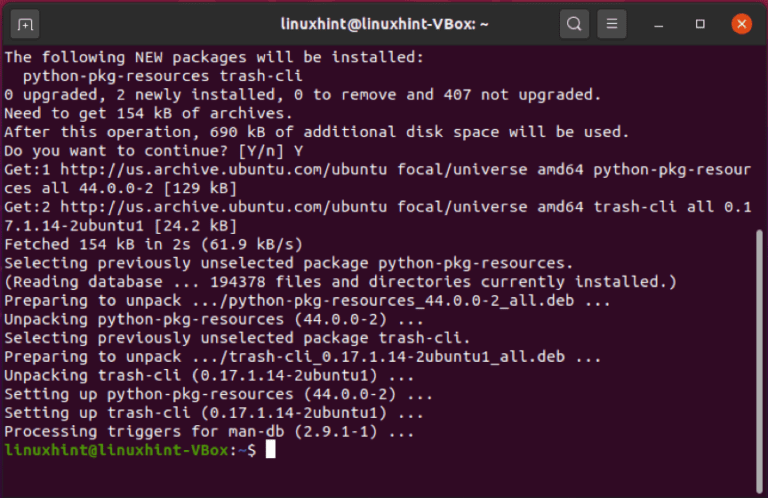
Web Dec 20 2014 nbsp 0183 32 alias rm trash And the trash cli package can be installed by the followoing command sudo apt get install trash cli The files you remove will be moved to trash and you can see them in nautilus trashcan You can always access the real rm by using one of the following method command rm something rm something rm something
Web Jul 17 2012 nbsp 0183 32 As far as I know in the trash folder local share Trash there is a folder with the files files and a folder with the file information info Each file has an associated trashinfo file in which the original path and time of deletion are stored You can use that to restore the file to its original location Web Sep 20 2015 nbsp 0183 32 1 Answer Sorted by 23 Before you start It s always a good idea to work from a copy of your deleted data so copy your entire disk before you begin If you cannot boot from a Live USB DVD before you begin
Web DESCRIPTION Use for restore a trashed file or directory in the original path This command is a part of trash cli package that provides a command line interface trashcan utility compliant with the FreeDesktop Trash Specification It remembers the name original path deletion date and permissions of each trashed file EXAMPLES