Restart Network Manager Ubuntu Command Line How To Restart Network On Ubuntu 22 04 LTS Jammy Jellyfish Linux Ubuntu Network Manager YouTube PrivatVPN How To Install Network Manager Linux Ubuntu YouTube How To Manually Install A Deb Package Using Command Line In Ubuntu Linux Cheat Sheet Linux Cheating Linux Operating System To restart it simply run sudo service network manager restart And then to see it s status run sudo service network manager status As we can see it s active and running If you see networkd in the Renderer in the netplan configuration file you need to restart it with the command sudo systemctl restart systemd networkd
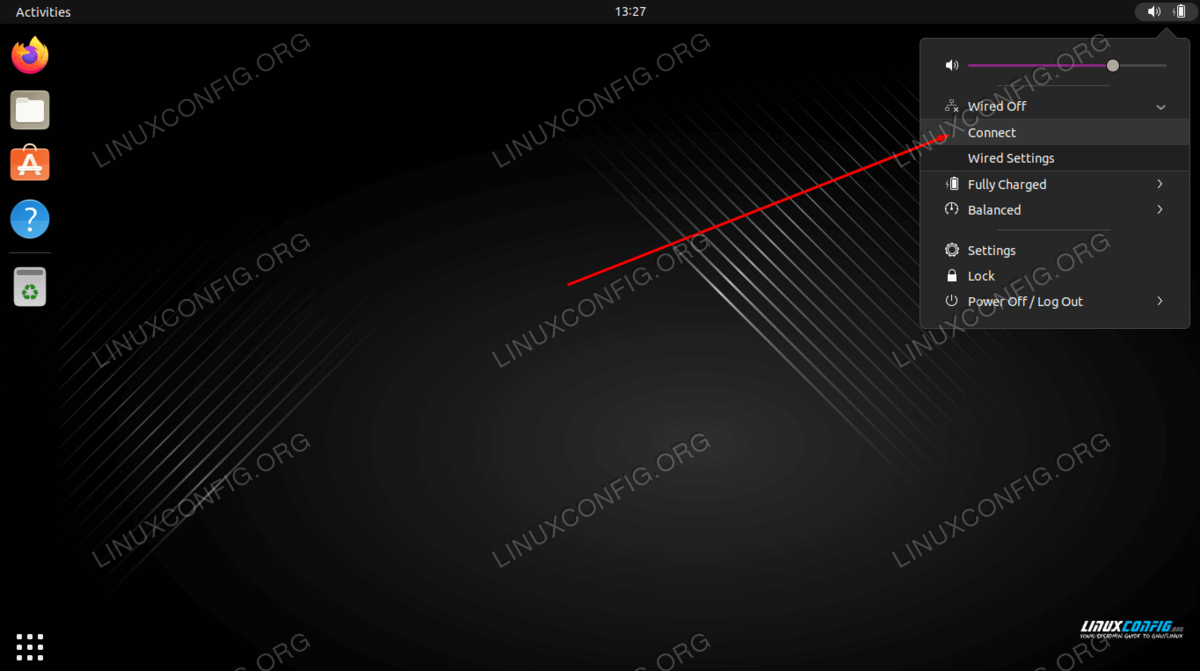
Method 1 Using the Command Line to Restart the Network in Ubuntu If you are running the Ubuntu s server edition the terminal is already opened In the Ubuntu desktop edition using the Ctrl Alt T keyboard shortcut gives you an access to the terminal Several commands can now be used to restart your network in Ubuntu Restarting Networking on Ubuntu via the Desktop GUI To restart a specific network adapter from the Ubuntu desktop click on the network icon in the top right of the screen expand the menu under the network adapter you want to restart and turn it off nmcli is the Network Manager Command Line Interface It comes installed with Ubuntu
Linux Cheat Sheet Linux Cheating Linux Operating System How To Update Ubuntu In The Command Line How To Restart Network In Ubuntu NetworkManager 1 4 2 Released For GNU Linux Distros With Various Text Editor How To Edit Network Manager In Ubuntu 18 04 Ask Ubuntu Ubuntu Commands Linux Command Line Cheat Sheet In A Well Formatted Image And Pdf File Network Manager Wired Settings Disappeared In Ubuntu 20 04 2 LTS How To Restart Network On Ubuntu 20 04
Restart Network Manager Ubuntu Command Line
 Restart Network Manager Ubuntu Command Line
https://linuxconfig.org/wp-content/uploads/2022/02/02-how-to-restart-network-on-ubuntu-22-04-lts-jammy-jellyfish.png
15 February 2022 by Korbin Brown There exist various ways of restarting the network on Ubuntu 22 04 Jammy Jellyfish Possibly the simplest way would be to restart the network from a GUI such as GNOME Other ways would include the use of the command line and commands like ip
Templates are pre-designed files or files that can be used for different purposes. They can save time and effort by providing a ready-made format and layout for creating different type of content. Templates can be used for personal or expert tasks, such as resumes, invitations, leaflets, newsletters, reports, presentations, and more.
Restart Network Manager Ubuntu Command Line
Ubuntu Command Line Script Disk Operations User Linux Advance

How To Update Ubuntu In The Command Line
How To Restart Network In Ubuntu
NetworkManager 1 4 2 Released For GNU Linux Distros With Various
Ubuntu Commands

Linux Command Line Cheat Sheet In A Well Formatted Image And Pdf File

16 April 2020 by Lubos Rendek There exist various ways of restarting network on Ubuntu 20 04 Possibly the simplest way would be to restart network from GUI such as GNOME Other ways would include the use of the command line and commands netplan and ip

If you are looking for GUI method just open dash type Network and select that now press On Off button to turn off and again click to on your networking is restarted now

How To Restart Network in Ubuntu Command Line Meet Rhino Linux Ubuntu based Rolling release AUR Sagar Sharma May 10 2023 Table of Contents After making some changes to the network config file or if the network is not working as expected restarting the network is the first choice of every Linux user
Method 1 Using NetworkManager Service CLI NetworkManager is a daemon for simplifying the networking on Unix like systems It provides a rich API for the applications to query and control network configuration and state Use the followings commands to start stop network service on a Ubuntu Linux system ADVERTISEMENT

The most simple and easiest way to restart the network using the network service manager Launch the terminal and type the following command on it sudo service network manager restart Verify Use Systemd to Restart Network Systemd has an array of system components that can also handle network services
1 Method 1 Restart the network in Ubuntu using the command line 2 Method 2 Restart the network in Ubuntu using GUI graphically 3 How to refresh the available network list 4 Conclusion You may see the network setting of your Ubuntu Linux system has been changed or you may have problems when trying to connect to the network 1 Systemctl command In Linux based systems systemd is the service manager that is responsible for the management of various background applications called services In order to control these services effectively systemd has a powerful command systemctl that has jurisdiction over these services
1 With the terminal open on your device you will want to start by turning off the network connection To use nmcli to turn off your network connection use the following command sudo nmcli networking off Copy 2 To complete the network restart of your Ubuntu device you will want to use nmcli again