Reset Ubuntu Password How To Reset Forgotten Root Password In Ubuntu How To Change User Root Forgotten Password In Ubuntu 17 0 Using Terminal How To Reset Root Password On Ubuntu Linux Mining How To Reset A Ubuntu Password Make Tech Easier How To Reset A Ubuntu Password Make Tech Easier Web Feb 17 2019 nbsp 0183 32 sudo passwd lt user name gt Change another user password If you changed your password and forgot it later don t worry You can easily reset Ubuntu password How to Reset Forgotten Ubuntu Password in 2 Minutes
Web Sep 20 2023 nbsp 0183 32 You can reset an Ubuntu password very easily This guide explains an easy method for changing the root password on Ubuntu The method should also be applicable to other Linux distributions Abhishek Prakash 20 Sep 2023 6 min read Forgot your Ubuntu login password It happens Web Sep 22 2008 nbsp 0183 32 You can use the following command to reset your password passwd lt username gt For example my username being geek I used this command passwd geek After changing your password use the following commands to reboot your system The sync command makes sure to write out data to the disk before rebooting sync reboot f
How To Reset A Ubuntu Password Make Tech Easier Reset Ubuntu Password How To Reset Ubuntu Password Ubuntu Forgot How To Reset The Root Password On Ubuntu 20 04 If Forgotten How To Reset A Ubuntu Password Make Tech Easier How To Reset Forgotten Password On Ubuntu 20 04 BENISNOUS Reset Forgotten Root Password In Ubuntu SYSNETTECH Solutions How To Reset Your Forgotten Password In Ubuntu 20 04 BENISNOUS How To Reset Lost Root Password On Ubuntu 16 04 Xenial Xerus Linux Reset Your Forgotten Ubuntu Password In 2 Minutes Or Less
Reset Ubuntu Password
 Reset Ubuntu Password
https://www.tecmint.com/wp-content/uploads/2020/04/Reset-Forgotten-Root-Password-in-Ubuntu.png
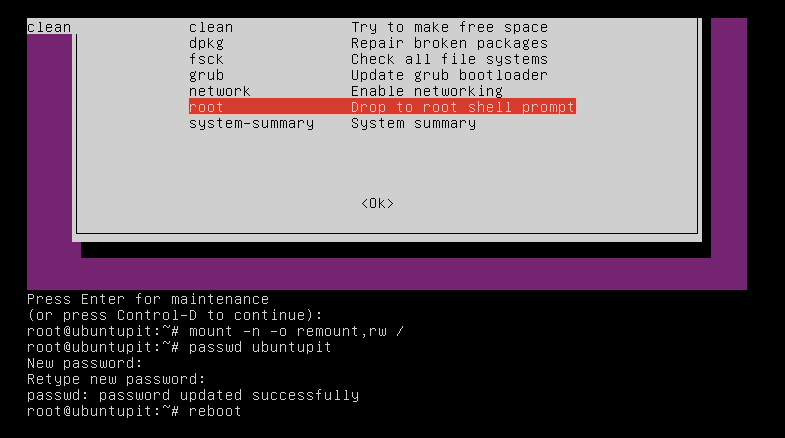
Web Jan 23 2024 nbsp 0183 32 Reset Ubuntu Password Recovery mode The recovery mode is a special boot option that allows you to perform various maintenance tasks on your Ubuntu system such as repairing file systems cleaning up disk space or resetting passwords To use this method follow these steps
Pre-crafted templates provide a time-saving option for producing a varied range of files and files. These pre-designed formats and designs can be used for various individual and expert projects, including resumes, invites, flyers, newsletters, reports, discussions, and more, improving the material creation procedure.
Reset Ubuntu Password
How To Reset Forgotten Root Password In Ubuntu Linux
Reset Ubuntu Password How To Reset Ubuntu Password Ubuntu Forgot
How To Reset The Root Password On Ubuntu 20 04 If Forgotten

How To Reset A Ubuntu Password Make Tech Easier

Reset Forgotten Root Password In Ubuntu SYSNETTECH Solutions

How To Reset Your Forgotten Password In Ubuntu 20 04 BENISNOUS
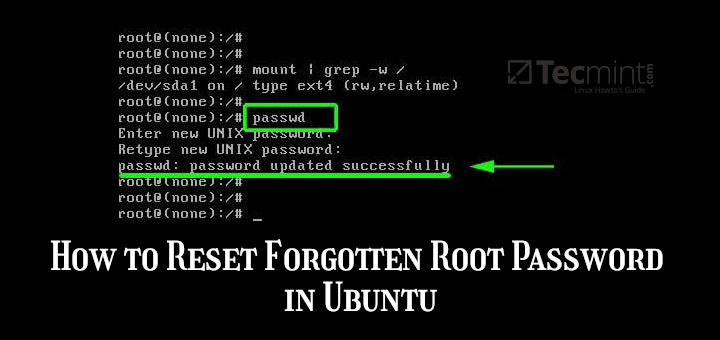
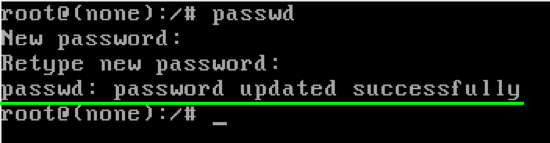
Web Apr 4 2016 nbsp 0183 32 You will now be asked for a new password Enter new UNIX password Type it out again for security and verification purposes Retype new UNIX password Your password should now be updated passwd password updated successfully You should now reboot your computer and check if the password works Type reboot into the prompt

Web If you have lost your password please visit our account recovery page and enter the email address that you signed up with We will email you a list of your account credentials and a link to reset your password If you used an external openID provider you will need to contact that provider Asking Privileges Badges Our model
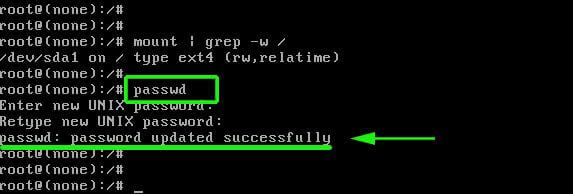
Web Jan 21 2019 nbsp 0183 32 passwd You will be prompted to enter your current password If the password is correct then you will be asked to enter and confirm the new password Changing password for linuxize current UNIX password Enter new UNIX password Retype new UNIX password passwd password updated successfully Password is not

Web Feb 11 2021 nbsp 0183 32 In this article I will show you how to reset the root password on an Ubuntu 20 04 system by modifying the Grub boot loader configuration and booting Ubuntu into a rescue mode Changing the root password To change the root password in your system open up the terminal window by using the Ctl Alt T shortcut

Web To reset the password type passwd username where username is the username you want to reset for example passwd mysterio in my case You ll then be prompted for a new password When you type the password you will get
[desc-11] [desc-12]
[desc-13]