Reset Root Password Centos 6 Grub How To Reset Root User Password On CentOS 8 Resetting A Forgotten How To Reset Forgotten Root Password In Ubuntu How To Reset Root Password On CentOS 7 Issabel 4 Zivo NiX BLog Reset Root Password Centos 6 10 Fasrblaster How To Reset Lost Root Password In CentOS 8 RHEL 8 ITzGeek Web Sep 11 2023 nbsp 0183 32 How to Reset GRUB Password in Linux This tutorial explains how to set reset break and remove GRUB password in RedHat and CentOS Linux step by step with practical examples Learn how to set GRUB password in Linux to secure boot loader and vice versa how to break or remove GRUB password in case it is forgotten
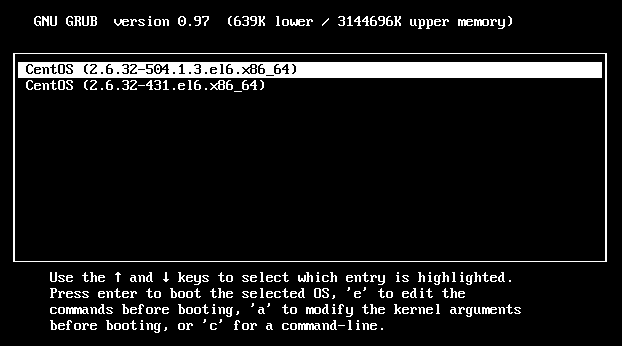
Web 1 Answer Sorted by 9 Boot from a LiveCD then mount the harddrive partition You can now chroot into your harddrive and just run passwd as root there changing the root pw That s also the way to change to grub password Share Improve this answer Follow Web Resetting a Forgotten Root Password If you have forgotten the root password it is possible to set a new one as follows CentOS 6 instructions also for CentOS 5 Interrupt the boot at the GRUB stage when you see the menu that says quot Booting CentOS 2 6 32 in X seconds quot and boot to runlevel 1 AKA single user mode by doing the following
How To Reset Lost Root Password In CentOS 8 RHEL 8 ITzGeek Reset Root Password In RHEL 8 CentOS 8 Rocky Linux 8 Reset Root Password Centos 6 10 Fasrinnovative How To Break Reset Root Password In RHEL 8 CentOS 8 How To Reset Root User Password In CentOS 8 RHEL 8 Linuxhowto How To Reset Forgotten Root Password On RedHat 6 CentOS 6 Tuxfixer 20 Reset Mysql Root Password In Centos 8 How To Reset The Root User Password Centos And RHEL AT BOOT From How To Reset Root Password On Centos 7 Zimbra Mail Server linux bash
Reset Root Password Centos 6 Grub
 Reset Root Password Centos 6 Grub
https://i.ytimg.com/vi/Kh3cAX_KzVw/maxresdefault.jpg
Web May 8 2017 nbsp 0183 32 To recover a root password on CentOS 7 you will again need to enter the grub menu and type e to edit the appropriate kernel Go to the line that begins with kernel and append the following to the end of the line init sysroot bin sh Then type b to boot this kernel It will boot up and you will need to mount the file system in a
Templates are pre-designed files or files that can be utilized for different purposes. They can save time and effort by providing a ready-made format and design for creating various type of material. Templates can be utilized for personal or expert tasks, such as resumes, invites, flyers, newsletters, reports, discussions, and more.
Reset Root Password Centos 6 Grub
How To Reset Forgotten Root Password On CentOS 7 CentOS 8 SysOpsPro

Reset Root Password In RHEL 8 CentOS 8 Rocky Linux 8

Reset Root Password Centos 6 10 Fasrinnovative
How To Break Reset Root Password In RHEL 8 CentOS 8
How To Reset Forgotten Root Password On RedHat 6 CentOS 6 Tuxfixer
20 Reset Mysql Root Password In Centos 8

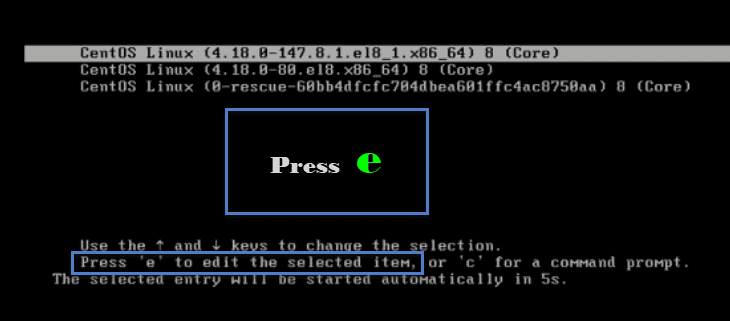
Web Nov 10 2019 nbsp 0183 32 This is easy and native method to reset the forgotten root password in RHEL 6 CentOS 6 systems Just follow our instruction to do the password reset without any headache Step 1 Reboot your system and interrupt in boot screen by using any key from your keyboard to launch the GRUB Menu
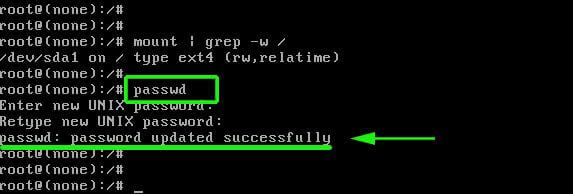
Web Feb 5 2020 nbsp 0183 32 You can t reset your root account password using a regular user account as a user account can t perform such tasks in general In this article we ll be covering how to recover your CentOS root password So let s see how to do it How to recover your root password step by step

Web Booting straight up to GRUB is not the default boot method for CentOS 5 amp 6 This How To was written to show you step by step the process of resetting the root password on your CentOS 5 6 installation

Web In this article we will learn how to reset the forgotten password of root user account on CentOS 6 operating system Prerequisites You should have a VPS Budget server or Dedicated server with CentOS 6 installed You should have access to your Snel client control panel to open a KVM console
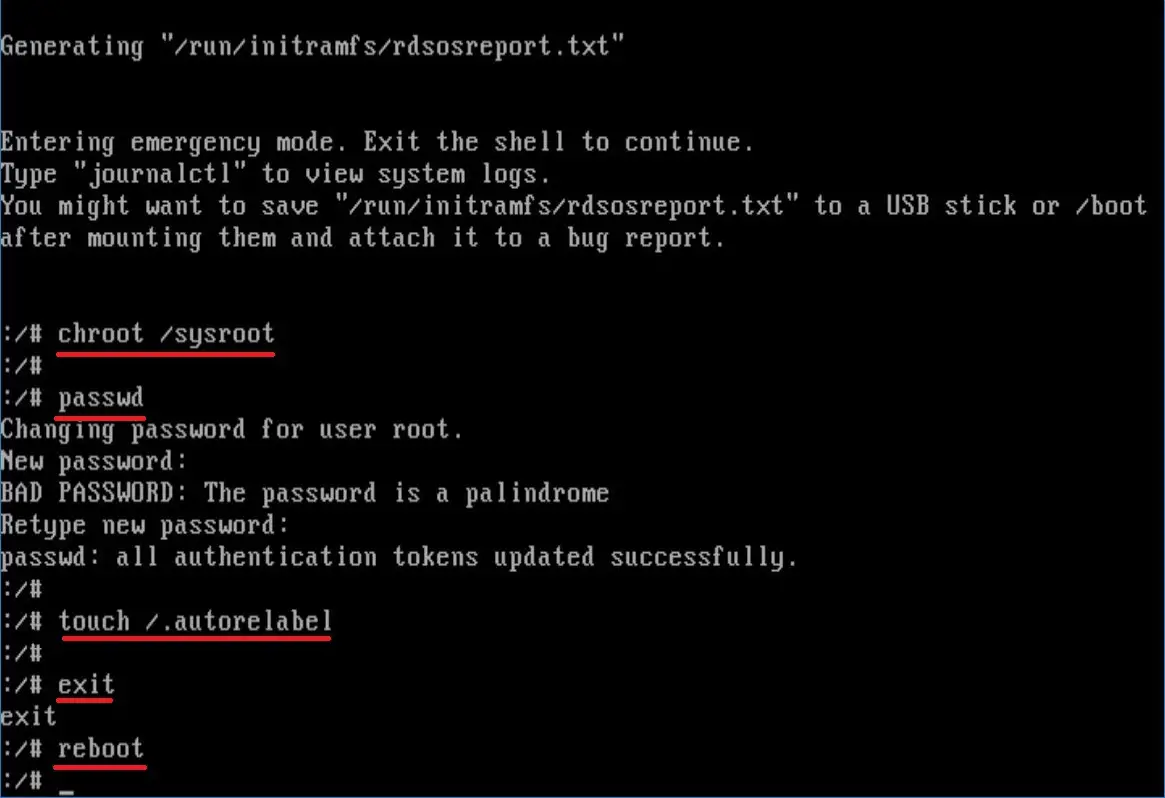
Web Sep 21 2020 nbsp 0183 32 Opened 1 at the GRUB Step 4 After reboot type passwd command without username and press Enter key in command prompt Change root password Step 5 Reboot your system and login using the new password Reference http wiki centos TipsAndTricks ResetRootPassword
Web Aug 6 2019 nbsp 0183 32 If forgotten the root password of the server CentOS 6 Then we can reset it via Single User mode 1 Restart the system Press ESC or ALT or SPACEBAR Based on appropriate server to stop at the screen to get the boot screen 2 At the grub boot menu press a key to modify the kernel arguments 3 Web Sep 8 2015 nbsp 0183 32 Steps 1 Reboot the system 2 At the screen Booting Red Hat Enterprise Linux or Booting CentOS press any key to display GRUB menu 3 At the GRUB menu select kernel version and press a to append to the list of kernel parameters 4 Add s at the end of the kernel parameters list to boot to the single user mode and press Enter 5
Web May 12 2021 nbsp 0183 32 In this guide we saw how to reset the root password on a Linux system even if the original has been forgotten Although it sounds complicated this is a relatively simple task that GRUB can facilitate by allowing us to mount the root partition without loading into the operating system